Single Immediate Payments (SIP) v1

Token.io's Single Immediate Payments v1 API supports payment initiation for:

  • Single Immediate Payments

  • Future Dated Payments

Using Token.io's API, you can initiate account-to-account (A2A) payments via Open Banking using PSD2 directly from the user’s bank account. Before accessing an account, you must receive formal approval and consent from the user. A connection to the payer’s banking system is then required to access and debit the payment account through your payment instruction.

The integration options to initiate A2A payments vary depending on whether you use Token.io's Hosted Pages (HP) integration options or the API-only integration.

These integration options are detailed below:

See Hosted Pages v2 and Hosted Pages v1 for more information on how to implement the Hosted Pages for Payments v1.

  • API-only integration – the TPP owns the user experience including bank selection logic, collection of mandatory fields, and embedded and decoupled authentication methods.

Hosted Pages (HP) integration options

Token.io's Hosted Pages (HP) guide the user through payment request initiation, consent, and authentication with the bank.

Token.io's HP support the redirect, decoupled and embedded authentication models.

Token.io offers the following HP integration options:

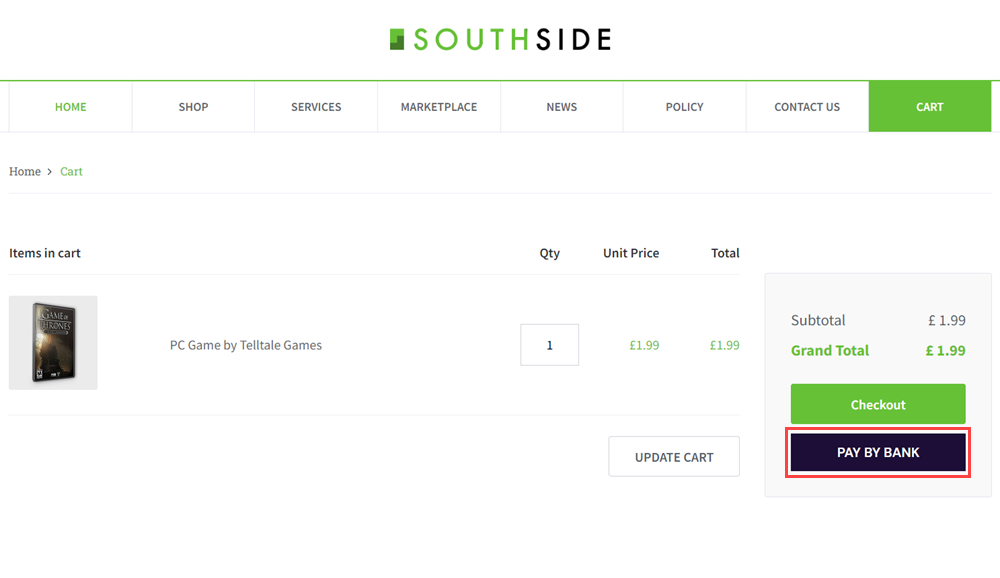
Embedded (modal) integration - seamlessly integrates Token.io's HP functionality into your website by creating a Pay by Bank button for your checkout page, which opens the HP in a modal window. This type of integration uses HP v2.

See Integrate with Token.io's modal SDK for more details.

  • Redirect integration - directs the user from your website to open Token.io's HP in a new tab, using a redirect URL. Redirect integration is available for HP v2 and HP v1.

Embedded (modal) integration

This section describes the integration option where the TPP uses Token.io's HP for all or some of the steps in the user journey. For example, the TPP can own bank selection and then hand over to the HP for authentication, which may provide better user continuity.

All authentication methods are handled entirely by the HP. The user accesses the HP through a Pay by Bank button created on the TPP's checkout page which opens the HP in a modal window.

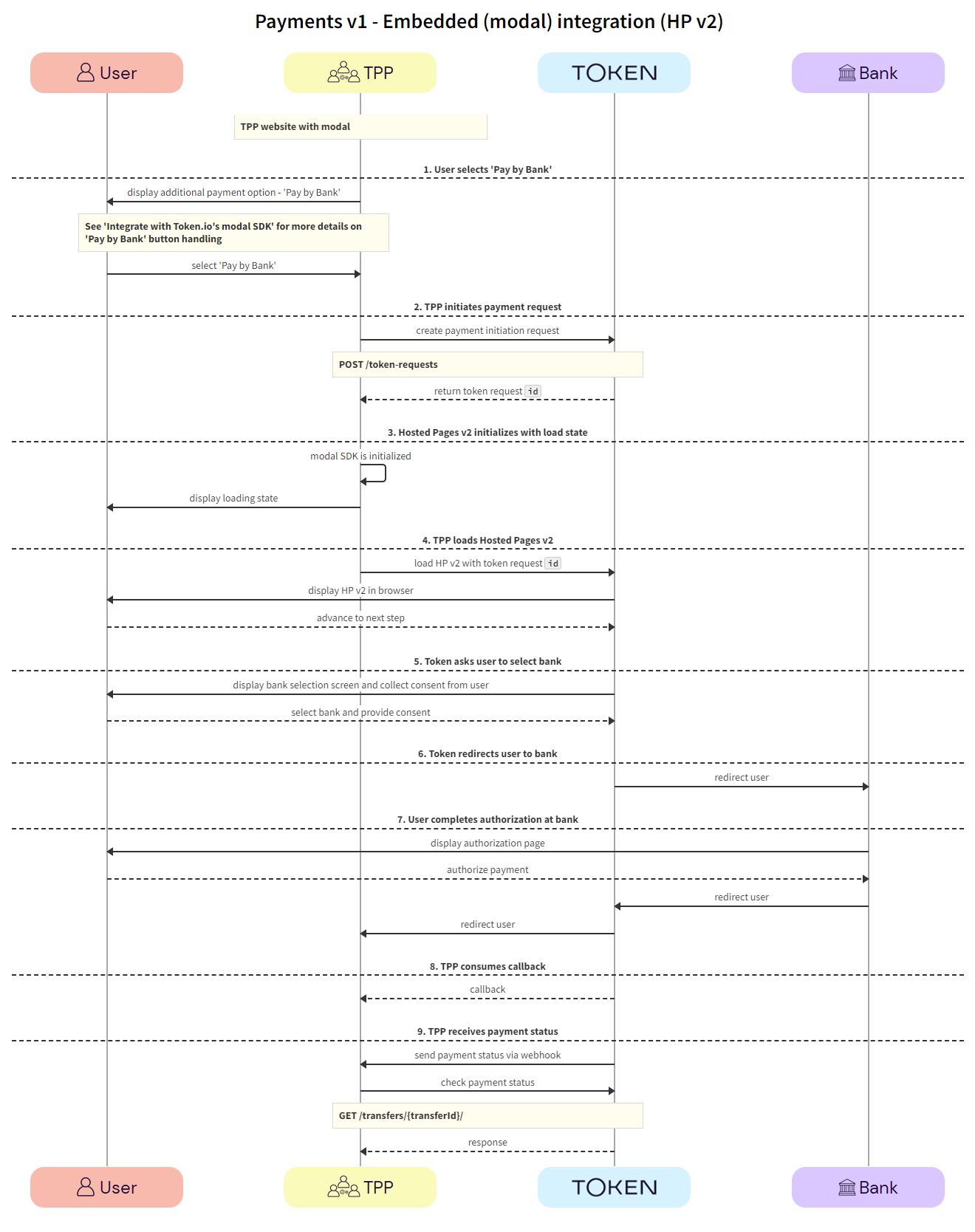
Click the image on the right to view a simplified swim lane diagram of the integration flow.

Details of the steps within the integration flow are shown below.

When using embedded (modal) integration, you must create a payment session/token request in order to render the Pay by Bank button.

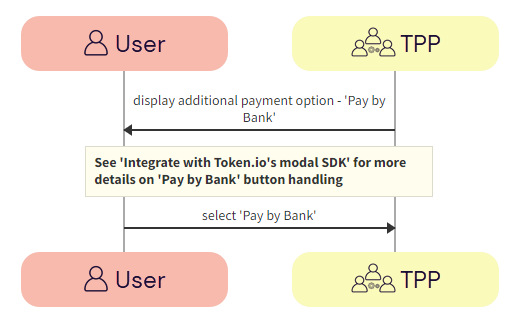
  1. User selects 'Pay by Bank'

The user clicks the 'Pay by Bank' button displayed on the TPP's website.

  1. TPP -> User - The TPP displays the 'Pay by Bank' button on the payment page of their website.

    See Integrate with Token.io's modal SDK for more details on creating the Pay by Bank button.

  1. User -> TPP - The user clicks the 'Pay by Bank' button.

  1. TPP initiates payment request

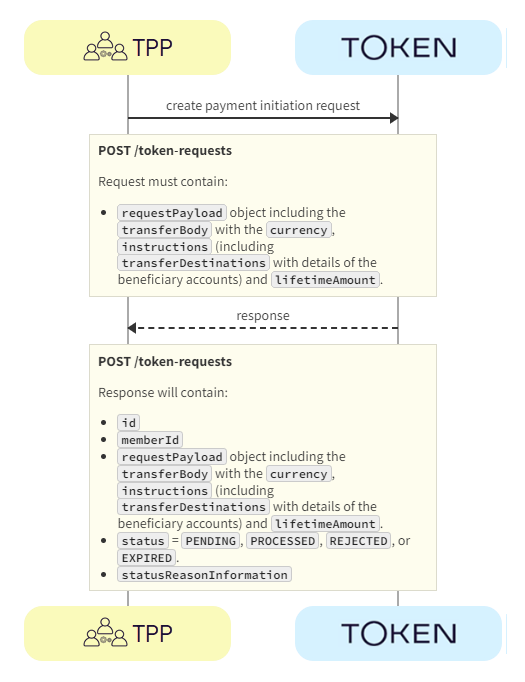
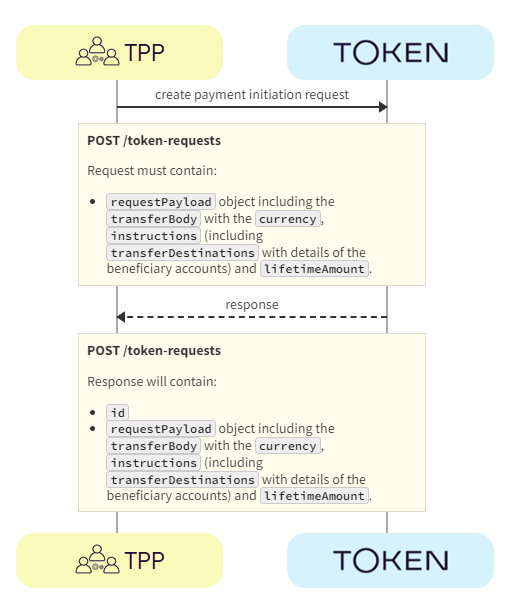
The TPP displays the Pay by Bank button. Clicking this launches Token.io's HP. The TPP initiates the payment request with Token.io using the POST /token-requests call. Token.io responds by acknowledging the details of the request, and providing the details for the next step, which in most cases will include a redirect URL to the bank.

  1. TPP -> Token.io - The TPP creates the payment initiation request using the POST /token-requests call.

If you're using Settlement accounts and you're an unregulated TPP, you'll always need to send the Settlement account id of the sub-TPP in the POST /token-requests request.

  1. Token.io -> TPP - Token.io generates a response to the payment initiation request which includes the token request id.

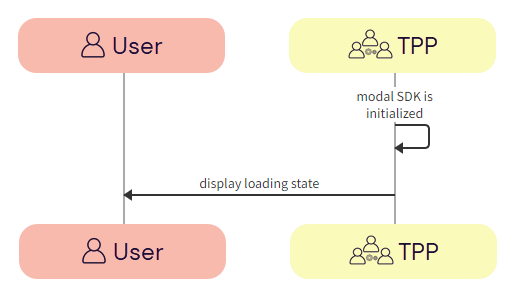
  1. Hosted Pages v2 initializes with load state

The modal SDK is initialized and the TPP displays a loading state in the modal SDK.

  1. TPP -> TPP - The redirect URL is loaded to initialize the modal SDK.

  2. TPP -> User - The TPP displays a loading state to the user in the modal SDK.

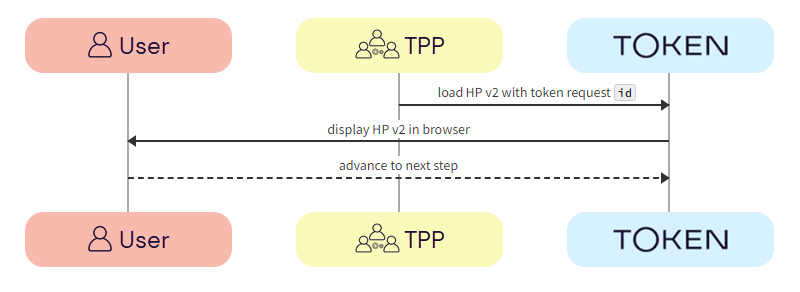
  1. TPP loads Hosted Pages v2

The TPP loads the Hosted Pages in the modal SDK. Token.io displays the HP to the user.

  1. TPP -> Token.io - The TPP loads the Hosted Pages in modal SDK using the redirect URL containing the token request id.

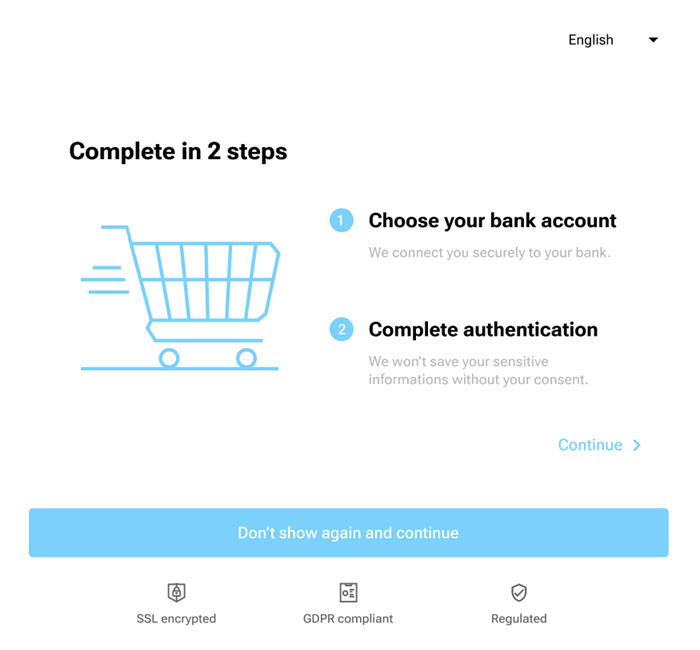
  2. Token.io -> User - Token.io displays the HP to the user. This can be the optional onboarding screen or the bank selection page (go to Step 5).

  1. User -> Token.io - The user advances to the next step in the payment flow.

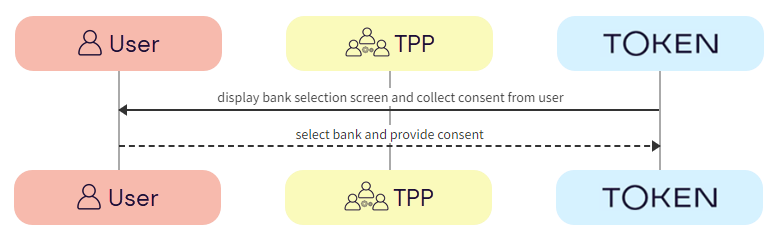
  1. User selects bank and provides consent

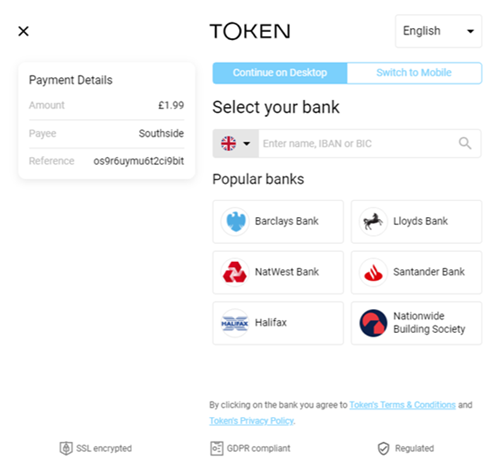
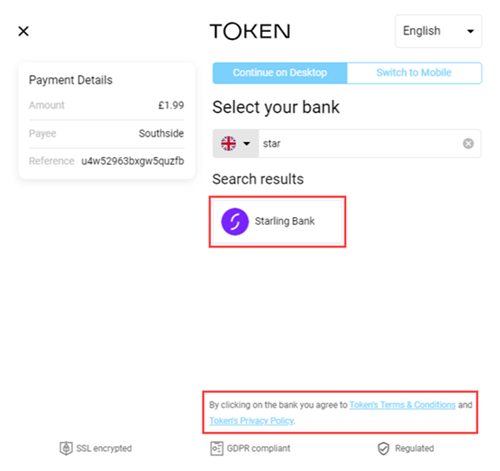
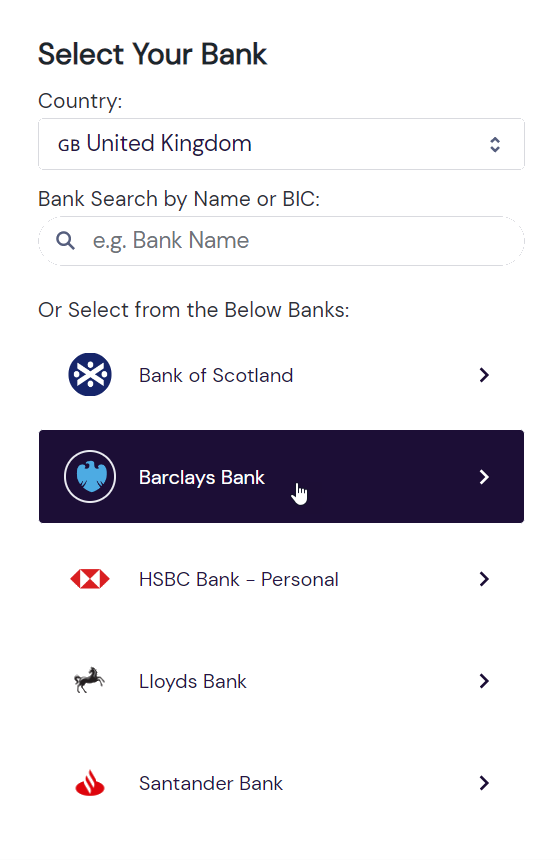
Token.io asks the user to select the bank they want to make the payment through. By selecting the bank, the user provides consent to Token.io.

  1. Token.io -> User - Token.io displays the bank selection screen to the user.

  1. User -> Token.io - The user selects the bank. By selecting the bank, the user agrees to Token's Terms & Conditions and Token's Privacy Policy.

  1. Token.io redirects user to bank

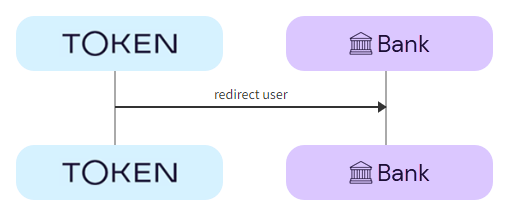
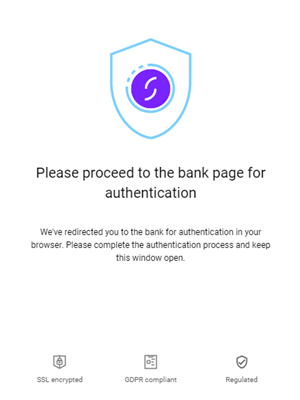
Token.io redirects the user to the bank.

  1. Token.io -> Bank - Token.io redirects the user to the bank using the redirectUrl.

  1. User completes authorization with bank

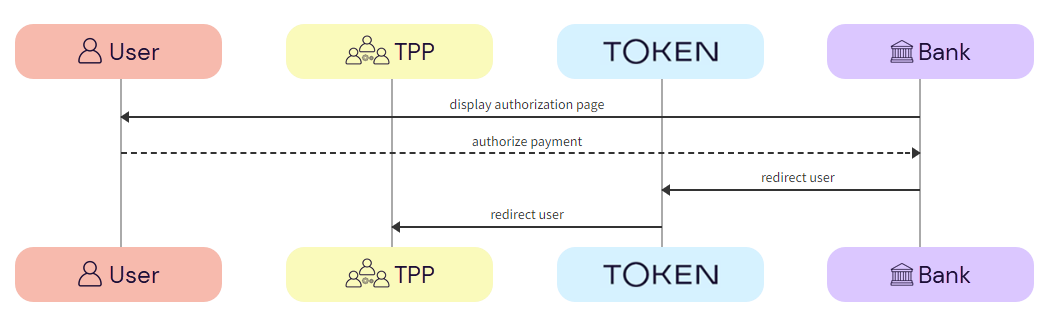
The user completes authorization with the bank.

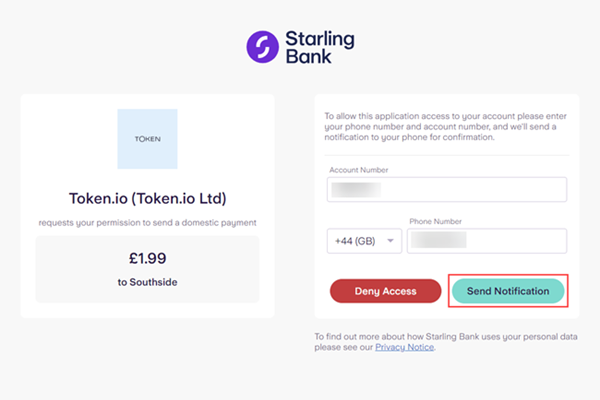
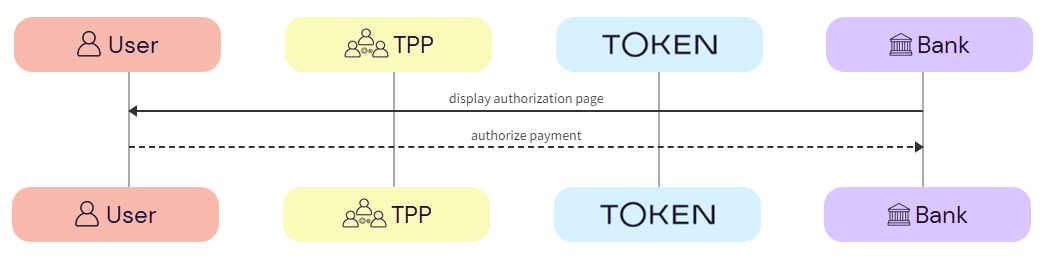
  1. Bank -> User - The bank displays the authorization page to the user.

  2. User -> Bank - The user authorizes the payment with the bank.

The authorization process will vary according to the bank selected.

  1. Bank -> Token.io - The bank redirects the user to Token.io.

  2. Token.io -> TPP - Token.io redirects the user to the TPP.

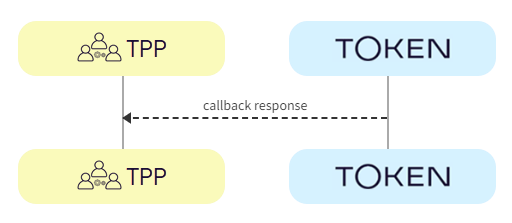
  1. TPP consumes callback

The TPP consumes the Token.io callback.

  1. Token.io -> TPP - The TPP consumes the Token.io callback and sends a response:

    • onDone - 'Payment processing'

    • onError - 'An error occurred during processing'

  1. TPP receives payment status

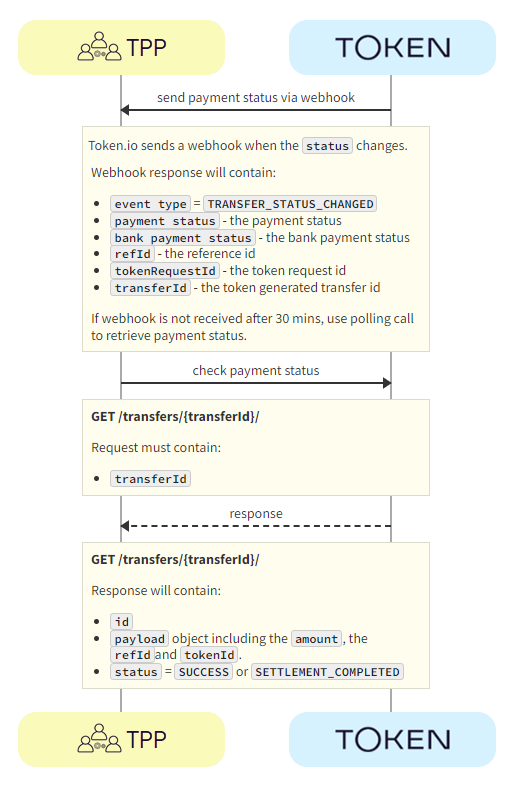
The payment status is sent from Token.io to the TPP in a webhook. Alternatively, Token.io offers an API to retrieve the current status of the initiated payment request.

  1. Token.io -> TPP- Token.io sends the payment status to the TPP using a webhook.

    If you're subscribed to webhooks, Token.io sends the payment status in a webhook every time a transfer is created or updated.

    See Webhooks for an example webhook notification.

    If the webhook is not received within 30 minutes, the TPP should call GET /transfers/{transferId} to retrieve the payment status.

If you're not using webhooks, you'll need to use GET /token-requests/{tokenRequestId}/result to obtain the transferId to then call GET /transfers/{transferId}.

See Alternative to webhooks for more details.

  1. TPP -> Token.io - The TPP checks the status with Token.io with the GET /transfers/{transferId} request.

  1. Token.io -> TPP - Token.io confirms the payment status with the GET /transfers/{transferId} response.

    If you're using Settlement accounts and the payment initiation request is successful, once the payment has been reconciled, the status will be SETTLEMENT_COMPLETED. Depending on the payment rail used, this can take a while.

    If you're not using Settlement accounts and the payment initiation request is successful, the status will be SUCCESS, but this does not guarantee that the payment has been settled.

    If the status is non-final, e.g., PROCESSING, the TPP should wait for additional webhooks to be sent. If the webhook is not received, the TPP should use a polling call (GET /transfers/{transferId}) every 15 mins.

    The recommended maximum polling time is 30 days. If the bank doesn't update the status, it will change to INITIATED after 30 days.

See HTTP errors for information on HTTP error status codes.

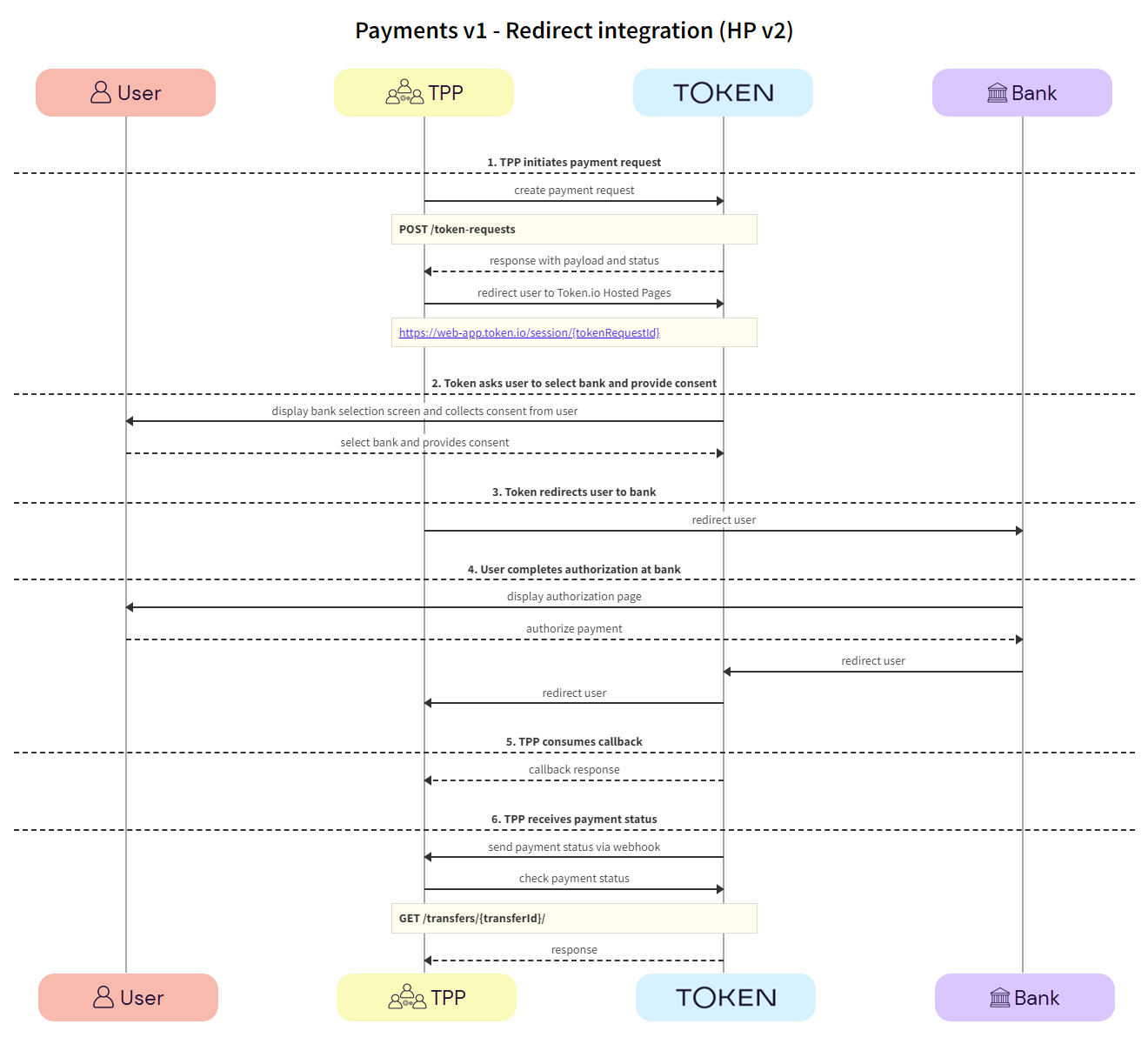
Redirect integration (HP v2)

This section describes the HP v2 integration option, where the TPP uses Token.io's HP for all or some of the steps in the user journey. For example, the TPP can own the bank selection and then hand over to the HP for authentication, which may provide better user continuity.

All authentication methods are handled entirely by the HP. The user accesses the HP through a redirect URL which opens a new browser tab.

Click the image on the right to view a simplified swim lane diagram of the integration flow.

Details of the steps within the integration flow are shown below.

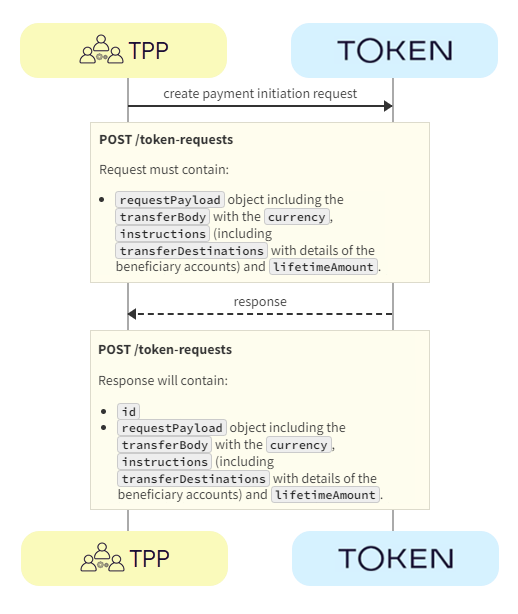
  1. TPP initiates payment request

The TPP initiates the payment request with Token.io using the POST /token-requests call. Token.io responds by acknowledging the details of the request.

  1. TPP -> Token.io - The TPP creates the payment initiation request using the POST /token-requests call.

If you're using Settlement accounts and you're an unregulated TPP, you'll always need to send the Settlement account id of the sub-TPP in the POST /token-requests request.

  1. Token.io -> TPP - Token.io generates a response to the payment initiation request.

  1. TPP -> Token.io - The TPP redirects the user to the Token.io HP at https://{{base-url}}/session/{tokenRequestId}.

    See Base URLs and Create a redirect URL for details on how to construct the redirect URL.

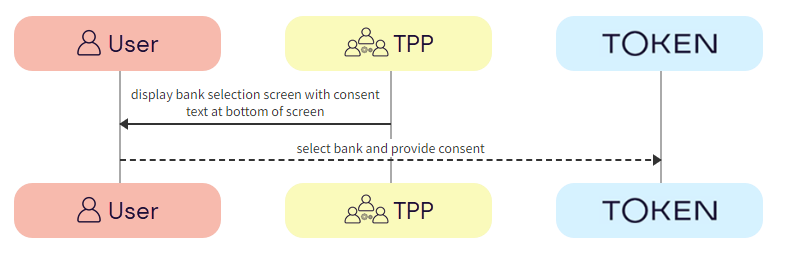
  1. User selects bank and provides consent

Token.io asks the user to select the bank they want to make the payment through. By selecting the bank, the user provides consent to Token.io.

  1. Token.io -> User - Token.io displays the bank selection screen to the user.

  1. User -> Token.io - The user selects the bank. By selecting the bank, the user agrees to Token.io's Terms & Conditions and Token.io's Privacy Policy.

  1. Token.io redirects user to bank

Token.io redirects the user to the bank.

  1. Token.io -> Bank - Token.io redirects the user to the bank.

  1. User completes authorization with bank

The user completes authorization with the bank.

  1. Bank -> User - The bank displays the authorization page to the user.

  2. User -> Bank - The user authorizes the payment with the bank.

The authorization process will vary according to the bank selected.

  1. Bank -> Token.io - The bank redirects the user to Token.io.

  2. Token.io -> TPP - Token.io redirects the user to the TPP.

  1. TPP consumes callback

The TPP consumes the Token.io callback.

  1. Token.io -> TPP - The TPP consumes the Token.io callback.

  1. TPP receives payment status

The payment status is sent from Token.io to the TPP in a webhook. Alternatively, Token.io offers an API to retrieve the current status of the initiated payment request.

  1. Token.io -> TPP - Token.io sends the payment status to the TPP using a webhook.

    If you're subscribed to webhooks, Token.io sends the payment status in a webhook every time a transfer is created or updated.

    See Webhooks for an example webhook notification.

    If the webhook is not received within 30 minutes, the TPP should call GET /transfers/{transferId} to retrieve the payment status.

If you're not using webhooks, you'll need to use GET /token-requests/{tokenRequestId}/result to obtain the transferId to then call GET /transfers/{transferId}.

See Alternative to webhooks for more details.

  1. TPP -> Token.io - The TPP checks the status with Token.io with the GET /transfers/{transferId} request.

  1. Token.io -> TPP - Token.io confirms the payment status with the GET /transfers/{transferId} response.

    If you're using Settlement accounts and the payment initiation request is successful, once the payment has been reconciled, the status will be SETTLEMENT_COMPLETED. Depending on the payment rail used, this can take a while.

    If you're not using Settlement accounts and the payment initiation request is successful, the status will be SUCCESS, but this does not guarantee that the payment has been settled.

    If the status is non-final, e.g., PROCESSING, the TPP should wait for additional webhooks to be sent. If the webhook is not received, the TPP should use a polling call (GET /transfers/{transferId}) every 15 mins.

    The recommended maximum polling time is 30 days. If the bank doesn't update the status, it will change to INITIATED after 30 days.

See HTTP errors for information on HTTP error status codes.

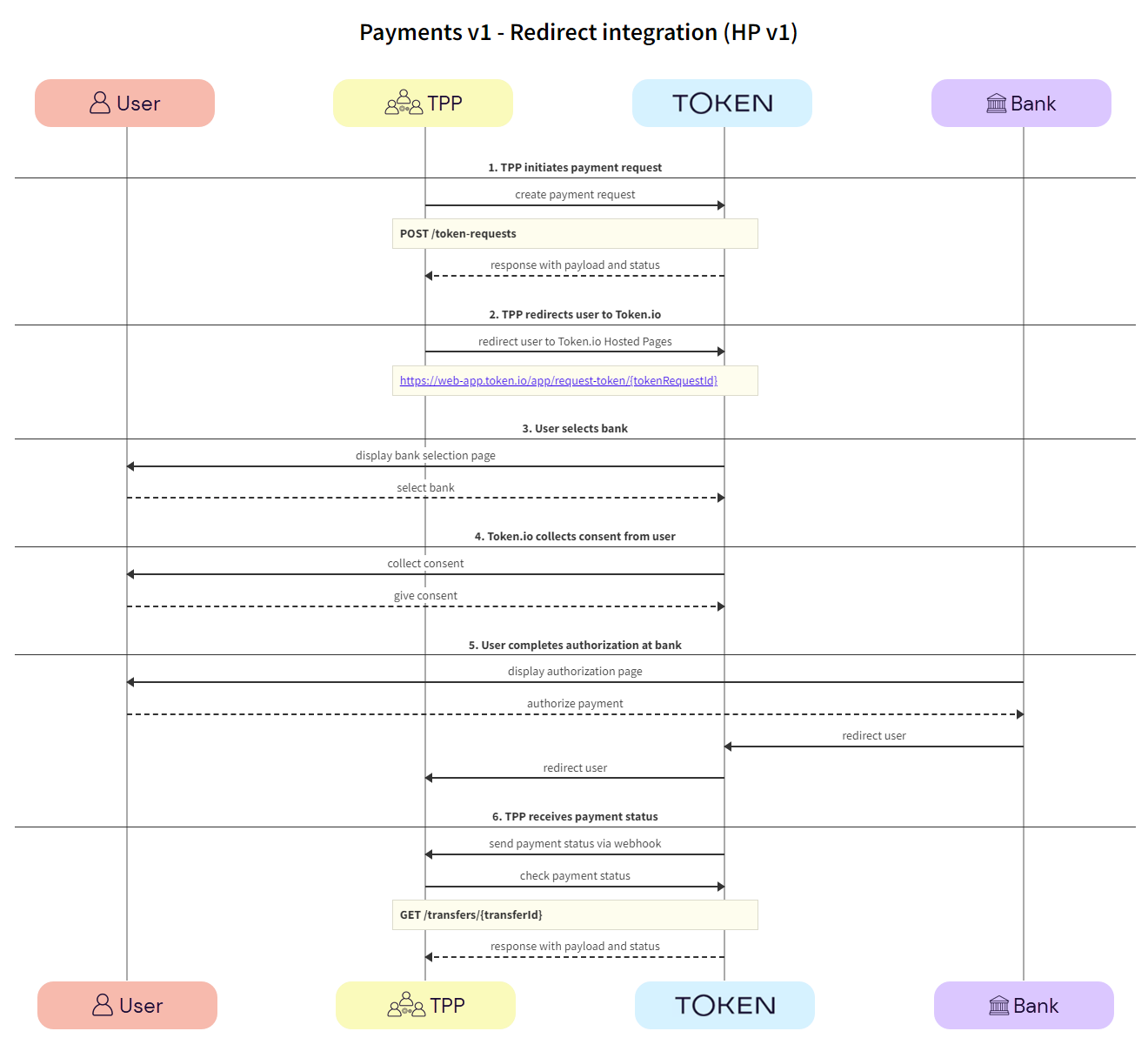
Redirect integration (HP v1)

This section describes the HP v1 integration option, where the TPP uses Token.io's HP for all or some of the steps in the user journey. For example, the TPP can own the bank selection and then hand over to the HP for authentication, which may provide better user continuity.

All authentication methods are handled entirely by the HP. The user accesses the HP through a redirect URL which opens a new browser tab.

Click the image on the right to view a simplified swim lane diagram of the integration flow.

Details of the steps within the integration flow are shown below.

  1. TPP initiates payment request

The TPP initiates the payment request with Token.io using the POST /token-requests call. Token.io responds by acknowledging the details of the request.

  1. TPP -> Token.io - The TPP creates the payment initiation request using the POST /token-requests call.

If you're using Settlement accounts and you're an unregulated TPP, you'll always need to send the Settlement account id of the sub-TPP in the POST /token-requests request.

  1. Token.io -> TPP - Token.io generates a response to the payment initiation request.

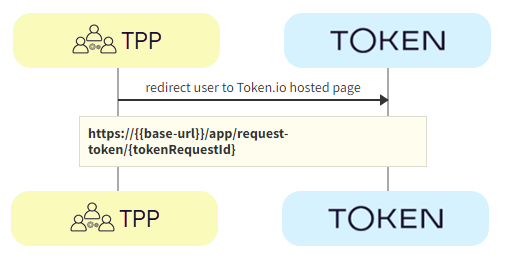
  1. TPP redirects user to Token.io HP

The TPP redirects the user to the Token.io HP.

  1. TPP -> Token.io - The TPP redirects the user to the Token.io HP at https://{{base-url}}/app/request-token/{tokenRequestId}.

    See Base URLs and Create a redirect URL for details on how to construct the redirect URL.

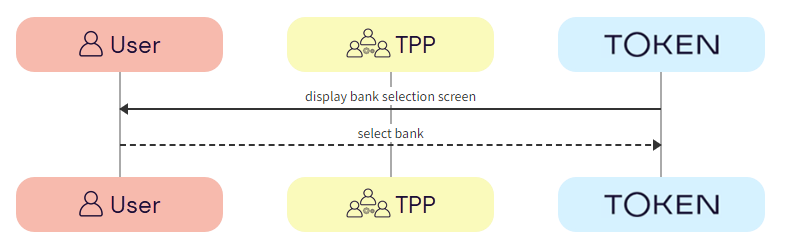
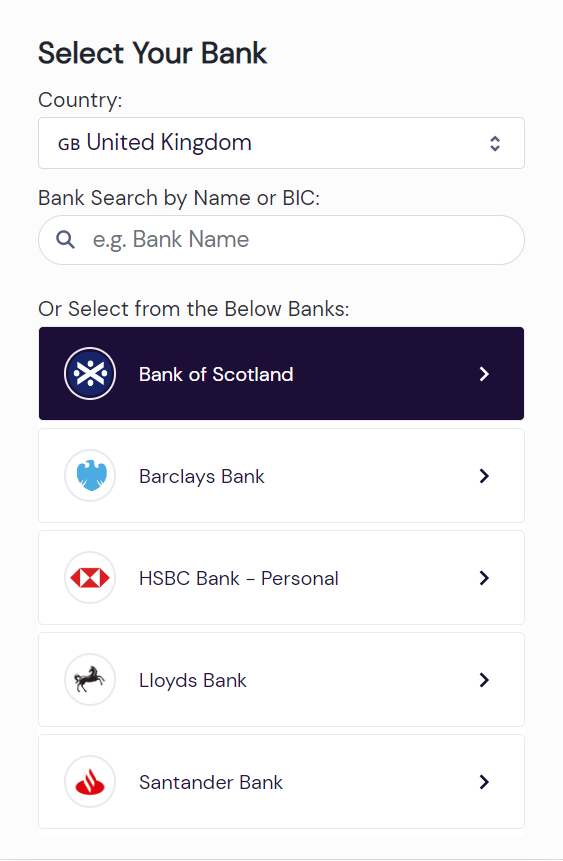
  1. User selects bank

The user selects the bank from the Token.io HP.

  1. Token.io -> User - Token.io displays the bank selection screen.

We recommend using the countries parameter in the POST /token-requests here, which can be used to pre-populate the Country field.

  1. User -> Token.io - The user selects the bank.

  1. Token.io collects consent from user

Token.io collects consent from the user.

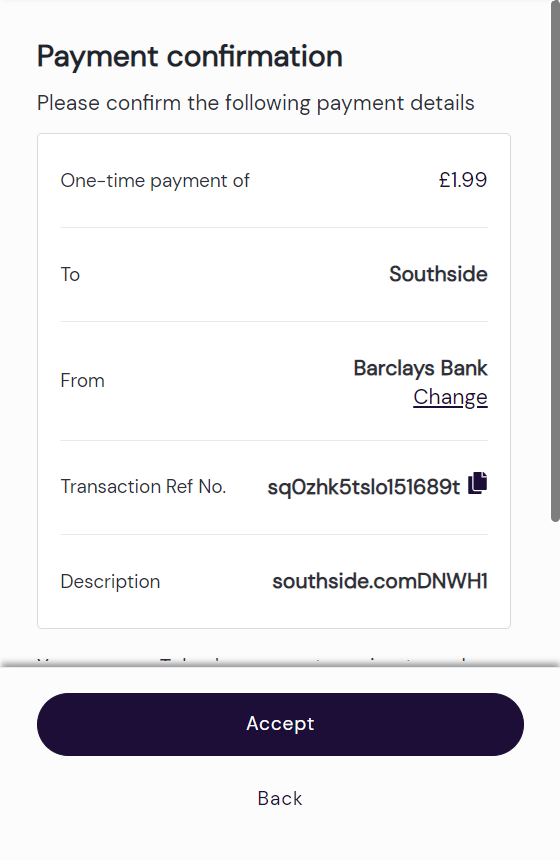
  1. Token.io -> User - Token.io requests consent from the user.

  2. User -> Token.io - The user provides consent to Token.io.

If the selected bank uses the redirect flow, clicking on Accept will initiate the redirect to the user’s bank at this point.

  1. User completes authorization with bank

The user completes authorization with the bank using the appropriate method; redirect, embedded or decoupled.

  1. Bank -> User - The bank displays the authorization page to the user.

  2. User -> Bank - The user authorizes the payment with the bank.

  1. TPP receives payment status

The payment status is sent from Token.io to the TPP in a webhook. Alternatively, Token.io offers an API endpoint to retrieve the current status of the initiated payment request.

  1. Token.io -> TPP - Token.io sends the payment status to the TPP using a webhook.

    If you're subscribed to webhooks, Token.io sends the payment status in a webhook every time a transfer is created or updated.

    See Webhooks for an example webhook notification.

    If the webhook is not received within 30 minutes, the TPP should call GET /transfers/{transferId} to retrieve the payment status.

If you're not using webhooks, you'll need to use GET /token-requests/{tokenRequestId}/result to obtain the transferId to then call GET /transfers/{transferId}.

See Alternative to webhooks for more details.

  1. TPP -> Token.io - The TPP checks the status with Token.io with the GET /transfers/{transferId} request.

  1. Token.io -> TPP - Token.io confirms the payment status with the GET /transfers/{transferId} response.

    If you're using Settlement accounts and the payment initiation request is successful, once the payment has been reconciled, the status will be SETTLEMENT_COMPLETED. Depending on the payment rail used, this can take a while.

    If you're not using Settlement accounts and the payment initiation request is successful, the status will be SUCCESS, but this does not guarantee that the payment has been settled.

    If the status is non-final, e.g., PROCESSING, the TPP should wait for additional webhooks to be sent. If the webhook is not received, the TPP should use a polling call (GET /transfers/{transferId}) every 15 mins.

    The recommended maximum polling time is 30 days. If the bank doesn't update the status, it will change to INITIATED after 30 days.

See HTTP errors for information on HTTP error status codes.

API-only integration

The following SCA methods can be handled using Token.io's API:

See Bank selection for information on selecting banks, mandatory fields, authentication models and supported payment rails for API-only integration.

Redirect authentication flow

This section describes the API integration where the TPP owns the full user experience. We recommend that TPPs use webhooks to receive notification of the payment status.

See the Token.io API reference for details of the following endpoints:

Then use our Launchpad to test them.

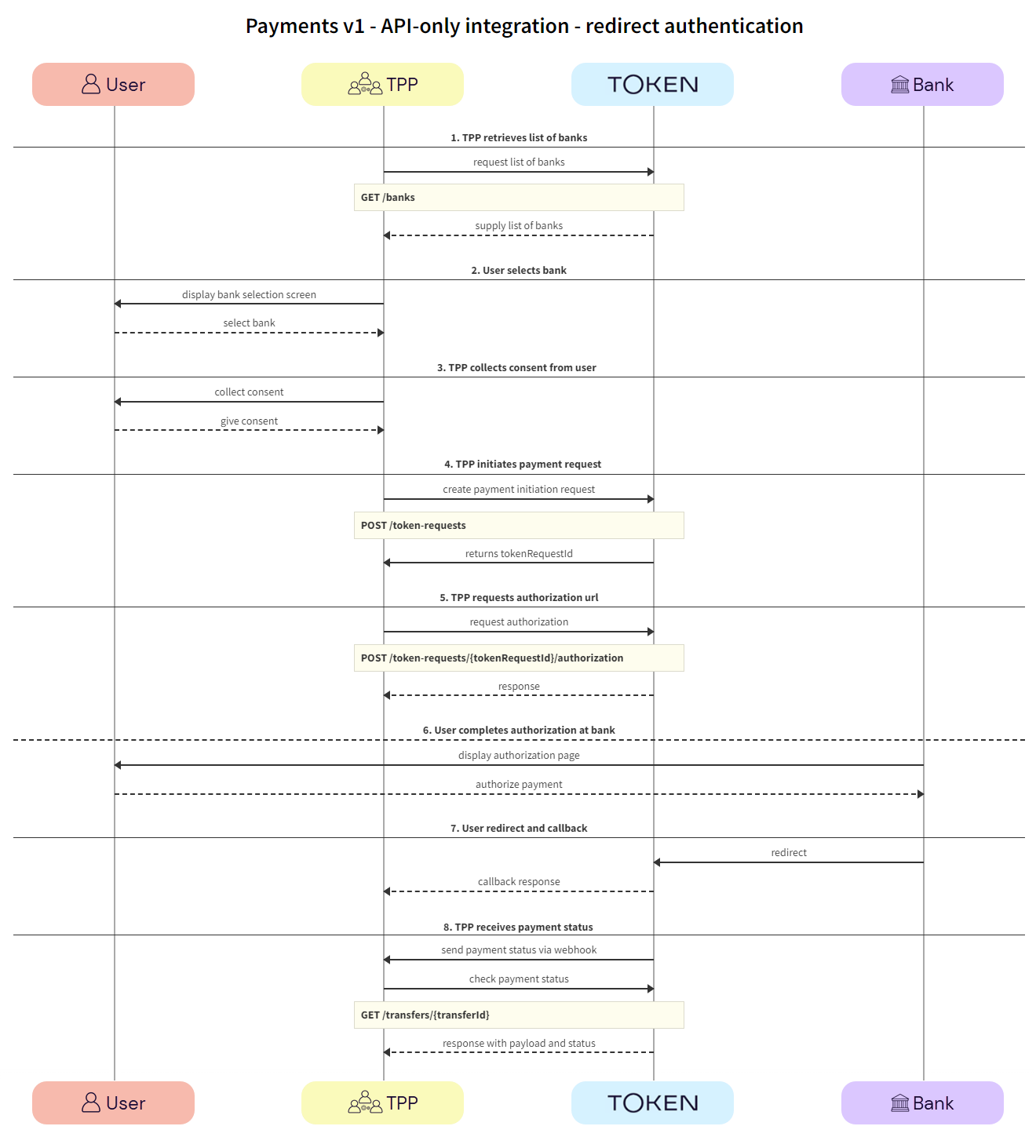
Click the image on the right to view a simplified swim lane diagram of the integration flow.

Details of the steps within the integration flow are shown below.

  1. TPP retrieves list of banks

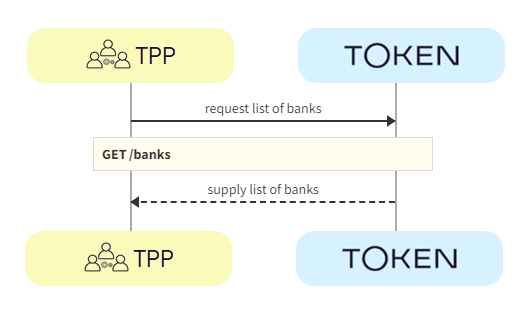
TPPs retrieve the list of available banks using the GET /banks call.

We recommend that this step is performed once daily, outside any payment initiation, e.g., at 11pm UTC, and that the result is cached.

In the GET /banks request, there are numerous filtering criteria you can add as parameters to narrow your query. As a minimum, you should filter by your member ID.

See Mandatory fields for information on which fields must be provided for a given bank to accept a payment initiation request.

  1. TPP -> Token.io - The TPP requests the list of banks from Token.io.

  1. Token.io -> TPP - Token.io supplies the list of banks to the TPP.

  1. User selects bank

The user selects the bank.

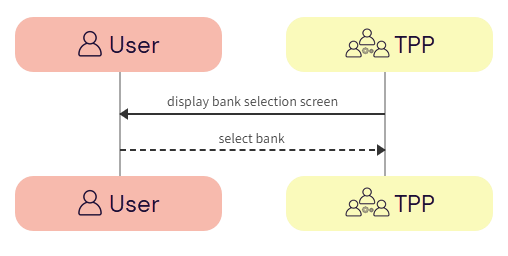
  1. TPP -> User - The TPP displays the bank selection screen.

  1. User -> TPP - The user selects the bank.

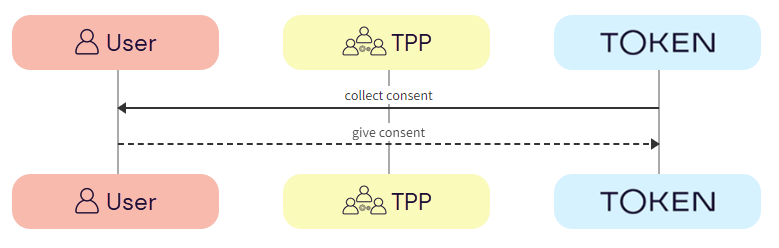
  1. TPP collects consent from user

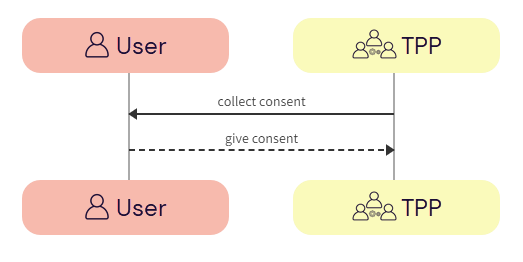
The TPP collects consent from the user. For more information see User consent collection.

  1. TPP -> User - The TPP initiates consent acceptance from the user.

  2. User -> TPP - The user gives consent to the TPP.

  1. TPP initiates payment request

The TPP initiates the token request with Token.io using the POST /token-requests call. Token.io responds by acknowledging the details of the request.

  1. TPP -> Token.io - The TPP creates the token request using the POST /token-requests call.

If you're using Settlement accounts and you're an unregulated TPP, you'll always need to send the Settlement account id of the sub-TPP in the POST /token-requests request.

  1. Token.io -> TPP - Token.io generates a response to the token request.

  1. TPP requests authorization URL

The TPP requests authorization using the POST /transfers call. Token.io responds with the authorization URL.

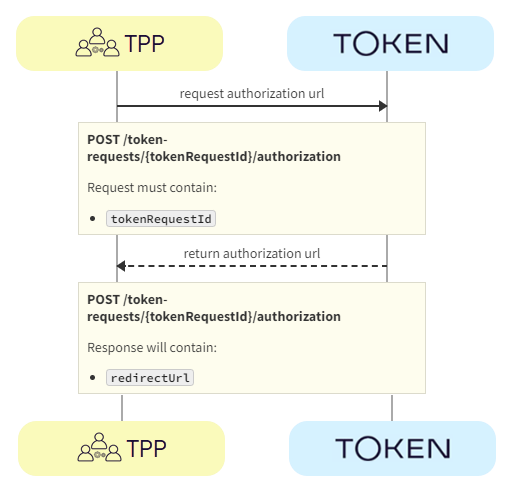
  1. TPP -> Token.io - The TPP requests the bank authorization URL using the POST /token-requests/{tokenRequestId}/authorization call.

  2. Token.io -> TPP - Token.io returns the redirectUrl provided by the bank.

  1. User completes authorization with bank

The user completes authorization with the bank.

  1. Bank -> User - The bank displays the authorization page to the user.

  2. User -> Bank - The user authorizes the payment with the bank.

  1. User redirect and callback

The user is redirected and the TPP consumes the Token.io callback.

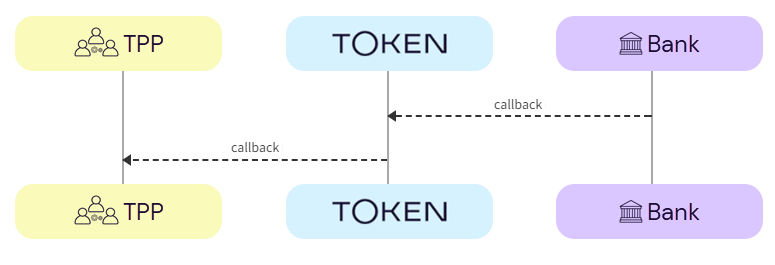
  1. Bank -> Token.io - The bank redirects the user to Token.io.

  2. Token.io -> TPP - Token.io immediately redirects the user to the redirect URL provided by the TPP in the redirect URL parameter of the token-request call. The TPP then consumes the callback from Token.io.

    See Redirect callback for more information on the Token.io callback.

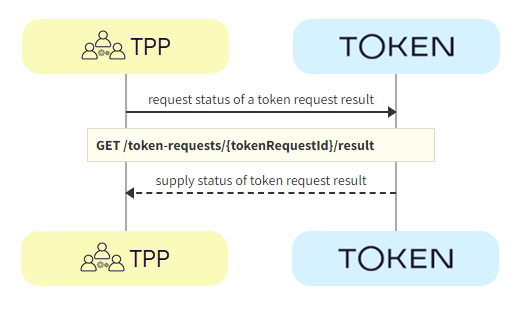
If for some reason neither the callback nor the webhook have been received, you can use the GET /token-requests/{tokenRequestId}/result call to retrieve the current status of the request.

If you're initiating a payment and you're not using both auto redeem and webhooks, you must fetch the status of the token request result using the GET /token-requests/{tokenRequestId}/result call.

When no further activity is detected in the production environment related to an active token request, the request expires after 20 minutes have elapsed.

  1. TPP receives payment status

Token.io recommends that the TPP subscribes to webhooks to receive payment status updates. As a fallback, the TPP can also poll Token.io for the current status of an initiated payment request.

  1. Token.io -> TPP - Token.io sends the payment status to the TPP in a webhook.

    If you're subscribed to webhooks, Token.io sends the payment status in a webhook every time a transfer is created or updated.

    See Webhooks for an example webhook notification.

    If the webhook is not received within 30 minutes, the TPP should call GET /transfers/{transferId} to retrieve the payment status.

If you're not using webhooks, you'll need to use GET /token-requests/{tokenRequestId}/result to obtain the transferId to then call GET /transfers/{transferId}.

See Alternative to webhooks for more details.

  1. TPP -> Token.io - The TPP checks the status with Token.io with the GET /transfers/{transferId} request.

  1. Token.io -> TPP - Token.io confirms the payment status with the GET /transfers/{transferId} response.

    If you're using Settlement accounts and the payment initiation request is successful, once the payment has been reconciled, the status will be SETTLEMENT_COMPLETED. Depending on the payment rail used, this can take a while.

    If you're not using Settlement accounts and the payment initiation request is successful, the status will be SUCCESS, but this does not guarantee that the payment has been settled.

    If the status is non-final, e.g., PROCESSING, the TPP should wait for additional webhooks to be sent. If the webhook is not received, the TPP should use a polling call (GET /transfers/{transferId}) every 15 mins.

    The recommended maximum polling time is 30 days. If the bank doesn't update the status, it will change to INITIATED after 30 days.

See HTTP errors for information on HTTP error status codes.

Other user authentication flows

Some banks require additional credential information for successful authentication and authorization with the bank:

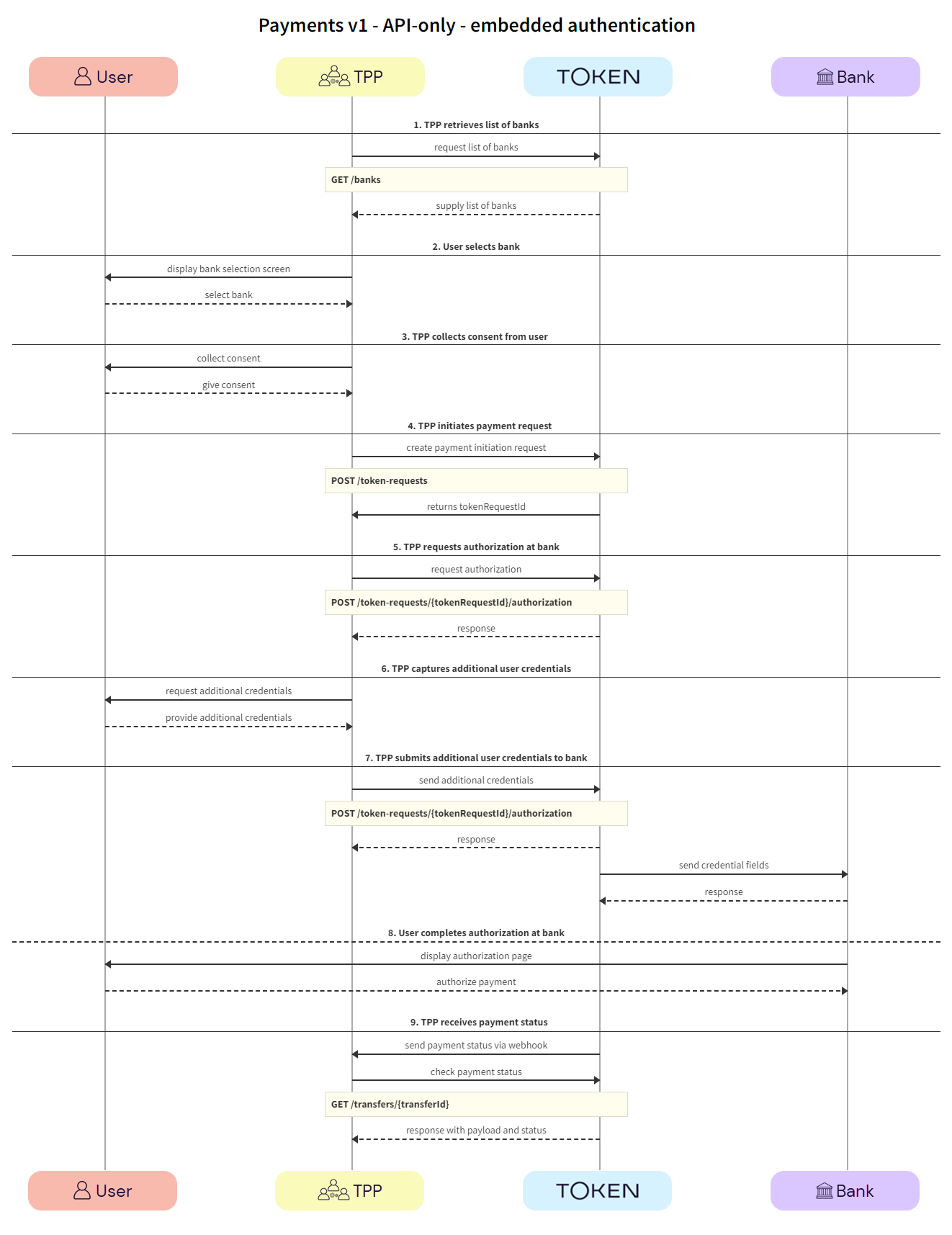
Embedded authentication flow

In most cases, banks will redirect users to their website or mobile app. However, there are some scenarios where the bank requires the TPP to capture the fields needed for user authentication. This user experience is referred to as embedded authentication.

See the Token.io API reference for details of the following endpoints:

Then use our Launchpad to test them.

Click the image on the right to view a simplified swim lane diagram of the integration flow.

Details of the steps within the integration flow are shown below.

  1. TPP retrieves list of banks

TPPs retrieve the list of available banks using the GET /banks call.

We recommend that this step is performed once daily, outside any payment initiation, e.g., at 11pm UTC, and that the result is cached.

In the GET /banks request, there are numerous filtering criteria you can add as parameters to narrow your query. As a minimum, you should filter by your member ID.

See Mandatory fields for information on which fields must be provided for a given bank to accept a payment initiation request.

  1. TPP -> Token.io - The TPP requests the list of banks from Token.io.

  1. Token.io -> TPP - Token.io supplies the list of banks to the TPP.

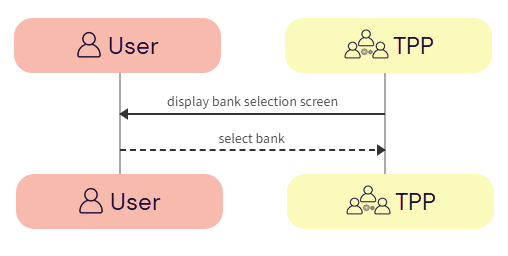
  1. User selects bank

The user selects the bank.

  1. TPP -> User - The TPP displays the bank selection screen.

  1. User -> TPP - The user selects the bank.

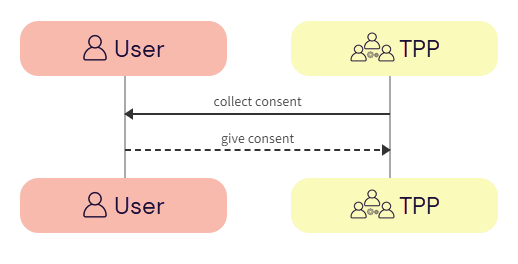
  1. TPP collects consent from user

The TPP collects consent from the user. For more information see User consent collection.

  1. TPP -> User - The TPP initiates consent acceptance from the user.

  2. User -> TPP - The user gives consent to the TPP.

  1. TPP initiates payment request

The TPP initiates the token request with Token.io using the POST /token-requests call. Token.io responds by acknowledging the details of the request.

  1. TPP -> Token.io - The TPP creates the token request using the POST /token-requests call.

If you're using Settlement accounts and you're an unregulated TPP, you'll always need to send the Settlement account id of the sub-TPP in the POST /token-requests request.

  1. Token.io -> TPP - Token.io generates a response to the token request.

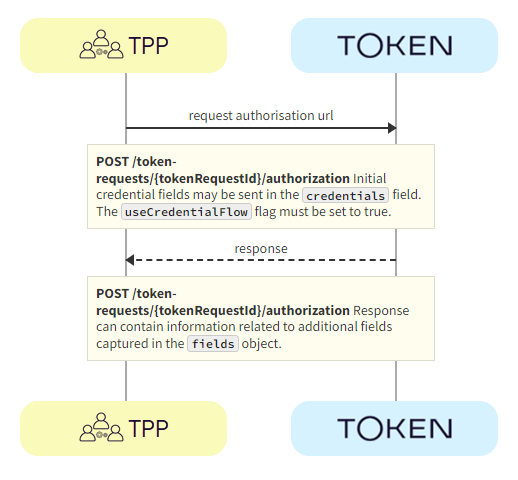
  1. TPP requests authorization with bank

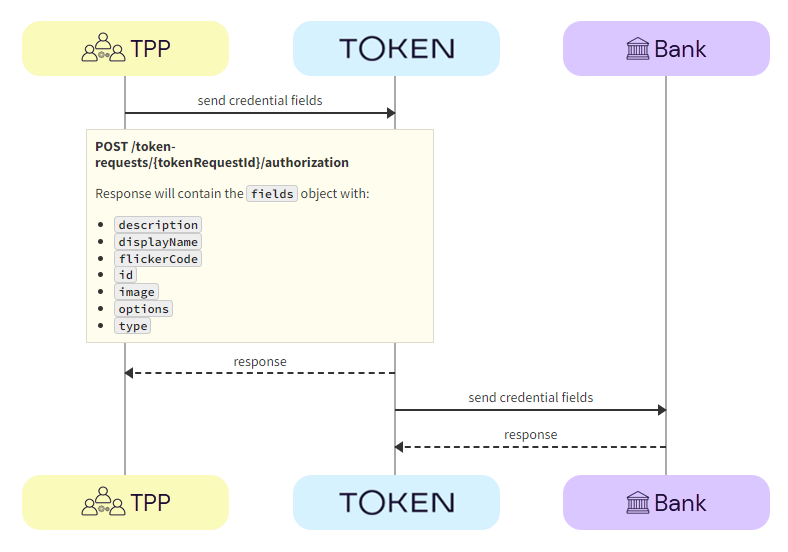
The TPP requests authorization using the POST /token-requests/{tokenRequestId}/authorization call. Token.io responds with the fields object, containing the initial fields required for the embedded flow.

  1. TPP -> Token.io - The TPP requests the authorization URL using the POST /token-requests/{tokenRequestId}/authorization call. Initial credentialFields from the response to GET /banks may be sent in the credentials field. The useCredentialFlow flag must be set to true. When this flag is set to true, the credential flow is triggered. The credentials map must be populated if required by the bank (see the credentialFields in the response to GET /banks), otherwise empty credentials are used.

The useCredentialFlow field should not be confused with the useWebAppCredentialsFlow.

When useWebAppCredentialsFlow is set to true and the bank's flow includes embedded steps, these steps are handled by Token.io's HP, rather than by the customer's own pages.

See the POST /token-requests/{tokenRequestId}/authorization request for more details.

  1. Token.io -> TPP - Token.io returns the fields to be used in the embedded flow. The response can contain information relating to additional fields to be captured in the fields object.

  1. TPP captures additional user credentials

The TPP captures additional credentials from the user.

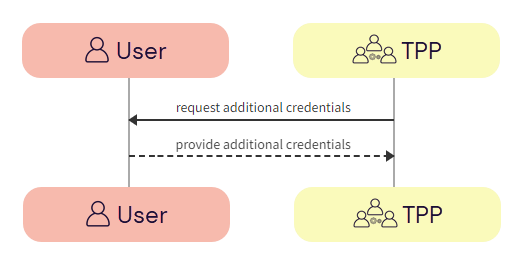
  1. TPP -> User - The TPP requests additional credentials from the user.

  1. User -> TPP - The user provides additional credentials to the TPP.

  1. TPP submits additional user credentials to bank

Using the POST /token-requests/{tokenRequestId}/authorization call, the TPP submits the additional credentials to the bank via Token.io.

  1. TPP -> Token.io - The TPP sends additional credentials using the POST /token-requests/{tokenRequestId}/authorization call.

  2. Token.io -> TPP - Token.io acknowledges receipt of the additional credentials and requests more, if required.

  3. Token.io -> Bank - Token.io sends this additional information to the bank.

  4. Bank -> Token.io - The bank confirms receipt of the information from Token.io.

    See Embedded callback for more information on the Token.io callback.

  1. User completes authorization with bank

The user completes authorization with the bank.

This is an optional step. For some banks, the user may not be redirected to the bank page for completing authorization.

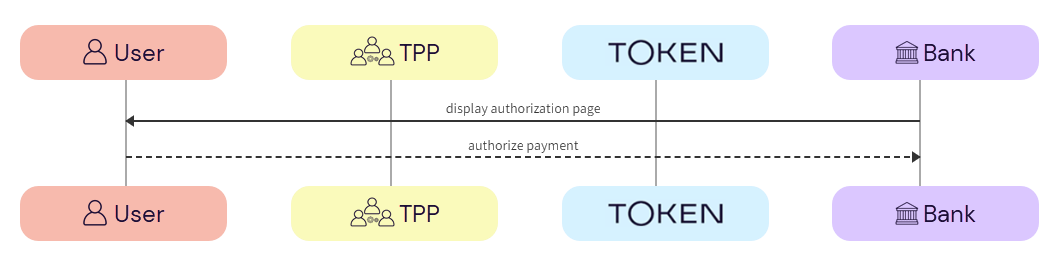
  1. Bank -> User - The bank displays the authorization page to the user.

  2. User -> Bank - The user authorizes the payment with the bank.

  1. TPP receives payment status

Token.io recommends that TPPs subscribe to webhooks to receive payment status updates. As a fallback, TPPs can also poll Token.io for the current status of an initiated payment request.

  1. Token.io -> TPP - Token.io sends the payment status to the TPP in a webhook.

    If you're subscribed to webhooks, Token.io sends the payment status in a webhook every time a transfer is created or updated.

    See Webhooks for an example webhook notification.

    If the webhook is not received within 30 minutes, the TPP should call GET /transfers/{transferId} to retrieve the payment status.

If you're not using webhooks, you'll need to use GET /token-requests/{tokenRequestId}/result to obtain the transferId to then call GET /transfers/{transferId}.

See Alternative to webhooks for more details.

  1. TPP -> Token.io - The TPP checks the status with Token.io with the GET /transfers/{transferId} request.

  1. Token.io -> TPP - Token.io confirms the payment status with the GET /transfers/{transferId} response.

    If you're using Settlement accounts and the payment initiation request is successful, once the payment has been reconciled, the status will be SETTLEMENT_COMPLETED. Depending on the payment rail used, this can take a while.

    If you're not using Settlement accounts and the payment initiation request is successful, the status will be SUCCESS, but this does not guarantee that the payment has been settled.

    If the status is non-final, e.g., PROCESSING, the TPP should wait for additional webhooks to be sent. If the webhook is not received, the TPP should use a polling call (GET /transfers/{transferId}) every 15 mins.

    The recommended maximum polling time is 30 days. If the bank doesn't update the status, it will change to INITIATED after 30 days.

See HTTP errors for information on HTTP error status codes.

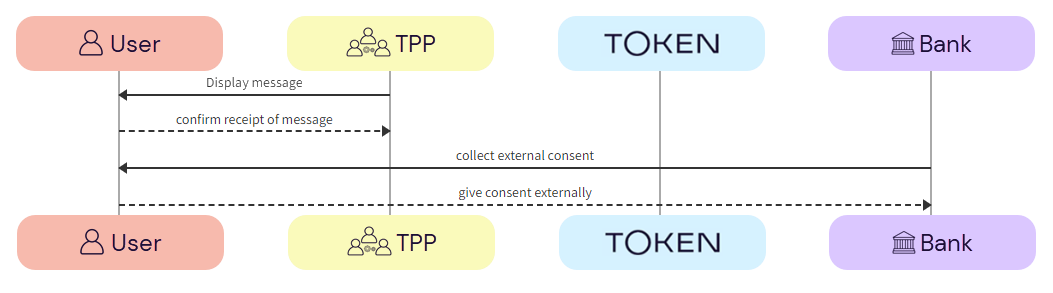
Decoupled authentication flow

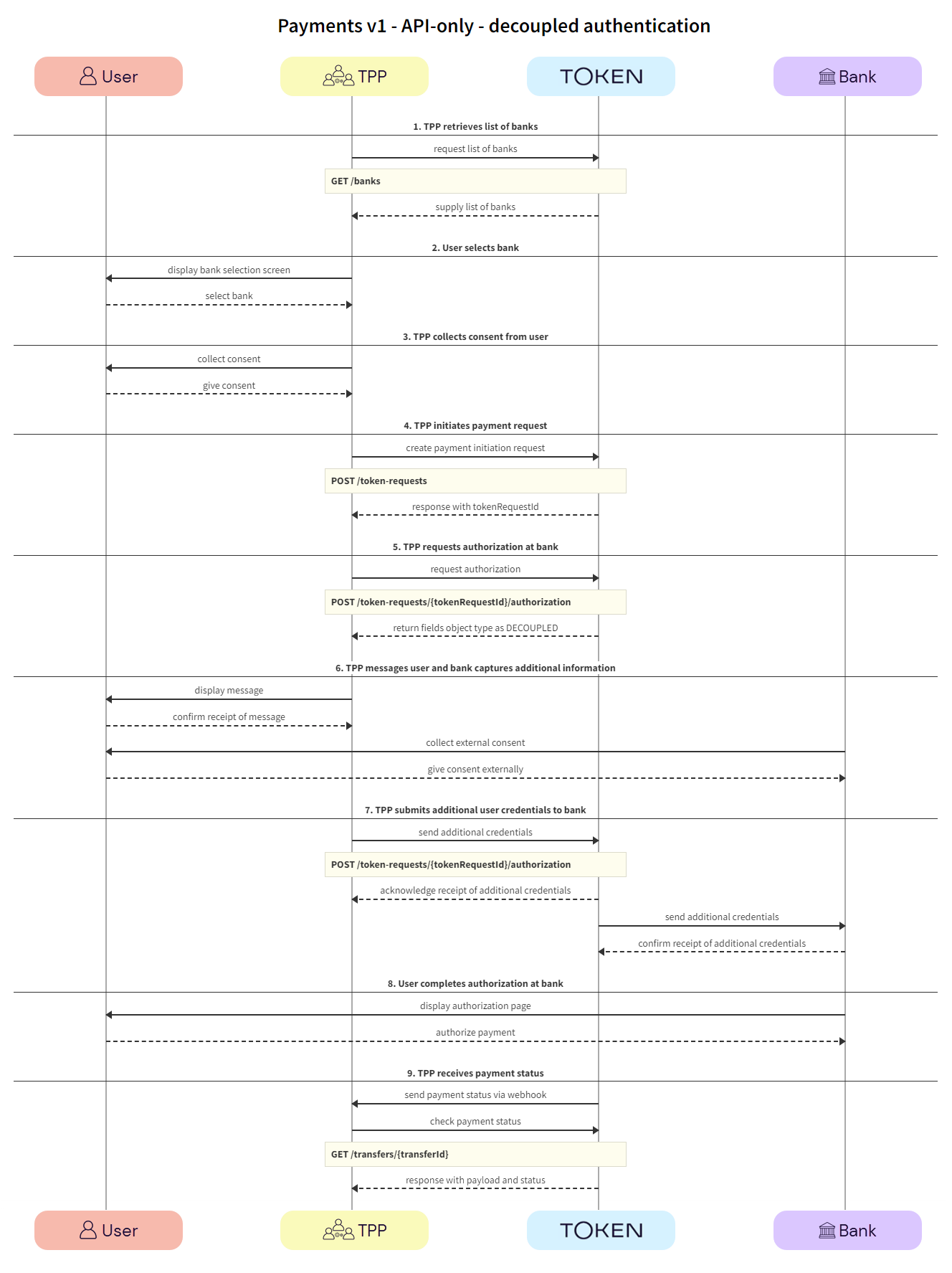
With decoupled authentication the bank carries out an additional form of authentication external to the API integration. This model allows for a number of solutions, for example using a mobile phone to authenticate, or using biometrics for authentication through a separate terminal, such as a point of sale (POS) device.

See the Token.io API reference for details of the following endpoints:

Click the image on the right to view a simplified swim lane diagram of the integration flow.

Details of the steps within the integration flow are shown below.

  1. TPP retrieves list of banks

The TPP retrieves the list of available banks using the GET /banks call.

We recommend that this step is performed once daily, outside any payment initiation, e.g., at 11pm UTC, and that the result is cached.

In the GET /banks request, there are numerous filtering criteria you can add as parameters to narrow your query. As a minimum, you should filter by your member ID.

See Mandatory fields for information on which fields must be provided for a given bank to accept a payment initiation request.

  1. TPP -> Token.io - The TPP requests the list of banks from Token.io.

  1. Token.io -> TPP - Token.io supplies the list of banks to the TPP.

  1. User selects bank

The user selects the bank.

  1. TPP -> User - The TPP displays the bank selection screen.

  1. User -> TPP - The user selects the bank.

  1. TPP collects consent from user

The TPP collects consent from the user. For more information see User consent collection.

  1. TPP -> User - The TPP initiates consent acceptance from the user.

  2. User -> TPP - The user gives consent to the TPP.

  1. TPP initiates payment request

The TPP initiates the token request with Token.io using the POST /token-requests call. Token.io responds by acknowledging the details of the request.

  1. TPP -> Token.io - The TPP creates the token request using the POST /token-requests call.

If you're using Settlement accounts and you're an unregulated TPP, you'll always need to send the Settlement account id of the sub-TPP in the POST /token-requests request.

  1. Token.io -> TPP - Token.io generates a response to the token request.

  1. TPP requests authorization with bank

The TPP requests authorization using the POST /token-requests/{tokenRequestId}/authorization call. Token.io responds with the fields object, containing the initial fields. In the fields object the type is returned as DECOUPLED.

  1. TPP -> Token.io - The TPP requests the authorization URL using the POST /token-requests/{tokenRequestId}/authorization call. Initial credentialFields from the response to GET /banks may be sent in the credentials field. The useCredentialFlow flag must be set to true. When this flag is set to true, the credential flow is triggered. The credentials map must be populated if required by the bank (see the credentialFields in the response to GET /banks), otherwise empty credentials are used.

The useCredentialFlow field should not be confused with the useWebAppCredentialsFlow.

When useWebAppCredentialsFlow is set to true and the bank's flow includes embedded steps, these steps are handled by Token.io's HP, rather than by the customer's own pages.

See the POST /token-requests/{tokenRequestId}/authorization request for more details.

  1. Token.io -> TPP - Token.io returns the fields object with type set to DECOUPLED and the message to be displayed to the user.

When implementing the decoupled authentication flow, you should consider the following:

See Decoupled callback for more information on the Token.io callback.

  1. TPP messages user and bank captures additional information

The TPP is expected to show the message to the user and to wait for confirmation of receipt before proceeding to the next step.

The bank will then challenge the user to authenticate themselves outside the API integration. This could be in the form of an SMS to the user’s registered phone number with the bank, or biometrics through a POS device.

  1. TPP -> User - The TPP displays the message to the user.

  2. User -> TPP - The user confirms receipt of the message.

  3. Bank -> User - The bank requests additional authentication from the user, through an external source, e.g., SMS. POS.

  4. User -> Bank - The user provides additional authentication credentials to the bank via an external source.

  1. TPP submits additional user credentials to bank

Using the POST /token-requests/{tokenRequestId}/authorization call, the TPP submits the additional credentials to the bank via Token.io.

  1. TPP -> Token.io - The TPP sends additional credentials using the POST /token-requests/{tokenRequestId}/authorization call.

  2. Token.io -> TPP - Token.io acknowledges receipts of the additional credentials and requests more, if required.

  3. Token.io -> Bank - Token.io sends this additional information to the bank.

  4. Bank -> Token.io - The bank confirms receipt of the information from Token.io.

  1. User completes authorization with bank

The user completes authorization with the bank.

  1. Bank -> User - The bank displays the authorization page to the user.

  2. User -> Bank - The user authorizes the payment with the bank.

  1. TPP receives payment status

Token.io recommends that TPPs subscribe to webhooks to receive payment status updates. As a fallback, TPPs can also poll Token.io for the current status of an initiated payment request.

  1. Token.io -> TPP - Token.io sends the payment status to the TPP in a webhook.

    If you're subscribed to webhooks, Token.io sends the payment status in a webhook every time a transfer is created or updated.

    See Webhooks for an example webhook notification.

    If the webhook is not received within 30 minutes, the TPP should call GET /transfers/{transferId} to retrieve the payment status.

If you're not using webhooks, you'll need to use GET /token-requests/{tokenRequestId}/result to obtain the transferId to then call GET /transfers/{transferId}.

See Alternative to webhooks for more details.

  1. TPP -> Token.io - The TPP checks the status with Token.io with the GET /transfers/{transferId} request.

  1. Token.io -> TPP - Token.io confirms the payment status with the GET /transfers/{transferId} response.

    If you're using Settlement accounts and the payment initiation request is successful, once the payment has been reconciled, the status will be SETTLEMENT_COMPLETED. Depending on the payment rail used, this can take a while.

    If you're not using Settlement accounts and the payment initiation request is successful, the status will be SUCCESS, but this does not guarantee that the payment has been settled.

    If the status is non-final, e.g., PROCESSING, the TPP should wait for additional webhooks to be sent. If the webhook is not received, the TPP should use a polling call (GET /transfers/{transferId}) every 15 mins.

    The recommended maximum polling time is 30 days. If the bank doesn't update the status, it will change to INITIATED after 30 days.

See HTTP errors for information on HTTP error status codes.

ON THIS PAGE

Single Immediate Payments (SIP) v1

Token.io's Single Immediate Payments v1 API supports payment initiation for:

  • Single Immediate Payments

  • Future Dated Payments

Using Token.io's API, you can initiate account-to-account (A2A) payments via Open Banking using PSD2 directly from the user’s bank account. Before accessing an account, you must receive formal approval and consent from the user. A connection to the payer’s banking system is then required to access and debit the payment account through your payment instruction.

The integration options to initiate A2A payments vary depending on whether you use Token.io's Hosted Pages (HP) integration options or the API-only integration.

These integration options are detailed below:

See Hosted Pages v2 and Hosted Pages v1 for more information on how to implement the Hosted Pages for Payments v1.

  • API-only integration – the TPP owns the user experience including bank selection logic, collection of mandatory fields, and embedded and decoupled authentication methods.

Hosted Pages (HP) integration options

Token.io's Hosted Pages (HP) guide the user through payment request initiation, consent, and authentication with the bank.

Token.io's HP support the redirect, decoupled and embedded authentication models.

Token.io offers the following HP integration options:

Embedded (modal) integration - seamlessly integrates Token.io's HP functionality into your website by creating a Pay by Bank button for your checkout page, which opens the HP in a modal window. This type of integration uses HP v2.

See Integrate with Token.io's modal SDK for more details.

  • Redirect integration - directs the user from your website to open Token.io's HP in a new tab, using a redirect URL. Redirect integration is available for HP v2 and HP v1.

Embedded (modal) integration

This section describes the integration option where the TPP uses Token.io's HP for all or some of the steps in the user journey. For example, the TPP can own bank selection and then hand over to the HP for authentication, which may provide better user continuity.

All authentication methods are handled entirely by the HP. The user accesses the HP through a Pay by Bank button created on the TPP's checkout page which opens the HP in a modal window.

Click the image on the right to view a simplified swim lane diagram of the integration flow.

Details of the steps within the integration flow are shown below.

When using embedded (modal) integration, you must create a payment session/token request in order to render the Pay by Bank button.

  1. User selects 'Pay by Bank'

The user clicks the 'Pay by Bank' button displayed on the TPP's website.

  1. TPP -> User - The TPP displays the 'Pay by Bank' button on the payment page of their website.

    See Integrate with Token.io's modal SDK for more details on creating the Pay by Bank button.

  1. User -> TPP - The user clicks the 'Pay by Bank' button.

  1. TPP initiates payment request

The TPP displays the Pay by Bank button. Clicking this launches Token.io's HP. The TPP initiates the payment request with Token.io using the POST /token-requests call. Token.io responds by acknowledging the details of the request, and providing the details for the next step, which in most cases will include a redirect URL to the bank.

  1. TPP -> Token.io - The TPP creates the payment initiation request using the POST /token-requests call.

If you're using Settlement accounts and you're an unregulated TPP, you'll always need to send the Settlement account id of the sub-TPP in the POST /token-requests request.

  1. Token.io -> TPP - Token.io generates a response to the payment initiation request which includes the token request id.

  1. Hosted Pages v2 initializes with load state

The modal SDK is initialized and the TPP displays a loading state in the modal SDK.

  1. TPP -> TPP - The redirect URL is loaded to initialize the modal SDK.

  2. TPP -> User - The TPP displays a loading state to the user in the modal SDK.

  1. TPP loads Hosted Pages v2

The TPP loads the Hosted Pages in the modal SDK. Token.io displays the HP to the user.

  1. TPP -> Token.io - The TPP loads the Hosted Pages in modal SDK using the redirect URL containing the token request id.

  2. Token.io -> User - Token.io displays the HP to the user. This can be the optional onboarding screen or the bank selection page (go to Step 5).

  1. User -> Token.io - The user advances to the next step in the payment flow.

  1. User selects bank and provides consent

Token.io asks the user to select the bank they want to make the payment through. By selecting the bank, the user provides consent to Token.io.

  1. Token.io -> User - Token.io displays the bank selection screen to the user.

  1. User -> Token.io - The user selects the bank. By selecting the bank, the user agrees to Token's Terms & Conditions and Token's Privacy Policy.

  1. Token.io redirects user to bank

Token.io redirects the user to the bank.

  1. Token.io -> Bank - Token.io redirects the user to the bank using the redirectUrl.

  1. User completes authorization with bank

The user completes authorization with the bank.

  1. Bank -> User - The bank displays the authorization page to the user.

  2. User -> Bank - The user authorizes the payment with the bank.

The authorization process will vary according to the bank selected.

  1. Bank -> Token.io - The bank redirects the user to Token.io.

  2. Token.io -> TPP - Token.io redirects the user to the TPP.

  1. TPP consumes callback

The TPP consumes the Token.io callback.

  1. Token.io -> TPP - The TPP consumes the Token.io callback and sends a response:

    • onDone - 'Payment processing'

    • onError - 'An error occurred during processing'

  1. TPP receives payment status

The payment status is sent from Token.io to the TPP in a webhook. Alternatively, Token.io offers an API to retrieve the current status of the initiated payment request.

  1. Token.io -> TPP- Token.io sends the payment status to the TPP using a webhook.

    If you're subscribed to webhooks, Token.io sends the payment status in a webhook every time a transfer is created or updated.

    See Webhooks for an example webhook notification.

    If the webhook is not received within 30 minutes, the TPP should call GET /transfers/{transferId} to retrieve the payment status.

If you're not using webhooks, you'll need to use GET /token-requests/{tokenRequestId}/result to obtain the transferId to then call GET /transfers/{transferId}.

See Alternative to webhooks for more details.

  1. TPP -> Token.io - The TPP checks the status with Token.io with the GET /transfers/{transferId} request.

  1. Token.io -> TPP - Token.io confirms the payment status with the GET /transfers/{transferId} response.

    If you're using Settlement accounts and the payment initiation request is successful, once the payment has been reconciled, the status will be SETTLEMENT_COMPLETED. Depending on the payment rail used, this can take a while.

    If you're not using Settlement accounts and the payment initiation request is successful, the status will be SUCCESS, but this does not guarantee that the payment has been settled.

    If the status is non-final, e.g., PROCESSING, the TPP should wait for additional webhooks to be sent. If the webhook is not received, the TPP should use a polling call (GET /transfers/{transferId}) every 15 mins.

    The recommended maximum polling time is 30 days. If the bank doesn't update the status, it will change to INITIATED after 30 days.

See HTTP errors for information on HTTP error status codes.

Redirect integration (HP v2)

This section describes the HP v2 integration option, where the TPP uses Token.io's HP for all or some of the steps in the user journey. For example, the TPP can own the bank selection and then hand over to the HP for authentication, which may provide better user continuity.

All authentication methods are handled entirely by the HP. The user accesses the HP through a redirect URL which opens a new browser tab.

Click the image on the right to view a simplified swim lane diagram of the integration flow.

Details of the steps within the integration flow are shown below.

  1. TPP initiates payment request

The TPP initiates the payment request with Token.io using the POST /token-requests call. Token.io responds by acknowledging the details of the request.

  1. TPP -> Token.io - The TPP creates the payment initiation request using the POST /token-requests call.

If you're using Settlement accounts and you're an unregulated TPP, you'll always need to send the Settlement account id of the sub-TPP in the POST /token-requests request.

  1. Token.io -> TPP - Token.io generates a response to the payment initiation request.

  1. TPP -> Token.io - The TPP redirects the user to the Token.io HP at https://{{base-url}}/session/{tokenRequestId}.

    See Base URLs and Create a redirect URL for details on how to construct the redirect URL.

  1. User selects bank and provides consent

Token.io asks the user to select the bank they want to make the payment through. By selecting the bank, the user provides consent to Token.io.

  1. Token.io -> User - Token.io displays the bank selection screen to the user.

  1. User -> Token.io - The user selects the bank. By selecting the bank, the user agrees to Token.io's Terms & Conditions and Token.io's Privacy Policy.

  1. Token.io redirects user to bank

Token.io redirects the user to the bank.

  1. Token.io -> Bank - Token.io redirects the user to the bank.

  1. User completes authorization with bank

The user completes authorization with the bank.

  1. Bank -> User - The bank displays the authorization page to the user.

  2. User -> Bank - The user authorizes the payment with the bank.

The authorization process will vary according to the bank selected.

  1. Bank -> Token.io - The bank redirects the user to Token.io.

  2. Token.io -> TPP - Token.io redirects the user to the TPP.

  1. TPP consumes callback

The TPP consumes the Token.io callback.

  1. Token.io -> TPP - The TPP consumes the Token.io callback.

  1. TPP receives payment status

The payment status is sent from Token.io to the TPP in a webhook. Alternatively, Token.io offers an API to retrieve the current status of the initiated payment request.

  1. Token.io -> TPP - Token.io sends the payment status to the TPP using a webhook.

    If you're subscribed to webhooks, Token.io sends the payment status in a webhook every time a transfer is created or updated.

    See Webhooks for an example webhook notification.

    If the webhook is not received within 30 minutes, the TPP should call GET /transfers/{transferId} to retrieve the payment status.

If you're not using webhooks, you'll need to use GET /token-requests/{tokenRequestId}/result to obtain the transferId to then call GET /transfers/{transferId}.

See Alternative to webhooks for more details.

  1. TPP -> Token.io - The TPP checks the status with Token.io with the GET /transfers/{transferId} request.

  1. Token.io -> TPP - Token.io confirms the payment status with the GET /transfers/{transferId} response.

    If you're using Settlement accounts and the payment initiation request is successful, once the payment has been reconciled, the status will be SETTLEMENT_COMPLETED. Depending on the payment rail used, this can take a while.

    If you're not using Settlement accounts and the payment initiation request is successful, the status will be SUCCESS, but this does not guarantee that the payment has been settled.

    If the status is non-final, e.g., PROCESSING, the TPP should wait for additional webhooks to be sent. If the webhook is not received, the TPP should use a polling call (GET /transfers/{transferId}) every 15 mins.

    The recommended maximum polling time is 30 days. If the bank doesn't update the status, it will change to INITIATED after 30 days.

See HTTP errors for information on HTTP error status codes.

Redirect integration (HP v1)

This section describes the HP v1 integration option, where the TPP uses Token.io's HP for all or some of the steps in the user journey. For example, the TPP can own the bank selection and then hand over to the HP for authentication, which may provide better user continuity.

All authentication methods are handled entirely by the HP. The user accesses the HP through a redirect URL which opens a new browser tab.

Click the image on the right to view a simplified swim lane diagram of the integration flow.

Details of the steps within the integration flow are shown below.

  1. TPP initiates payment request

The TPP initiates the payment request with Token.io using the POST /token-requests call. Token.io responds by acknowledging the details of the request.

  1. TPP -> Token.io - The TPP creates the payment initiation request using the POST /token-requests call.

If you're using Settlement accounts and you're an unregulated TPP, you'll always need to send the Settlement account id of the sub-TPP in the POST /token-requests request.

  1. Token.io -> TPP - Token.io generates a response to the payment initiation request.

  1. TPP redirects user to Token.io HP

The TPP redirects the user to the Token.io HP.

  1. TPP -> Token.io - The TPP redirects the user to the Token.io HP at https://{{base-url}}/app/request-token/{tokenRequestId}.

    See Base URLs and Create a redirect URL for details on how to construct the redirect URL.

  1. User selects bank

The user selects the bank from the Token.io HP.

  1. Token.io -> User - Token.io displays the bank selection screen.

We recommend using the countries parameter in the POST /token-requests here, which can be used to pre-populate the Country field.

  1. User -> Token.io - The user selects the bank.

  1. Token.io collects consent from user

Token.io collects consent from the user.

  1. Token.io -> User - Token.io requests consent from the user.

  2. User -> Token.io - The user provides consent to Token.io.

If the selected bank uses the redirect flow, clicking on Accept will initiate the redirect to the user’s bank at this point.

  1. User completes authorization with bank

The user completes authorization with the bank using the appropriate method; redirect, embedded or decoupled.

  1. Bank -> User - The bank displays the authorization page to the user.

  2. User -> Bank - The user authorizes the payment with the bank.

  1. TPP receives payment status

The payment status is sent from Token.io to the TPP in a webhook. Alternatively, Token.io offers an API endpoint to retrieve the current status of the initiated payment request.

  1. Token.io -> TPP - Token.io sends the payment status to the TPP using a webhook.

    If you're subscribed to webhooks, Token.io sends the payment status in a webhook every time a transfer is created or updated.

    See Webhooks for an example webhook notification.

    If the webhook is not received within 30 minutes, the TPP should call GET /transfers/{transferId} to retrieve the payment status.

If you're not using webhooks, you'll need to use GET /token-requests/{tokenRequestId}/result to obtain the transferId to then call GET /transfers/{transferId}.

See Alternative to webhooks for more details.

  1. TPP -> Token.io - The TPP checks the status with Token.io with the GET /transfers/{transferId} request.

  1. Token.io -> TPP - Token.io confirms the payment status with the GET /transfers/{transferId} response.

    If you're using Settlement accounts and the payment initiation request is successful, once the payment has been reconciled, the status will be SETTLEMENT_COMPLETED. Depending on the payment rail used, this can take a while.

    If you're not using Settlement accounts and the payment initiation request is successful, the status will be SUCCESS, but this does not guarantee that the payment has been settled.

    If the status is non-final, e.g., PROCESSING, the TPP should wait for additional webhooks to be sent. If the webhook is not received, the TPP should use a polling call (GET /transfers/{transferId}) every 15 mins.

    The recommended maximum polling time is 30 days. If the bank doesn't update the status, it will change to INITIATED after 30 days.

See HTTP errors for information on HTTP error status codes.

API-only integration

The following SCA methods can be handled using Token.io's API:

See Bank selection for information on selecting banks, mandatory fields, authentication models and supported payment rails for API-only integration.

Redirect authentication flow

This section describes the API integration where the TPP owns the full user experience. We recommend that TPPs use webhooks to receive notification of the payment status.

See the Token.io API reference for details of the following endpoints:

Then use our Launchpad to test them.

Click the image on the right to view a simplified swim lane diagram of the integration flow.

Details of the steps within the integration flow are shown below.

  1. TPP retrieves list of banks

TPPs retrieve the list of available banks using the GET /banks call.

We recommend that this step is performed once daily, outside any payment initiation, e.g., at 11pm UTC, and that the result is cached.

In the GET /banks request, there are numerous filtering criteria you can add as parameters to narrow your query. As a minimum, you should filter by your member ID.

See Mandatory fields for information on which fields must be provided for a given bank to accept a payment initiation request.

  1. TPP -> Token.io - The TPP requests the list of banks from Token.io.

  1. Token.io -> TPP - Token.io supplies the list of banks to the TPP.

  1. User selects bank

The user selects the bank.

  1. TPP -> User - The TPP displays the bank selection screen.

  1. User -> TPP - The user selects the bank.

  1. TPP collects consent from user

The TPP collects consent from the user. For more information see User consent collection.

  1. TPP -> User - The TPP initiates consent acceptance from the user.

  2. User -> TPP - The user gives consent to the TPP.

  1. TPP initiates payment request

The TPP initiates the token request with Token.io using the POST /token-requests call. Token.io responds by acknowledging the details of the request.

  1. TPP -> Token.io - The TPP creates the token request using the POST /token-requests call.

If you're using Settlement accounts and you're an unregulated TPP, you'll always need to send the Settlement account id of the sub-TPP in the POST /token-requests request.

  1. Token.io -> TPP - Token.io generates a response to the token request.

  1. TPP requests authorization URL

The TPP requests authorization using the POST /transfers call. Token.io responds with the authorization URL.

  1. TPP -> Token.io - The TPP requests the bank authorization URL using the POST /token-requests/{tokenRequestId}/authorization call.

  2. Token.io -> TPP - Token.io returns the redirectUrl provided by the bank.

  1. User completes authorization with bank

The user completes authorization with the bank.

  1. Bank -> User - The bank displays the authorization page to the user.

  2. User -> Bank - The user authorizes the payment with the bank.

  1. User redirect and callback

The user is redirected and the TPP consumes the Token.io callback.

  1. Bank -> Token.io - The bank redirects the user to Token.io.

  2. Token.io -> TPP - Token.io immediately redirects the user to the redirect URL provided by the TPP in the redirect URL parameter of the token-request call. The TPP then consumes the callback from Token.io.

    See Redirect callback for more information on the Token.io callback.

If for some reason neither the callback nor the webhook have been received, you can use the GET /token-requests/{tokenRequestId}/result call to retrieve the current status of the request.

If you're initiating a payment and you're not using both auto redeem and webhooks, you must fetch the status of the token request result using the GET /token-requests/{tokenRequestId}/result call.

When no further activity is detected in the production environment related to an active token request, the request expires after 20 minutes have elapsed.

  1. TPP receives payment status

Token.io recommends that the TPP subscribes to webhooks to receive payment status updates. As a fallback, the TPP can also poll Token.io for the current status of an initiated payment request.

  1. Token.io -> TPP - Token.io sends the payment status to the TPP in a webhook.

    If you're subscribed to webhooks, Token.io sends the payment status in a webhook every time a transfer is created or updated.

    See Webhooks for an example webhook notification.

    If the webhook is not received within 30 minutes, the TPP should call GET /transfers/{transferId} to retrieve the payment status.

If you're not using webhooks, you'll need to use GET /token-requests/{tokenRequestId}/result to obtain the transferId to then call GET /transfers/{transferId}.

See Alternative to webhooks for more details.

  1. TPP -> Token.io - The TPP checks the status with Token.io with the GET /transfers/{transferId} request.

  1. Token.io -> TPP - Token.io confirms the payment status with the GET /transfers/{transferId} response.

    If you're using Settlement accounts and the payment initiation request is successful, once the payment has been reconciled, the status will be SETTLEMENT_COMPLETED. Depending on the payment rail used, this can take a while.

    If you're not using Settlement accounts and the payment initiation request is successful, the status will be SUCCESS, but this does not guarantee that the payment has been settled.

    If the status is non-final, e.g., PROCESSING, the TPP should wait for additional webhooks to be sent. If the webhook is not received, the TPP should use a polling call (GET /transfers/{transferId}) every 15 mins.

    The recommended maximum polling time is 30 days. If the bank doesn't update the status, it will change to INITIATED after 30 days.

See HTTP errors for information on HTTP error status codes.

Other user authentication flows

Some banks require additional credential information for successful authentication and authorization with the bank:

Embedded authentication flow

In most cases, banks will redirect users to their website or mobile app. However, there are some scenarios where the bank requires the TPP to capture the fields needed for user authentication. This user experience is referred to as embedded authentication.

See the Token.io API reference for details of the following endpoints:

Then use our Launchpad to test them.

Click the image on the right to view a simplified swim lane diagram of the integration flow.

Details of the steps within the integration flow are shown below.

  1. TPP retrieves list of banks

TPPs retrieve the list of available banks using the GET /banks call.

We recommend that this step is performed once daily, outside any payment initiation, e.g., at 11pm UTC, and that the result is cached.

In the GET /banks request, there are numerous filtering criteria you can add as parameters to narrow your query. As a minimum, you should filter by your member ID.

See Mandatory fields for information on which fields must be provided for a given bank to accept a payment initiation request.

  1. TPP -> Token.io - The TPP requests the list of banks from Token.io.

  1. Token.io -> TPP - Token.io supplies the list of banks to the TPP.

  1. User selects bank

The user selects the bank.

  1. TPP -> User - The TPP displays the bank selection screen.

  1. User -> TPP - The user selects the bank.

  1. TPP collects consent from user

The TPP collects consent from the user. For more information see User consent collection.

  1. TPP -> User - The TPP initiates consent acceptance from the user.

  2. User -> TPP - The user gives consent to the TPP.

  1. TPP initiates payment request

The TPP initiates the token request with Token.io using the POST /token-requests call. Token.io responds by acknowledging the details of the request.

  1. TPP -> Token.io - The TPP creates the token request using the POST /token-requests call.

If you're using Settlement accounts and you're an unregulated TPP, you'll always need to send the Settlement account id of the sub-TPP in the POST /token-requests request.

  1. Token.io -> TPP - Token.io generates a response to the token request.

  1. TPP requests authorization with bank

The TPP requests authorization using the POST /token-requests/{tokenRequestId}/authorization call. Token.io responds with the fields object, containing the initial fields required for the embedded flow.

  1. TPP -> Token.io - The TPP requests the authorization URL using the POST /token-requests/{tokenRequestId}/authorization call. Initial credentialFields from the response to GET /banks may be sent in the credentials field. The useCredentialFlow flag must be set to true. When this flag is set to true, the credential flow is triggered. The credentials map must be populated if required by the bank (see the credentialFields in the response to GET /banks), otherwise empty credentials are used.

The useCredentialFlow field should not be confused with the useWebAppCredentialsFlow.

When useWebAppCredentialsFlow is set to true and the bank's flow includes embedded steps, these steps are handled by Token.io's HP, rather than by the customer's own pages.

See the POST /token-requests/{tokenRequestId}/authorization request for more details.

  1. Token.io -> TPP - Token.io returns the fields to be used in the embedded flow. The response can contain information relating to additional fields to be captured in the fields object.

  1. TPP captures additional user credentials

The TPP captures additional credentials from the user.

  1. TPP -> User - The TPP requests additional credentials from the user.

  1. User -> TPP - The user provides additional credentials to the TPP.

  1. TPP submits additional user credentials to bank

Using the POST /token-requests/{tokenRequestId}/authorization call, the TPP submits the additional credentials to the bank via Token.io.

  1. TPP -> Token.io - The TPP sends additional credentials using the POST /token-requests/{tokenRequestId}/authorization call.

  2. Token.io -> TPP - Token.io acknowledges receipt of the additional credentials and requests more, if required.

  3. Token.io -> Bank - Token.io sends this additional information to the bank.

  4. Bank -> Token.io - The bank confirms receipt of the information from Token.io.

    See Embedded callback for more information on the Token.io callback.

  1. User completes authorization with bank

The user completes authorization with the bank.

This is an optional step. For some banks, the user may not be redirected to the bank page for completing authorization.

  1. Bank -> User - The bank displays the authorization page to the user.

  2. User -> Bank - The user authorizes the payment with the bank.

  1. TPP receives payment status

Token.io recommends that TPPs subscribe to webhooks to receive payment status updates. As a fallback, TPPs can also poll Token.io for the current status of an initiated payment request.

  1. Token.io -> TPP - Token.io sends the payment status to the TPP in a webhook.

    If you're subscribed to webhooks, Token.io sends the payment status in a webhook every time a transfer is created or updated.

    See Webhooks for an example webhook notification.

    If the webhook is not received within 30 minutes, the TPP should call GET /transfers/{transferId} to retrieve the payment status.

If you're not using webhooks, you'll need to use GET /token-requests/{tokenRequestId}/result to obtain the transferId to then call GET /transfers/{transferId}.

See Alternative to webhooks for more details.

  1. TPP -> Token.io - The TPP checks the status with Token.io with the GET /transfers/{transferId} request.

  1. Token.io -> TPP - Token.io confirms the payment status with the GET /transfers/{transferId} response.

    If you're using Settlement accounts and the payment initiation request is successful, once the payment has been reconciled, the status will be SETTLEMENT_COMPLETED. Depending on the payment rail used, this can take a while.

    If you're not using Settlement accounts and the payment initiation request is successful, the status will be SUCCESS, but this does not guarantee that the payment has been settled.

    If the status is non-final, e.g., PROCESSING, the TPP should wait for additional webhooks to be sent. If the webhook is not received, the TPP should use a polling call (GET /transfers/{transferId}) every 15 mins.

    The recommended maximum polling time is 30 days. If the bank doesn't update the status, it will change to INITIATED after 30 days.

See HTTP errors for information on HTTP error status codes.

Decoupled authentication flow

With decoupled authentication the bank carries out an additional form of authentication external to the API integration. This model allows for a number of solutions, for example using a mobile phone to authenticate, or using biometrics for authentication through a separate terminal, such as a point of sale (POS) device.

See the Token.io API reference for details of the following endpoints:

Click the image on the right to view a simplified swim lane diagram of the integration flow.

Details of the steps within the integration flow are shown below.

  1. TPP retrieves list of banks

The TPP retrieves the list of available banks using the GET /banks call.

We recommend that this step is performed once daily, outside any payment initiation, e.g., at 11pm UTC, and that the result is cached.

In the GET /banks request, there are numerous filtering criteria you can add as parameters to narrow your query. As a minimum, you should filter by your member ID.

See Mandatory fields for information on which fields must be provided for a given bank to accept a payment initiation request.

  1. TPP -> Token.io - The TPP requests the list of banks from Token.io.

  1. Token.io -> TPP - Token.io supplies the list of banks to the TPP.

  1. User selects bank

The user selects the bank.

  1. TPP -> User - The TPP displays the bank selection screen.

  1. User -> TPP - The user selects the bank.

  1. TPP collects consent from user

The TPP collects consent from the user. For more information see User consent collection.

  1. TPP -> User - The TPP initiates consent acceptance from the user.

  2. User -> TPP - The user gives consent to the TPP.

  1. TPP initiates payment request

The TPP initiates the token request with Token.io using the POST /token-requests call. Token.io responds by acknowledging the details of the request.

  1. TPP -> Token.io - The TPP creates the token request using the POST /token-requests call.

If you're using Settlement accounts and you're an unregulated TPP, you'll always need to send the Settlement account id of the sub-TPP in the POST /token-requests request.

  1. Token.io -> TPP - Token.io generates a response to the token request.

  1. TPP requests authorization with bank

The TPP requests authorization using the POST /token-requests/{tokenRequestId}/authorization call. Token.io responds with the fields object, containing the initial fields. In the fields object the type is returned as DECOUPLED.

  1. TPP -> Token.io - The TPP requests the authorization URL using the POST /token-requests/{tokenRequestId}/authorization call. Initial credentialFields from the response to GET /banks may be sent in the credentials field. The useCredentialFlow flag must be set to true. When this flag is set to true, the credential flow is triggered. The credentials map must be populated if required by the bank (see the credentialFields in the response to GET /banks), otherwise empty credentials are used.

The useCredentialFlow field should not be confused with the useWebAppCredentialsFlow.

When useWebAppCredentialsFlow is set to true and the bank's flow includes embedded steps, these steps are handled by Token.io's HP, rather than by the customer's own pages.

See the POST /token-requests/{tokenRequestId}/authorization request for more details.

  1. Token.io -> TPP - Token.io returns the fields object with type set to DECOUPLED and the message to be displayed to the user.

When implementing the decoupled authentication flow, you should consider the following:

See Decoupled callback for more information on the Token.io callback.

  1. TPP messages user and bank captures additional information

The TPP is expected to show the message to the user and to wait for confirmation of receipt before proceeding to the next step.

The bank will then challenge the user to authenticate themselves outside the API integration. This could be in the form of an SMS to the user’s registered phone number with the bank, or biometrics through a POS device.

  1. TPP -> User - The TPP displays the message to the user.

  2. User -> TPP - The user confirms receipt of the message.

  3. Bank -> User - The bank requests additional authentication from the user, through an external source, e.g., SMS. POS.

  4. User -> Bank - The user provides additional authentication credentials to the bank via an external source.

  1. TPP submits additional user credentials to bank

Using the POST /token-requests/{tokenRequestId}/authorization call, the TPP submits the additional credentials to the bank via Token.io.

  1. TPP -> Token.io - The TPP sends additional credentials using the POST /token-requests/{tokenRequestId}/authorization call.

  2. Token.io -> TPP - Token.io acknowledges receipts of the additional credentials and requests more, if required.

  3. Token.io -> Bank - Token.io sends this additional information to the bank.

  4. Bank -> Token.io - The bank confirms receipt of the information from Token.io.

  1. User completes authorization with bank

The user completes authorization with the bank.

  1. Bank -> User - The bank displays the authorization page to the user.

  2. User -> Bank - The user authorizes the payment with the bank.

  1. TPP receives payment status

Token.io recommends that TPPs subscribe to webhooks to receive payment status updates. As a fallback, TPPs can also poll Token.io for the current status of an initiated payment request.

  1. Token.io -> TPP - Token.io sends the payment status to the TPP in a webhook.

    If you're subscribed to webhooks, Token.io sends the payment status in a webhook every time a transfer is created or updated.

    See Webhooks for an example webhook notification.

    If the webhook is not received within 30 minutes, the TPP should call GET /transfers/{transferId} to retrieve the payment status.

If you're not using webhooks, you'll need to use GET /token-requests/{tokenRequestId}/result to obtain the transferId to then call GET /transfers/{transferId}.

See Alternative to webhooks for more details.

  1. TPP -> Token.io - The TPP checks the status with Token.io with the GET /transfers/{transferId} request.

  1. Token.io -> TPP - Token.io confirms the payment status with the GET /transfers/{transferId} response.

    If you're using Settlement accounts and the payment initiation request is successful, once the payment has been reconciled, the status will be SETTLEMENT_COMPLETED. Depending on the payment rail used, this can take a while.

    If you're not using Settlement accounts and the payment initiation request is successful, the status will be SUCCESS, but this does not guarantee that the payment has been settled.

    If the status is non-final, e.g., PROCESSING, the TPP should wait for additional webhooks to be sent. If the webhook is not received, the TPP should use a polling call (GET /transfers/{transferId}) every 15 mins.

    The recommended maximum polling time is 30 days. If the bank doesn't update the status, it will change to INITIATED after 30 days.

See HTTP errors for information on HTTP error status codes.

ON THIS PAGE

Single Immediate Payments (SIP) v1

Token.io's Single Immediate Payments v1 API supports payment initiation for:

  • Single Immediate Payments

  • Future Dated Payments

Using Token.io's API, you can initiate account-to-account (A2A) payments via Open Banking using PSD2 directly from the user’s bank account. Before accessing an account, you must receive formal approval and consent from the user. A connection to the payer’s banking system is then required to access and debit the payment account through your payment instruction.

The integration options to initiate A2A payments vary depending on whether you use Token.io's Hosted Pages (HP) integration options or the API-only integration.

These integration options are detailed below:

See Hosted Pages v2 and Hosted Pages v1 for more information on how to implement the Hosted Pages for Payments v1.

  • API-only integration – the TPP owns the user experience including bank selection logic, collection of mandatory fields, and embedded and decoupled authentication methods.

Hosted Pages (HP) integration options

Token.io's Hosted Pages (HP) guide the user through payment request initiation, consent, and authentication with the bank.

Token.io's HP support the redirect, decoupled and embedded authentication models.

Token.io offers the following HP integration options:

Embedded (modal) integration - seamlessly integrates Token.io's HP functionality into your website by creating a Pay by Bank button for your checkout page, which opens the HP in a modal window. This type of integration uses HP v2.

See Integrate with Token.io's modal SDK for more details.

  • Redirect integration - directs the user from your website to open Token.io's HP in a new tab, using a redirect URL. Redirect integration is available for HP v2 and HP v1.

Embedded (modal) integration

This section describes the integration option where the TPP uses Token.io's HP for all or some of the steps in the user journey. For example, the TPP can own bank selection and then hand over to the HP for authentication, which may provide better user continuity.

All authentication methods are handled entirely by the HP. The user accesses the HP through a Pay by Bank button created on the TPP's checkout page which opens the HP in a modal window.

Click the image on the right to view a simplified swim lane diagram of the integration flow.

Details of the steps within the integration flow are shown below.

When using embedded (modal) integration, you must create a payment session/token request in order to render the Pay by Bank button.

  1. User selects 'Pay by Bank'

The user clicks the 'Pay by Bank' button displayed on the TPP's website.

  1. TPP -> User - The TPP displays the 'Pay by Bank' button on the payment page of their website.

    See Integrate with Token.io's modal SDK for more details on creating the Pay by Bank button.

  1. User -> TPP - The user clicks the 'Pay by Bank' button.

  1. TPP initiates payment request

The TPP displays the Pay by Bank button. Clicking this launches Token.io's HP. The TPP initiates the payment request with Token.io using the POST /token-requests call. Token.io responds by acknowledging the details of the request, and providing the details for the next step, which in most cases will include a redirect URL to the bank.

  1. TPP -> Token.io - The TPP creates the payment initiation request using the POST /token-requests call.

If you're using Settlement accounts and you're an unregulated TPP, you'll always need to send the Settlement account id of the sub-TPP in the POST /token-requests request.

  1. Token.io -> TPP - Token.io generates a response to the payment initiation request which includes the token request id.

  1. Hosted Pages v2 initializes with load state

The modal SDK is initialized and the TPP displays a loading state in the modal SDK.

  1. TPP -> TPP - The redirect URL is loaded to initialize the modal SDK.

  2. TPP -> User - The TPP displays a loading state to the user in the modal SDK.

  1. TPP loads Hosted Pages v2

The TPP loads the Hosted Pages in the modal SDK. Token.io displays the HP to the user.

  1. TPP -> Token.io - The TPP loads the Hosted Pages in modal SDK using the redirect URL containing the token request id.

  2. Token.io -> User - Token.io displays the HP to the user. This can be the optional onboarding screen or the bank selection page (go to Step 5).

  1. User -> Token.io - The user advances to the next step in the payment flow.

  1. User selects bank and provides consent

Token.io asks the user to select the bank they want to make the payment through. By selecting the bank, the user provides consent to Token.io.

  1. Token.io -> User - Token.io displays the bank selection screen to the user.

  1. User -> Token.io - The user selects the bank. By selecting the bank, the user agrees to Token's Terms & Conditions and Token's Privacy Policy.

  1. Token.io redirects user to bank

Token.io redirects the user to the bank.

  1. Token.io -> Bank - Token.io redirects the user to the bank using the redirectUrl.

  1. User completes authorization with bank

The user completes authorization with the bank.

  1. Bank -> User - The bank displays the authorization page to the user.

  2. User -> Bank - The user authorizes the payment with the bank.

The authorization process will vary according to the bank selected.

  1. Bank -> Token.io - The bank redirects the user to Token.io.

  2. Token.io -> TPP - Token.io redirects the user to the TPP.

  1. TPP consumes callback

The TPP consumes the Token.io callback.

  1. Token.io -> TPP - The TPP consumes the Token.io callback and sends a response:

    • onDone - 'Payment processing'

    • onError - 'An error occurred during processing'

  1. TPP receives payment status

The payment status is sent from Token.io to the TPP in a webhook. Alternatively, Token.io offers an API to retrieve the current status of the initiated payment request.

  1. Token.io -> TPP- Token.io sends the payment status to the TPP using a webhook.

    If you're subscribed to webhooks, Token.io sends the payment status in a webhook every time a transfer is created or updated.

    See Webhooks for an example webhook notification.

    If the webhook is not received within 30 minutes, the TPP should call GET /transfers/{transferId} to retrieve the payment status.

If you're not using webhooks, you'll need to use GET /token-requests/{tokenRequestId}/result to obtain the transferId to then call GET /transfers/{transferId}.

See Alternative to webhooks for more details.

  1. TPP -> Token.io - The TPP checks the status with Token.io with the GET /transfers/{transferId} request.

  1. Token.io -> TPP - Token.io confirms the payment status with the GET /transfers/{transferId} response.

    If you're using Settlement accounts and the payment initiation request is successful, once the payment has been reconciled, the status will be SETTLEMENT_COMPLETED. Depending on the payment rail used, this can take a while.

    If you're not using Settlement accounts and the payment initiation request is successful, the status will be SUCCESS, but this does not guarantee that the payment has been settled.

    If the status is non-final, e.g., PROCESSING, the TPP should wait for additional webhooks to be sent. If the webhook is not received, the TPP should use a polling call (GET /transfers/{transferId}) every 15 mins.

    The recommended maximum polling time is 30 days. If the bank doesn't update the status, it will change to INITIATED after 30 days.

See HTTP errors for information on HTTP error status codes.

Redirect integration (HP v2)

This section describes the HP v2 integration option, where the TPP uses Token.io's HP for all or some of the steps in the user journey. For example, the TPP can own the bank selection and then hand over to the HP for authentication, which may provide better user continuity.

All authentication methods are handled entirely by the HP. The user accesses the HP through a redirect URL which opens a new browser tab.

Click the image on the right to view a simplified swim lane diagram of the integration flow.

Details of the steps within the integration flow are shown below.

  1. TPP initiates payment request

The TPP initiates the payment request with Token.io using the POST /token-requests call. Token.io responds by acknowledging the details of the request.

  1. TPP -> Token.io - The TPP creates the payment initiation request using the POST /token-requests call.

If you're using Settlement accounts and you're an unregulated TPP, you'll always need to send the Settlement account id of the sub-TPP in the POST /token-requests request.

  1. Token.io -> TPP - Token.io generates a response to the payment initiation request.

  1. TPP -> Token.io - The TPP redirects the user to the Token.io HP at https://{{base-url}}/session/{tokenRequestId}.

    See Base URLs and Create a redirect URL for details on how to construct the redirect URL.

  1. User selects bank and provides consent

Token.io asks the user to select the bank they want to make the payment through. By selecting the bank, the user provides consent to Token.io.

  1. Token.io -> User - Token.io displays the bank selection screen to the user.

  1. User -> Token.io - The user selects the bank. By selecting the bank, the user agrees to Token.io's Terms & Conditions and Token.io's Privacy Policy.

  1. Token.io redirects user to bank

Token.io redirects the user to the bank.

  1. Token.io -> Bank - Token.io redirects the user to the bank.

  1. User completes authorization with bank

The user completes authorization with the bank.

  1. Bank -> User - The bank displays the authorization page to the user.

  2. User -> Bank - The user authorizes the payment with the bank.

The authorization process will vary according to the bank selected.

  1. Bank -> Token.io - The bank redirects the user to Token.io.

  2. Token.io -> TPP - Token.io redirects the user to the TPP.

  1. TPP consumes callback

The TPP consumes the Token.io callback.

  1. Token.io -> TPP - The TPP consumes the Token.io callback.

  1. TPP receives payment status

The payment status is sent from Token.io to the TPP in a webhook. Alternatively, Token.io offers an API to retrieve the current status of the initiated payment request.

  1. Token.io -> TPP - Token.io sends the payment status to the TPP using a webhook.

    If you're subscribed to webhooks, Token.io sends the payment status in a webhook every time a transfer is created or updated.

    See Webhooks for an example webhook notification.

    If the webhook is not received within 30 minutes, the TPP should call GET /transfers/{transferId} to retrieve the payment status.

If you're not using webhooks, you'll need to use GET /token-requests/{tokenRequestId}/result to obtain the transferId to then call GET /transfers/{transferId}.

See Alternative to webhooks for more details.

  1. TPP -> Token.io - The TPP checks the status with Token.io with the GET /transfers/{transferId} request.

  1. Token.io -> TPP - Token.io confirms the payment status with the GET /transfers/{transferId} response.

    If you're using Settlement accounts and the payment initiation request is successful, once the payment has been reconciled, the status will be SETTLEMENT_COMPLETED. Depending on the payment rail used, this can take a while.

    If you're not using Settlement accounts and the payment initiation request is successful, the status will be SUCCESS, but this does not guarantee that the payment has been settled.

    If the status is non-final, e.g., PROCESSING, the TPP should wait for additional webhooks to be sent. If the webhook is not received, the TPP should use a polling call (GET /transfers/{transferId}) every 15 mins.

    The recommended maximum polling time is 30 days. If the bank doesn't update the status, it will change to INITIATED after 30 days.

See HTTP errors for information on HTTP error status codes.

Redirect integration (HP v1)

This section describes the HP v1 integration option, where the TPP uses Token.io's HP for all or some of the steps in the user journey. For example, the TPP can own the bank selection and then hand over to the HP for authentication, which may provide better user continuity.

All authentication methods are handled entirely by the HP. The user accesses the HP through a redirect URL which opens a new browser tab.

Click the image on the right to view a simplified swim lane diagram of the integration flow.

Details of the steps within the integration flow are shown below.

  1. TPP initiates payment request

The TPP initiates the payment request with Token.io using the POST /token-requests call. Token.io responds by acknowledging the details of the request.

  1. TPP -> Token.io - The TPP creates the payment initiation request using the POST /token-requests call.

If you're using Settlement accounts and you're an unregulated TPP, you'll always need to send the Settlement account id of the sub-TPP in the POST /token-requests request.

  1. Token.io -> TPP - Token.io generates a response to the payment initiation request.

  1. TPP redirects user to Token.io HP

The TPP redirects the user to the Token.io HP.

  1. TPP -> Token.io - The TPP redirects the user to the Token.io HP at https://{{base-url}}/app/request-token/{tokenRequestId}.

    See Base URLs and Create a redirect URL for details on how to construct the redirect URL.

  1. User selects bank

The user selects the bank from the Token.io HP.

  1. Token.io -> User - Token.io displays the bank selection screen.

We recommend using the countries parameter in the POST /token-requests here, which can be used to pre-populate the Country field.

  1. User -> Token.io - The user selects the bank.

  1. Token.io collects consent from user

Token.io collects consent from the user.

  1. Token.io -> User - Token.io requests consent from the user.

  2. User -> Token.io - The user provides consent to Token.io.

If the selected bank uses the redirect flow, clicking on Accept will initiate the redirect to the user’s bank at this point.

  1. User completes authorization with bank

The user completes authorization with the bank using the appropriate method; redirect, embedded or decoupled.

  1. Bank -> User - The bank displays the authorization page to the user.

  2. User -> Bank - The user authorizes the payment with the bank.

  1. TPP receives payment status

The payment status is sent from Token.io to the TPP in a webhook. Alternatively, Token.io offers an API endpoint to retrieve the current status of the initiated payment request.

  1. Token.io -> TPP - Token.io sends the payment status to the TPP using a webhook.

    If you're subscribed to webhooks, Token.io sends the payment status in a webhook every time a transfer is created or updated.

    See Webhooks for an example webhook notification.

    If the webhook is not received within 30 minutes, the TPP should call GET /transfers/{transferId} to retrieve the payment status.

If you're not using webhooks, you'll need to use GET /token-requests/{tokenRequestId}/result to obtain the transferId to then call GET /transfers/{transferId}.

See Alternative to webhooks for more details.

  1. TPP -> Token.io - The TPP checks the status with Token.io with the GET /transfers/{transferId} request.

  1. Token.io -> TPP - Token.io confirms the payment status with the GET /transfers/{transferId} response.

    If you're using Settlement accounts and the payment initiation request is successful, once the payment has been reconciled, the status will be SETTLEMENT_COMPLETED. Depending on the payment rail used, this can take a while.

    If you're not using Settlement accounts and the payment initiation request is successful, the status will be SUCCESS, but this does not guarantee that the payment has been settled.

    If the status is non-final, e.g., PROCESSING, the TPP should wait for additional webhooks to be sent. If the webhook is not received, the TPP should use a polling call (GET /transfers/{transferId}) every 15 mins.

    The recommended maximum polling time is 30 days. If the bank doesn't update the status, it will change to INITIATED after 30 days.

See HTTP errors for information on HTTP error status codes.

API-only integration

The following SCA methods can be handled using Token.io's API:

See Bank selection for information on selecting banks, mandatory fields, authentication models and supported payment rails for API-only integration.

Redirect authentication flow

This section describes the API integration where the TPP owns the full user experience. We recommend that TPPs use webhooks to receive notification of the payment status.

See the Token.io API reference for details of the following endpoints:

Then use our Launchpad to test them.

Click the image on the right to view a simplified swim lane diagram of the integration flow.

Details of the steps within the integration flow are shown below.

  1. TPP retrieves list of banks

TPPs retrieve the list of available banks using the GET /banks call.

We recommend that this step is performed once daily, outside any payment initiation, e.g., at 11pm UTC, and that the result is cached.

In the GET /banks request, there are numerous filtering criteria you can add as parameters to narrow your query. As a minimum, you should filter by your member ID.

See Mandatory fields for information on which fields must be provided for a given bank to accept a payment initiation request.

  1. TPP -> Token.io - The TPP requests the list of banks from Token.io.

  1. Token.io -> TPP - Token.io supplies the list of banks to the TPP.

  1. User selects bank

The user selects the bank.

  1. TPP -> User - The TPP displays the bank selection screen.

  1. User -> TPP - The user selects the bank.

  1. TPP collects consent from user

The TPP collects consent from the user. For more information see User consent collection.

  1. TPP -> User - The TPP initiates consent acceptance from the user.

  2. User -> TPP - The user gives consent to the TPP.

  1. TPP initiates payment request

The TPP initiates the token request with Token.io using the POST /token-requests call. Token.io responds by acknowledging the details of the request.

  1. TPP -> Token.io - The TPP creates the token request using the POST /token-requests call.

If you're using Settlement accounts and you're an unregulated TPP, you'll always need to send the Settlement account id of the sub-TPP in the POST /token-requests request.

  1. Token.io -> TPP - Token.io generates a response to the token request.

  1. TPP requests authorization URL

The TPP requests authorization using the POST /transfers call. Token.io responds with the authorization URL.

  1. TPP -> Token.io - The TPP requests the bank authorization URL using the POST /token-requests/{tokenRequestId}/authorization call.

  2. Token.io -> TPP - Token.io returns the redirectUrl provided by the bank.

  1. User completes authorization with bank

The user completes authorization with the bank.

  1. Bank -> User - The bank displays the authorization page to the user.

  2. User -> Bank - The user authorizes the payment with the bank.

  1. User redirect and callback

The user is redirected and the TPP consumes the Token.io callback.

  1. Bank -> Token.io - The bank redirects the user to Token.io.

  2. Token.io -> TPP - Token.io immediately redirects the user to the redirect URL provided by the TPP in the redirect URL parameter of the token-request call. The TPP then consumes the callback from Token.io.

    See Redirect callback for more information on the Token.io callback.

If for some reason neither the callback nor the webhook have been received, you can use the GET /token-requests/{tokenRequestId}/result call to retrieve the current status of the request.

If you're initiating a payment and you're not using both auto redeem and webhooks, you must fetch the status of the token request result using the GET /token-requests/{tokenRequestId}/result call.

When no further activity is detected in the production environment related to an active token request, the request expires after 20 minutes have elapsed.

  1. TPP receives payment status

Token.io recommends that the TPP subscribes to webhooks to receive payment status updates. As a fallback, the TPP can also poll Token.io for the current status of an initiated payment request.

  1. Token.io -> TPP - Token.io sends the payment status to the TPP in a webhook.

    If you're subscribed to webhooks, Token.io sends the payment status in a webhook every time a transfer is created or updated.

    See Webhooks for an example webhook notification.

    If the webhook is not received within 30 minutes, the TPP should call GET /transfers/{transferId} to retrieve the payment status.

If you're not using webhooks, you'll need to use GET /token-requests/{tokenRequestId}/result to obtain the transferId to then call GET /transfers/{transferId}.

See Alternative to webhooks for more details.

  1. TPP -> Token.io - The TPP checks the status with Token.io with the GET /transfers/{transferId} request.

  1. Token.io -> TPP - Token.io confirms the payment status with the GET /transfers/{transferId} response.

    If you're using Settlement accounts and the payment initiation request is successful, once the payment has been reconciled, the status will be SETTLEMENT_COMPLETED. Depending on the payment rail used, this can take a while.

    If you're not using Settlement accounts and the payment initiation request is successful, the status will be SUCCESS, but this does not guarantee that the payment has been settled.

    If the status is non-final, e.g., PROCESSING, the TPP should wait for additional webhooks to be sent. If the webhook is not received, the TPP should use a polling call (GET /transfers/{transferId}) every 15 mins.

    The recommended maximum polling time is 30 days. If the bank doesn't update the status, it will change to INITIATED after 30 days.

See HTTP errors for information on HTTP error status codes.

Other user authentication flows

Some banks require additional credential information for successful authentication and authorization with the bank:

Embedded authentication flow

In most cases, banks will redirect users to their website or mobile app. However, there are some scenarios where the bank requires the TPP to capture the fields needed for user authentication. This user experience is referred to as embedded authentication.

See the Token.io API reference for details of the following endpoints:

Then use our Launchpad to test them.

Click the image on the right to view a simplified swim lane diagram of the integration flow.

Details of the steps within the integration flow are shown below.

  1. TPP retrieves list of banks

TPPs retrieve the list of available banks using the GET /banks call.

We recommend that this step is performed once daily, outside any payment initiation, e.g., at 11pm UTC, and that the result is cached.

In the GET /banks request, there are numerous filtering criteria you can add as parameters to narrow your query. As a minimum, you should filter by your member ID.

See Mandatory fields for information on which fields must be provided for a given bank to accept a payment initiation request.

  1. TPP -> Token.io - The TPP requests the list of banks from Token.io.

  1. Token.io -> TPP - Token.io supplies the list of banks to the TPP.

  1. User selects bank

The user selects the bank.

  1. TPP -> User - The TPP displays the bank selection screen.

  1. User -> TPP - The user selects the bank.

  1. TPP collects consent from user

The TPP collects consent from the user. For more information see User consent collection.

  1. TPP -> User - The TPP initiates consent acceptance from the user.

  2. User -> TPP - The user gives consent to the TPP.

  1. TPP initiates payment request

The TPP initiates the token request with Token.io using the POST /token-requests call. Token.io responds by acknowledging the details of the request.

  1. TPP -> Token.io - The TPP creates the token request using the POST /token-requests call.

If you're using Settlement accounts and you're an unregulated TPP, you'll always need to send the Settlement account id of the sub-TPP in the POST /token-requests request.

  1. Token.io -> TPP - Token.io generates a response to the token request.

  1. TPP requests authorization with bank

The TPP requests authorization using the POST /token-requests/{tokenRequestId}/authorization call. Token.io responds with the fields object, containing the initial fields required for the embedded flow.

  1. TPP -> Token.io - The TPP requests the authorization URL using the POST /token-requests/{tokenRequestId}/authorization call. Initial credentialFields from the response to GET /banks may be sent in the credentials field. The useCredentialFlow flag must be set to true. When this flag is set to true, the credential flow is triggered. The credentials map must be populated if required by the bank (see the credentialFields in the response to GET /banks), otherwise empty credentials are used.

The useCredentialFlow field should not be confused with the useWebAppCredentialsFlow.

When useWebAppCredentialsFlow is set to true and the bank's flow includes embedded steps, these steps are handled by Token.io's HP, rather than by the customer's own pages.

See the POST /token-requests/{tokenRequestId}/authorization request for more details.

  1. Token.io -> TPP - Token.io returns the fields to be used in the embedded flow. The response can contain information relating to additional fields to be captured in the fields object.

  1. TPP captures additional user credentials

The TPP captures additional credentials from the user.

  1. TPP -> User - The TPP requests additional credentials from the user.

  1. User -> TPP - The user provides additional credentials to the TPP.

  1. TPP submits additional user credentials to bank

Using the POST /token-requests/{tokenRequestId}/authorization call, the TPP submits the additional credentials to the bank via Token.io.

  1. TPP -> Token.io - The TPP sends additional credentials using the POST /token-requests/{tokenRequestId}/authorization call.

  2. Token.io -> TPP - Token.io acknowledges receipt of the additional credentials and requests more, if required.

  3. Token.io -> Bank - Token.io sends this additional information to the bank.

  4. Bank -> Token.io - The bank confirms receipt of the information from Token.io.

    See Embedded callback for more information on the Token.io callback.

  1. User completes authorization with bank

The user completes authorization with the bank.

This is an optional step. For some banks, the user may not be redirected to the bank page for completing authorization.

  1. Bank -> User - The bank displays the authorization page to the user.

  2. User -> Bank - The user authorizes the payment with the bank.

  1. TPP receives payment status

Token.io recommends that TPPs subscribe to webhooks to receive payment status updates. As a fallback, TPPs can also poll Token.io for the current status of an initiated payment request.

  1. Token.io -> TPP - Token.io sends the payment status to the TPP in a webhook.

    If you're subscribed to webhooks, Token.io sends the payment status in a webhook every time a transfer is created or updated.

    See Webhooks for an example webhook notification.

    If the webhook is not received within 30 minutes, the TPP should call GET /transfers/{transferId} to retrieve the payment status.

If you're not using webhooks, you'll need to use GET /token-requests/{tokenRequestId}/result to obtain the transferId to then call GET /transfers/{transferId}.

See Alternative to webhooks for more details.

  1. TPP -> Token.io - The TPP checks the status with Token.io with the GET /transfers/{transferId} request.

  1. Token.io -> TPP - Token.io confirms the payment status with the GET /transfers/{transferId} response.

    If you're using Settlement accounts and the payment initiation request is successful, once the payment has been reconciled, the status will be SETTLEMENT_COMPLETED. Depending on the payment rail used, this can take a while.

    If you're not using Settlement accounts and the payment initiation request is successful, the status will be SUCCESS, but this does not guarantee that the payment has been settled.

    If the status is non-final, e.g., PROCESSING, the TPP should wait for additional webhooks to be sent. If the webhook is not received, the TPP should use a polling call (GET /transfers/{transferId}) every 15 mins.

    The recommended maximum polling time is 30 days. If the bank doesn't update the status, it will change to INITIATED after 30 days.

See HTTP errors for information on HTTP error status codes.

Decoupled authentication flow

With decoupled authentication the bank carries out an additional form of authentication external to the API integration. This model allows for a number of solutions, for example using a mobile phone to authenticate, or using biometrics for authentication through a separate terminal, such as a point of sale (POS) device.

See the Token.io API reference for details of the following endpoints:

Click the image on the right to view a simplified swim lane diagram of the integration flow.

Details of the steps within the integration flow are shown below.

  1. TPP retrieves list of banks

The TPP retrieves the list of available banks using the GET /banks call.

We recommend that this step is performed once daily, outside any payment initiation, e.g., at 11pm UTC, and that the result is cached.

In the GET /banks request, there are numerous filtering criteria you can add as parameters to narrow your query. As a minimum, you should filter by your member ID.

See Mandatory fields for information on which fields must be provided for a given bank to accept a payment initiation request.

  1. TPP -> Token.io - The TPP requests the list of banks from Token.io.

  1. Token.io -> TPP - Token.io supplies the list of banks to the TPP.

  1. User selects bank

The user selects the bank.

  1. TPP -> User - The TPP displays the bank selection screen.

  1. User -> TPP - The user selects the bank.

  1. TPP collects consent from user

The TPP collects consent from the user. For more information see User consent collection.

  1. TPP -> User - The TPP initiates consent acceptance from the user.

  2. User -> TPP - The user gives consent to the TPP.

  1. TPP initiates payment request

The TPP initiates the token request with Token.io using the POST /token-requests call. Token.io responds by acknowledging the details of the request.

  1. TPP -> Token.io - The TPP creates the token request using the POST /token-requests call.

If you're using Settlement accounts and you're an unregulated TPP, you'll always need to send the Settlement account id of the sub-TPP in the POST /token-requests request.

  1. Token.io -> TPP - Token.io generates a response to the token request.

  1. TPP requests authorization with bank

The TPP requests authorization using the POST /token-requests/{tokenRequestId}/authorization call. Token.io responds with the fields object, containing the initial fields. In the fields object the type is returned as DECOUPLED.

  1. TPP -> Token.io - The TPP requests the authorization URL using the POST /token-requests/{tokenRequestId}/authorization call. Initial credentialFields from the response to GET /banks may be sent in the credentials field. The useCredentialFlow flag must be set to true. When this flag is set to true, the credential flow is triggered. The credentials map must be populated if required by the bank (see the credentialFields in the response to GET /banks), otherwise empty credentials are used.

The useCredentialFlow field should not be confused with the useWebAppCredentialsFlow.

When useWebAppCredentialsFlow is set to true and the bank's flow includes embedded steps, these steps are handled by Token.io's HP, rather than by the customer's own pages.

See the POST /token-requests/{tokenRequestId}/authorization request for more details.

  1. Token.io -> TPP - Token.io returns the fields object with type set to DECOUPLED and the message to be displayed to the user.

When implementing the decoupled authentication flow, you should consider the following:

See Decoupled callback for more information on the Token.io callback.

  1. TPP messages user and bank captures additional information

The TPP is expected to show the message to the user and to wait for confirmation of receipt before proceeding to the next step.

The bank will then challenge the user to authenticate themselves outside the API integration. This could be in the form of an SMS to the user’s registered phone number with the bank, or biometrics through a POS device.

  1. TPP -> User - The TPP displays the message to the user.

  2. User -> TPP - The user confirms receipt of the message.

  3. Bank -> User - The bank requests additional authentication from the user, through an external source, e.g., SMS. POS.

  4. User -> Bank - The user provides additional authentication credentials to the bank via an external source.

  1. TPP submits additional user credentials to bank

Using the POST /token-requests/{tokenRequestId}/authorization call, the TPP submits the additional credentials to the bank via Token.io.

  1. TPP -> Token.io - The TPP sends additional credentials using the POST /token-requests/{tokenRequestId}/authorization call.

  2. Token.io -> TPP - Token.io acknowledges receipts of the additional credentials and requests more, if required.

  3. Token.io -> Bank - Token.io sends this additional information to the bank.

  4. Bank -> Token.io - The bank confirms receipt of the information from Token.io.

  1. User completes authorization with bank

The user completes authorization with the bank.

  1. Bank -> User - The bank displays the authorization page to the user.

  2. User -> Bank - The user authorizes the payment with the bank.

  1. TPP receives payment status

Token.io recommends that TPPs subscribe to webhooks to receive payment status updates. As a fallback, TPPs can also poll Token.io for the current status of an initiated payment request.

  1. Token.io -> TPP - Token.io sends the payment status to the TPP in a webhook.

    If you're subscribed to webhooks, Token.io sends the payment status in a webhook every time a transfer is created or updated.

    See Webhooks for an example webhook notification.

    If the webhook is not received within 30 minutes, the TPP should call GET /transfers/{transferId} to retrieve the payment status.

If you're not using webhooks, you'll need to use GET /token-requests/{tokenRequestId}/result to obtain the transferId to then call GET /transfers/{transferId}.

See Alternative to webhooks for more details.

  1. TPP -> Token.io - The TPP checks the status with Token.io with the GET /transfers/{transferId} request.

  1. Token.io -> TPP - Token.io confirms the payment status with the GET /transfers/{transferId} response.

    If you're using Settlement accounts and the payment initiation request is successful, once the payment has been reconciled, the status will be SETTLEMENT_COMPLETED. Depending on the payment rail used, this can take a while.

    If you're not using Settlement accounts and the payment initiation request is successful, the status will be SUCCESS, but this does not guarantee that the payment has been settled.

    If the status is non-final, e.g., PROCESSING, the TPP should wait for additional webhooks to be sent. If the webhook is not received, the TPP should use a polling call (GET /transfers/{transferId}) every 15 mins.

    The recommended maximum polling time is 30 days. If the bank doesn't update the status, it will change to INITIATED after 30 days.

See HTTP errors for information on HTTP error status codes.

ON THIS PAGE


If you have any feedback about the developer documentation, please contact devdocs@token.io

© 2025 TOKEN, INC.     ALL RIGHTS RESERVED.