Callback for API-only integration

For the API-only integration callback, the bank calls back to Token.io and Token.io calls back to the TPP - as shown here:
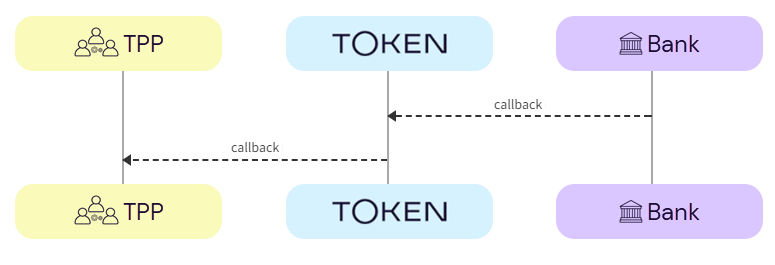
Payment initiation starts from the POST /token-requests/{tokenRequestId}/authorization endpoint with bank authorization, using a given token request ID. If you've redirected the user to the redirect URL provided in the response for the POST /token-requests/{tokenRequestId}/authorization call, the bank will call back to Token.io. Token.io will process the callback and call back to you. The callback parameters normally include the token request ID, but if this is followed by an embedded or decoupled step, additional credential-fields are returned.

In the callback response you may receive:

Callback for redirect authentication flow

The callback for redirect authorisation flow contains the request-id and the request_id. You won't receive any additional credentials.

Example callback for Payments v1 API-only redirect authentication flow

https://tpp.callback.url?request-id=rq:3SVzgJtzu2DvaZSgRGznpdknT3dq:5zKtXEAq&request_id=rq:3SVzgJtzu2DvaZSgRGznpdknT3dq:5zKtXEAq


or in JSON format:

{

    "request-id": "rq:3SVzgJtzu2DvaZSgRGznpdknT3dq:5zKtXEAq",

    "request_id": "rq:3SVzgJtzu2DvaZSgRGznpdknT3dq:5zKtXEAq"

}

After this, you should call GET /token-requests/{tokenRequestId}/result to get the payment authorization result.

If the callback is unsuccessful, a gRPC code is displayed:

Example callback for Payments v1 API-only redirect authentication flow with error

https://tpp.callabck.url?request-id=rq:3SVzgJtzu2DvaZSgRGznpdknT3dq:5zKtXEAq&request_id=rq:3SVzgJtzu2DvaZSgRGznpdknT3dq:5zKtXEAq&trace-id=idm45Ag1X8D8Kvdw&error=14&message=Bank+is+unavailable


or in JSON format:

{

    "request-id": "rq:3SVzgJtzu2DvaZSgRGznpdknT3dq:5zKtXEAq",

    "request_id": "rq:3SVzgJtzu2DvaZSgRGznpdknT3dq:5zKtXEAq"

    "trace-id": "idm45Ag1X8D8Kvdw",

    "error": 14,

    "message": "Bank is unavailable"

}

Callback for embedded authentication flow

If more credentials are required, for example if you're using an embedded authentication flow, additional credentials will be returned in the callback URL in the credential-fields query parameter:

Example callback for Payments v1 API-only embedded authentication flow

https://tpp.callabck.url/?request-id=rq:43hA2P34BC9a1jwYmyjmDYBrTETA:5zKtXEAq&request_id=rq:43hA2P34BC9a1jwYmyjmDYBrTETA:5zKtXEAq
&credential-fields=
eyJmaWVsZHMiOlt7ImRlc2NyaXB0aW9uIjoiT25lLXRpbWUgcGFzc2NvZGUiLCJpZCI6Im90cCJ9XX0


or in JSON format:

{

    "request-id": "rq:43hA2P34BC9a1jwYmyjmDYBrTETA:5zKtXEAq",

    "request_id": "rq:43hA2P34BC9a1jwYmyjmDYBrTETA:5zKtXEAq",

    "credential-fields": "eyJmaWVsZHMiOlt7ImRlc2NyaXB0aW9uIjoiT25lLXRpbWUgcGFzc2NvZGU

iLCJpZCI6Im90cCJ9XX0"

}

In this example, once you base64-decode the value of credential-fields, you'll see:

Example base64-decoded credential-fields for Payments v1 embedded authentication flow

{

    "fields": [

        {

        "description": "One-time passcode",

        "id": "otp"

        }

    ]

}

The decoded credentials have the same structure as credentials returned in the payment initiation response.

Callback for decoupled authentication flow

If a decoupled authentication step is required after the initial redirect callback, additional credentials will be returned in the callback URL in the credential-fields query parameter:

Example callback for Payments v1 API-only decoupled authentication flow

https://tpp.callabck.url/?request-id=rq:3smDYdTPr4gejc9g6MrHFnAAssg8:5zKtXEAq&request_id=rq:3smDYdTPr4gejc9g6MrHFnAAssg8:5zKtXEAq
&credential-fields=
eyJmaWVsZHMiOlt7ImRlc2NyaXB0aW9uIjoiUGxlYXNlLCBhdXRob3JpemUgcGF5bWVudCB1c2luZyBtb2JpbGU
gZGV2aWNlLiIsInR5cGUiOiJERUNPVVBMRUQifV19


or in JSON format:

{

    "request-id": "rq:3smDYdTPr4gejc9g6MrHFnAAssg8:5zKtXEAq",

    "request_id": "rq:3smDYdTPr4gejc9g6MrHFnAAssg8:5zKtXEAq",

    "credential-fields": "eyJmaWVsZHMiOlt7ImRlc2NyaXB0aW9uIjoiUGxlYXNlLCBhdXRob3JpemUgcGF5bWV

udCB1c2luZyBtb2JpbGUgZGV2aWNlLiIsInR5cGUiOiJERUNPVVBMRUQifV19"

}

In this example, once you base64-decode the value of credential-fields, you'll see:

Example base64-decoded credential-fields for Payments v1 decoupled authentication flow

{

    "fields": [

        {

        "description": "Please, authorize payment using mobile device.",

        "type": "DECOUPLED"

        }

    ]

}

Fetching the status of a token request result

To check on whether the final result of a token request is available, call GET /token-requests/{tokenRequestId}/result using the tokenRequestId returned in the response to your original request. This call will return a PENDING status if the result is not available. The status is PROCESSED once the result becomes available. If the request is rejected by the bank, status becomes REJECTED. The status will be EXPIRED if the token request expires before a PROCESSED or REJECTED status is issued by the bank.

When no further activity is detected in the production environment related to an active token request, the request expires after 20 minutes have elapsed.

Recovery flow

The recovery flow should be implemented when the user doesn't return to the redirectUrl specified in the Token.io request after a given amount of time.

For example, due to connectivity issues the user may have completed the transaction and funds may have been transferred, but the user has not been redirected.

Token.io will send webhooks as the payment status changes, regardless of whether or where the user has been redirected, until a final status has been received from the bank.

The end point used in the recovery flow depends on the stage reached in the payment flow.

Recovery using GET a token request result

The GET /token-requests/{tokenRequestId}/result endpoint should be used when the TPP does not receive a callback from Token.io.
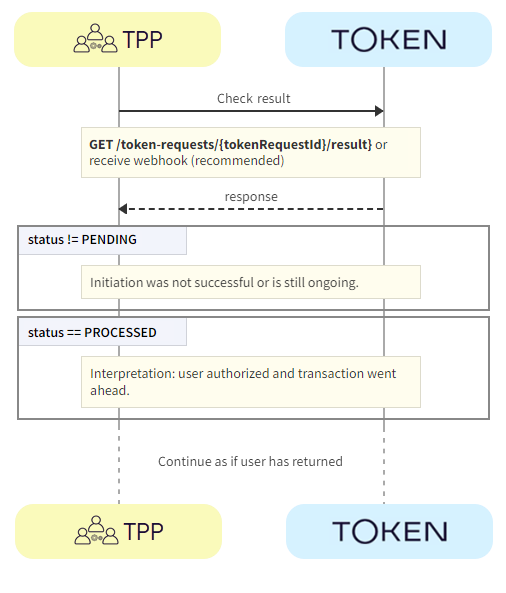
  1. TPP -> Token.io - Using the GET /token-requests/{tokenRequestId}/result endpoint, the TPP checks the status of the payment initiation from Token.io.

  2. Token.io -> TPP - If the payment initiation has been successful, Token.io returns a 200 response. The response may contain:

  • status = PENDING - The result is not yet available and the TPP should wait.

  • status = PROCESSED - The TPP should continue as if the user has returned to the redirect URL specified in the Token.io request.

Recovery using GET a transfer

The GET /transfers/{transferId} endpoint is used if GET /token-requests/{tokenRequestId}/result has been called, and/or no webhook was received in the expected timeframe.
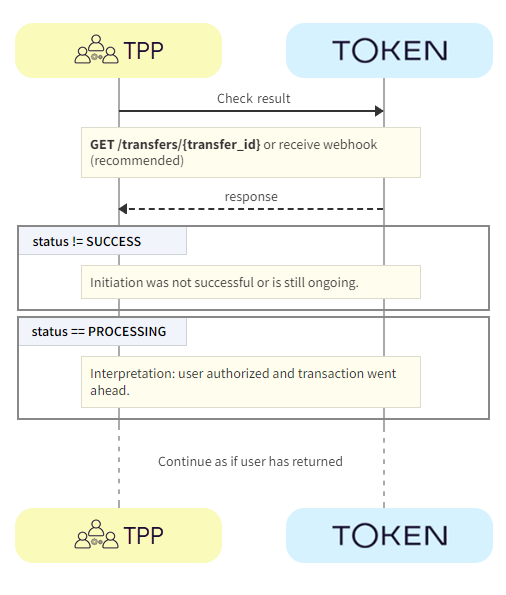
  1. TPP -> Token.io - Using the GET /transfers/{transferId} endpoint, the TPP checks the status of the payment initiation from Token.io.

  2. Token.io -> TPP - If the payment initiation has been successfully processed by the bank, Token.io returns a 200 response. The response may contain:

  • status = PROCESSING - The payment initiation request has been acknowledged by the bank and is now being processed.

  • status = SUCCESS - The payment initiation request has been successfully completed. This does not guarantee that the payment has been settled.

Payment initiation status

The following table describes the possible statuses that can be returned in the status field of the POST /transfers, GET /transfers and GET /transfers/{transferId} endpoints.

Any status you encounter that's not listed in the table has been deprecated. It will be removed in the future.
Please rely only on the statuses specified below.

Payment Initiation Status
Status Description

Final/Intermediate

PROCESSING This status indicates that the transaction is in process and that the final status has not been received from the bank. Intermediate
SUCCESS This status indicates that successful payment initiation has been received from the bank. Settlement might not be complete. Final
INITIATED This status is set when the previous status has remained as PROCESSING for 30 days and cannot be updated. The transaction has been initiated but the result is unknown. This is the final status and will not get updated later because Token.io has stopped polling the bank.
This status is also returned in a two-step flow in the event that a user’s request has been authorized at the bank but the payment confirmation has subsequently failed.”
Final
PENDING This status indicates that the user has successfully completed the authorization process with the bank and the transfer is pending redemption. This status is only relevant for two-step payment flows. Intermediate
PENDING_EXTERNAL_AUTHORIZATION This status indicates that the user has been sent to the bank to complete the authorization process. If not completed within the allowed timeframe (usually around 15 mins, but there are variations between banks) the transaction will expire and transition to FAILURE_EXPIRED. This status is only relevant for one-step payment flows. Intermediate
FAILURE_GENERIC This status usually indicates a technical failure. Possibly, a failure callback was received from the bank, with no transaction status and no further information. Final
FAILURE_PERMISSION_DENIED This status indicates that the user has been denied authorization with the bank This status is only relevant for two-step payment flows. Final
FAILURE_CANCELED This status indicates that the payment initiation has been canceled before execution. Final
FAILURE_EXPIRED This status indicates that the user did not complete the authorization process within the allowed timeframe (usually around 15 mins, but there are variations between banks) and the payment has expired.
Token.io will poll the bank for an authorization response for maximum of 30 minutes. If no response has been received in this time, the transaction will be updated to this status.
Final
FAILURE_INSUFFICIENT_FUNDS This status indicates that the payment initiation request has been rejected due to insufficient funds. Final
FAILURE_DECLINED This status indicates that the payment initiation has been rejected by the bank. Final
SETTLEMENT_IN_PROGRESS This status is provided when a Token.io Settlement account is used as the beneficiary for the payment, and replaces the payment initiation status.
Token.io is waiting for the payment to reach the payee bank. No action is required; await the next step, e.g., Token.io sends a webhook with the status update, or a polling call (GET /transfers/{transferId}).
The status will change to SETTLEMENT_IN_PROGRESS soon after Token.io receives the final status from the debtor bank.
Intermediate
SETTLEMENT_COMPLETED This status is provided when a Token.io Settlement account is used as the beneficiary for the payment, and replaces the payment initiation status.
The payment has reached the payee bank and Token.io has matched the transaction in the TPP’s settlement account to the initiated payment.
For instant payments, SETTLEMENT_COMPLETED will be achieved within 30-45 minutes from payment initiation, at the latest.
For non-instant payments, the time to reach SETTLEMENT_COMPLETED will depend on the clearing period for the payment.
Final
SETTLEMENT_INCOMPLETE This status is provided when a Token.io Settlement account is used as the beneficiary for the payment, and replaces the payment initiation status. Reconciliation has failed. This happens when Token.io doesn't find the corresponding transaction in the TPP's settlement account automatically.
See Settlement status for SEPA and SEPA Instant payments for more information.
Final

Please be aware that Token.io’sSUCCESS status does not guarantee funds transfer. It merely indicates/confirms the success of a payment initiation. SUCCESS means the final status on the bank’s side has been reached, regardless of whether or not this status is shared with Token.io, and there will be no further updates from the bank. For non-instant transfers, TPPs are strongly advised to look at the combination of statuses — Token.io’s status, as well as the final status from the bank — for a risk-based approach; otherwise, TPPs are advised to rely on end-to-end reconciliation for final status confirmation.

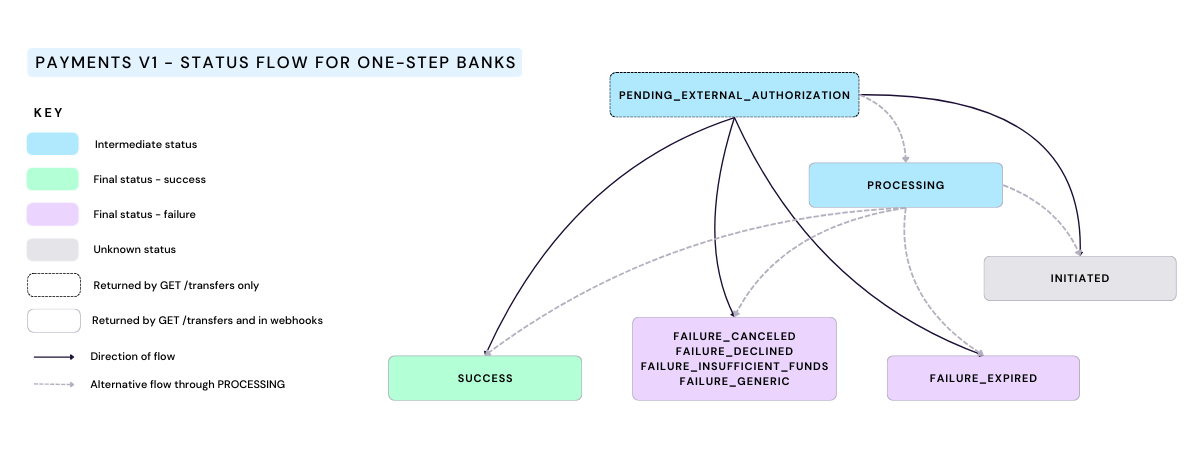
The following diagram shows the flow between payment initiation statuses for one-step banks.
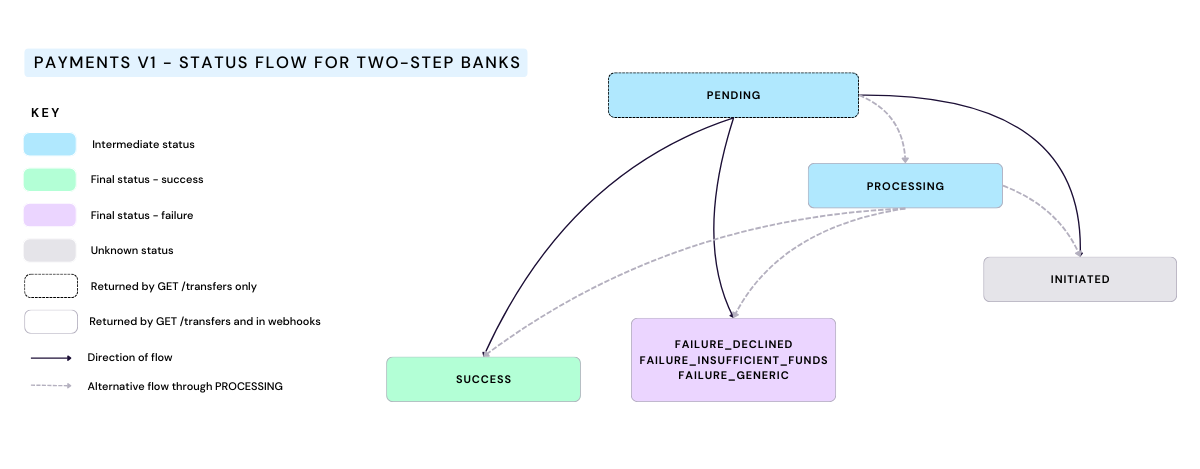
The following diagram shows the flow between payment initiation statuses for two-step banks.
GET payment information for all transfers

To retrieve payment information for multiple payments in one request, TPPs can use the GET /transfers call.

We recommend that this API is used when webhooks are not working as expected. The date range should be restricted to less than one day.

Filtering capabilities allow for retrieving payment details by:

  • a specific set of tokenIds

  • all tokenIds except a specific set of tokenIds

  • boundaries for start and end times of transfers

  • one or more transactionStatus values

  • all transfers that don't have one or more transactionStatus values

  • refId list
  • role, e.g., payer or payee.

  • sub-TPP reference id (actingAsRefId)

  • refund status (transferRefundStatus)

Callback for API-only integration

For the API-only integration callback, the bank calls back to Token.io and Token.io calls back to the TPP - as shown here:

Payment initiation starts from the POST /token-requests/{tokenRequestId}/authorization endpoint with bank authorization, using a given token request ID. If you've redirected the user to the redirect URL provided in the response for the POST /token-requests/{tokenRequestId}/authorization call, the bank will call back to Token.io. Token.io will process the callback and call back to you. The callback parameters normally include the token request ID, but if this is followed by an embedded or decoupled step, additional credential-fields are returned.

In the callback response you may receive:

Callback for redirect authentication flow

The callback for redirect authorisation flow contains the request-id and the request_id. You won't receive any additional credentials.

Example callback for Payments v1 API-only redirect authentication flow

https://tpp.callback.url?request-id=rq:3SVzgJtzu2DvaZSgRGznpdknT3dq:5zKtXEAq&request_id=rq:3SVzgJtzu2DvaZSgRGznpdknT3dq:5zKtXEAq


or in JSON format:

{

    "request-id": "rq:3SVzgJtzu2DvaZSgRGznpdknT3dq:5zKtXEAq",

    "request_id": "rq:3SVzgJtzu2DvaZSgRGznpdknT3dq:5zKtXEAq"

}

After this, you should call GET /token-requests/{tokenRequestId}/result to get the payment authorization result.

If the callback is unsuccessful, a gRPC code is displayed:

Example callback for Payments v1 API-only redirect authentication flow with error

https://tpp.callabck.url?request-id=rq:3SVzgJtzu2DvaZSgRGznpdknT3dq:5zKtXEAq&request_id=rq:3SVzgJtzu2DvaZSgRGznpdknT3dq:5zKtXEAq&trace-id=idm45Ag1X8D8Kvdw&error=14&message=Bank+is+unavailable


or in JSON format:

{

    "request-id": "rq:3SVzgJtzu2DvaZSgRGznpdknT3dq:5zKtXEAq",

    "request_id": "rq:3SVzgJtzu2DvaZSgRGznpdknT3dq:5zKtXEAq"

    "trace-id": "idm45Ag1X8D8Kvdw",

    "error": 14,

    "message": "Bank is unavailable"

}

Callback for embedded authentication flow

If more credentials are required, for example if you're using an embedded authentication flow, additional credentials will be returned in the callback URL in the credential-fields query parameter:

Example callback for Payments v1 API-only embedded authentication flow

https://tpp.callabck.url/?request-id=rq:43hA2P34BC9a1jwYmyjmDYBrTETA:5zKtXEAq&request_id=rq:43hA2P34BC9a1jwYmyjmDYBrTETA:5zKtXEAq
&credential-fields=
eyJmaWVsZHMiOlt7ImRlc2NyaXB0aW9uIjoiT25lLXRpbWUgcGFzc2NvZGUiLCJpZCI6Im90cCJ9XX0


or in JSON format:

{

    "request-id": "rq:43hA2P34BC9a1jwYmyjmDYBrTETA:5zKtXEAq",

    "request_id": "rq:43hA2P34BC9a1jwYmyjmDYBrTETA:5zKtXEAq",

    "credential-fields": "eyJmaWVsZHMiOlt7ImRlc2NyaXB0aW9uIjoiT25lLXRpbWUgcGFzc2NvZGU

iLCJpZCI6Im90cCJ9XX0"

}

In this example, once you base64-decode the value of credential-fields, you'll see:

Example base64-decoded credential-fields for Payments v1 embedded authentication flow

{

    "fields": [

        {

        "description": "One-time passcode",

        "id": "otp"

        }

    ]

}

The decoded credentials have the same structure as credentials returned in the payment initiation response.

Callback for decoupled authentication flow

If a decoupled authentication step is required after the initial redirect callback, additional credentials will be returned in the callback URL in the credential-fields query parameter:

Example callback for Payments v1 API-only decoupled authentication flow

https://tpp.callabck.url/?request-id=rq:3smDYdTPr4gejc9g6MrHFnAAssg8:5zKtXEAq&request_id=rq:3smDYdTPr4gejc9g6MrHFnAAssg8:5zKtXEAq
&credential-fields=
eyJmaWVsZHMiOlt7ImRlc2NyaXB0aW9uIjoiUGxlYXNlLCBhdXRob3JpemUgcGF5bWVudCB1c2luZyBtb2JpbGU
gZGV2aWNlLiIsInR5cGUiOiJERUNPVVBMRUQifV19


or in JSON format:

{

    "request-id": "rq:3smDYdTPr4gejc9g6MrHFnAAssg8:5zKtXEAq",

    "request_id": "rq:3smDYdTPr4gejc9g6MrHFnAAssg8:5zKtXEAq",

    "credential-fields": "eyJmaWVsZHMiOlt7ImRlc2NyaXB0aW9uIjoiUGxlYXNlLCBhdXRob3JpemUgcGF5bWV

udCB1c2luZyBtb2JpbGUgZGV2aWNlLiIsInR5cGUiOiJERUNPVVBMRUQifV19"

}

In this example, once you base64-decode the value of credential-fields, you'll see:

Example base64-decoded credential-fields for Payments v1 decoupled authentication flow

{

    "fields": [

        {

        "description": "Please, authorize payment using mobile device.",

        "type": "DECOUPLED"

        }

    ]

}

Fetching the status of a token request result

To check on whether the final result of a token request is available, call GET /token-requests/{tokenRequestId}/result using the tokenRequestId returned in the response to your original request. This call will return a PENDING status if the result is not available. The status is PROCESSED once the result becomes available. If the request is rejected by the bank, status becomes REJECTED. The status will be EXPIRED if the token request expires before a PROCESSED or REJECTED status is issued by the bank.

When no further activity is detected in the production environment related to an active token request, the request expires after 20 minutes have elapsed.

Recovery flow

The recovery flow should be implemented when the user doesn't return to the redirectUrl specified in the Token.io request after a given amount of time.

For example, due to connectivity issues the user may have completed the transaction and funds may have been transferred, but the user has not been redirected.

Token.io will send webhooks as the payment status changes, regardless of whether or where the user has been redirected, until a final status has been received from the bank.

The end point used in the recovery flow depends on the stage reached in the payment flow.

Recovery using GET a token request result

The GET /token-requests/{tokenRequestId}/result endpoint should be used when the TPP does not receive a callback from Token.io.

  1. TPP -> Token.io - Using the GET /token-requests/{tokenRequestId}/result endpoint, the TPP checks the status of the payment initiation from Token.io.

  2. Token.io -> TPP - If the payment initiation has been successful, Token.io returns a 200 response. The response may contain:

  • status = PENDING - The result is not yet available and the TPP should wait.

  • status = PROCESSED - The TPP should continue as if the user has returned to the redirect URL specified in the Token.io request.

Recovery using GET a transfer

The GET /transfers/{transferId} endpoint is used if GET /token-requests/{tokenRequestId}/result has been called, and/or no webhook was received in the expected timeframe.

  1. TPP -> Token.io - Using the GET /transfers/{transferId} endpoint, the TPP checks the status of the payment initiation from Token.io.

  2. Token.io -> TPP - If the payment initiation has been successfully processed by the bank, Token.io returns a 200 response. The response may contain:

  • status = PROCESSING - The payment initiation request has been acknowledged by the bank and is now being processed.

  • status = SUCCESS - The payment initiation request has been successfully completed. This does not guarantee that the payment has been settled.

Payment initiation status

The following table describes the possible statuses that can be returned in the status field of the POST /transfers, GET /transfers and GET /transfers/{transferId} endpoints.

Any status you encounter that's not listed in the table has been deprecated. It will be removed in the future.
Please rely only on the statuses specified below.

Payment Initiation Status
Status Description

Final/Intermediate

PROCESSING This status indicates that the transaction is in process and that the final status has not been received from the bank. Intermediate
SUCCESS This status indicates that successful payment initiation has been received from the bank. Settlement might not be complete. Final
INITIATED This status is set when the previous status has remained as PROCESSING for 30 days and cannot be updated. The transaction has been initiated but the result is unknown. This is the final status and will not get updated later because Token.io has stopped polling the bank.
This status is also returned in a two-step flow in the event that a user’s request has been authorized at the bank but the payment confirmation has subsequently failed.”
Final
PENDING This status indicates that the user has successfully completed the authorization process with the bank and the transfer is pending redemption. This status is only relevant for two-step payment flows. Intermediate
PENDING_EXTERNAL_AUTHORIZATION This status indicates that the user has been sent to the bank to complete the authorization process. If not completed within the allowed timeframe (usually around 15 mins, but there are variations between banks) the transaction will expire and transition to FAILURE_EXPIRED. This status is only relevant for one-step payment flows. Intermediate
FAILURE_GENERIC This status usually indicates a technical failure. Possibly, a failure callback was received from the bank, with no transaction status and no further information. Final
FAILURE_PERMISSION_DENIED This status indicates that the user has been denied authorization with the bank This status is only relevant for two-step payment flows. Final
FAILURE_CANCELED This status indicates that the payment initiation has been canceled before execution. Final
FAILURE_EXPIRED This status indicates that the user did not complete the authorization process within the allowed timeframe (usually around 15 mins, but there are variations between banks) and the payment has expired.
Token.io will poll the bank for an authorization response for maximum of 30 minutes. If no response has been received in this time, the transaction will be updated to this status.
Final
FAILURE_INSUFFICIENT_FUNDS This status indicates that the payment initiation request has been rejected due to insufficient funds. Final
FAILURE_DECLINED This status indicates that the payment initiation has been rejected by the bank. Final
SETTLEMENT_IN_PROGRESS This status is provided when a Token.io Settlement account is used as the beneficiary for the payment, and replaces the payment initiation status.
Token.io is waiting for the payment to reach the payee bank. No action is required; await the next step, e.g., Token.io sends a webhook with the status update, or a polling call (GET /transfers/{transferId}).
The status will change to SETTLEMENT_IN_PROGRESS soon after Token.io receives the final status from the debtor bank.
Intermediate
SETTLEMENT_COMPLETED This status is provided when a Token.io Settlement account is used as the beneficiary for the payment, and replaces the payment initiation status.
The payment has reached the payee bank and Token.io has matched the transaction in the TPP’s settlement account to the initiated payment.
For instant payments, SETTLEMENT_COMPLETED will be achieved within 30-45 minutes from payment initiation, at the latest.
For non-instant payments, the time to reach SETTLEMENT_COMPLETED will depend on the clearing period for the payment.
Final
SETTLEMENT_INCOMPLETE This status is provided when a Token.io Settlement account is used as the beneficiary for the payment, and replaces the payment initiation status. Reconciliation has failed. This happens when Token.io doesn't find the corresponding transaction in the TPP's settlement account automatically.
See Settlement status for SEPA and SEPA Instant payments for more information.
Final

Please be aware that Token.io’sSUCCESS status does not guarantee funds transfer. It merely indicates/confirms the success of a payment initiation. SUCCESS means the final status on the bank’s side has been reached, regardless of whether or not this status is shared with Token.io, and there will be no further updates from the bank. For non-instant transfers, TPPs are strongly advised to look at the combination of statuses — Token.io’s status, as well as the final status from the bank — for a risk-based approach; otherwise, TPPs are advised to rely on end-to-end reconciliation for final status confirmation.

The following diagram shows the flow between payment initiation statuses for one-step banks.

The following diagram shows the flow between payment initiation statuses for two-step banks.

GET payment information for all transfers

To retrieve payment information for multiple payments in one request, TPPs can use the GET /transfers call.

We recommend that this API is used when webhooks are not working as expected. The date range should be restricted to less than one day.

Filtering capabilities allow for retrieving payment details by:

  • a specific set of tokenIds

  • all tokenIds except a specific set of tokenIds

  • boundaries for start and end times of transfers

  • one or more transactionStatus values

  • all transfers that don't have one or more transactionStatus values

  • refId list
  • role, e.g., payer or payee.

  • sub-TPP reference id (actingAsRefId)

  • refund status (transferRefundStatus)

Callback for API-only integration

For the API-only integration callback, the bank calls back to Token.io and Token.io calls back to the TPP - as shown here:

Payment initiation starts from the POST /token-requests/{tokenRequestId}/authorization endpoint with bank authorization, using a given token request ID. If you've redirected the user to the redirect URL provided in the response for the POST /token-requests/{tokenRequestId}/authorization call, the bank will call back to Token.io. Token.io will process the callback and call back to you. The callback parameters normally include the token request ID, but if this is followed by an embedded or decoupled step, additional credential-fields are returned.

In the callback response you may receive:

Callback for redirect authentication flow

The callback for redirect authorisation flow contains the request-id and the request_id. You won't receive any additional credentials.

Example callback for Payments v1 API-only redirect authentication flow

https://tpp.callback.url?request-id=rq:3SVzgJtzu2DvaZSgRGznpdknT3dq:5zKtXEAq&request_id=rq:3SVzgJtzu2DvaZSgRGznpdknT3dq:5zKtXEAq


or in JSON format:

{

    "request-id": "rq:3SVzgJtzu2DvaZSgRGznpdknT3dq:5zKtXEAq",

    "request_id": "rq:3SVzgJtzu2DvaZSgRGznpdknT3dq:5zKtXEAq"

}

After this, you should call GET /token-requests/{tokenRequestId}/result to get the payment authorization result.

If the callback is unsuccessful, a gRPC code is displayed:

Example callback for Payments v1 API-only redirect authentication flow with error

https://tpp.callabck.url?request-id=rq:3SVzgJtzu2DvaZSgRGznpdknT3dq:5zKtXEAq&request_id=rq:3SVzgJtzu2DvaZSgRGznpdknT3dq:5zKtXEAq&trace-id=idm45Ag1X8D8Kvdw&error=14&message=Bank+is+unavailable


or in JSON format:

{

    "request-id": "rq:3SVzgJtzu2DvaZSgRGznpdknT3dq:5zKtXEAq",

    "request_id": "rq:3SVzgJtzu2DvaZSgRGznpdknT3dq:5zKtXEAq"

    "trace-id": "idm45Ag1X8D8Kvdw",

    "error": 14,

    "message": "Bank is unavailable"

}

Callback for embedded authentication flow

If more credentials are required, for example if you're using an embedded authentication flow, additional credentials will be returned in the callback URL in the credential-fields query parameter:

Example callback for Payments v1 API-only embedded authentication flow

https://tpp.callabck.url/?request-id=rq:43hA2P34BC9a1jwYmyjmDYBrTETA:5zKtXEAq&request_id=rq:43hA2P34BC9a1jwYmyjmDYBrTETA:5zKtXEAq
&credential-fields=
eyJmaWVsZHMiOlt7ImRlc2NyaXB0aW9uIjoiT25lLXRpbWUgcGFzc2NvZGUiLCJpZCI6Im90cCJ9XX0


or in JSON format:

{

    "request-id": "rq:43hA2P34BC9a1jwYmyjmDYBrTETA:5zKtXEAq",

    "request_id": "rq:43hA2P34BC9a1jwYmyjmDYBrTETA:5zKtXEAq",

    "credential-fields": "eyJmaWVsZHMiOlt7ImRlc2NyaXB0aW9uIjoiT25lLXRpbWUgcGFzc2NvZGU

iLCJpZCI6Im90cCJ9XX0"

}

In this example, once you base64-decode the value of credential-fields, you'll see:

Example base64-decoded credential-fields for Payments v1 embedded authentication flow

{

    "fields": [

        {

        "description": "One-time passcode",

        "id": "otp"

        }

    ]

}

The decoded credentials have the same structure as credentials returned in the payment initiation response.

Callback for decoupled authentication flow

If a decoupled authentication step is required after the initial redirect callback, additional credentials will be returned in the callback URL in the credential-fields query parameter:

Example callback for Payments v1 API-only decoupled authentication flow

https://tpp.callabck.url/?request-id=rq:3smDYdTPr4gejc9g6MrHFnAAssg8:5zKtXEAq&request_id=rq:3smDYdTPr4gejc9g6MrHFnAAssg8:5zKtXEAq
&credential-fields=
eyJmaWVsZHMiOlt7ImRlc2NyaXB0aW9uIjoiUGxlYXNlLCBhdXRob3JpemUgcGF5bWVudCB1c2luZyBtb2JpbGU
gZGV2aWNlLiIsInR5cGUiOiJERUNPVVBMRUQifV19


or in JSON format:

{

    "request-id": "rq:3smDYdTPr4gejc9g6MrHFnAAssg8:5zKtXEAq",

    "request_id": "rq:3smDYdTPr4gejc9g6MrHFnAAssg8:5zKtXEAq",

    "credential-fields": "eyJmaWVsZHMiOlt7ImRlc2NyaXB0aW9uIjoiUGxlYXNlLCBhdXRob3JpemUgcGF5bWV

udCB1c2luZyBtb2JpbGUgZGV2aWNlLiIsInR5cGUiOiJERUNPVVBMRUQifV19"

}

In this example, once you base64-decode the value of credential-fields, you'll see:

Example base64-decoded credential-fields for Payments v1 decoupled authentication flow

{

    "fields": [

        {

        "description": "Please, authorize payment using mobile device.",

        "type": "DECOUPLED"

        }

    ]

}

Fetching the status of a token request result

To check on whether the final result of a token request is available, call GET /token-requests/{tokenRequestId}/result using the tokenRequestId returned in the response to your original request. This call will return a PENDING status if the result is not available. The status is PROCESSED once the result becomes available. If the request is rejected by the bank, status becomes REJECTED. The status will be EXPIRED if the token request expires before a PROCESSED or REJECTED status is issued by the bank.

When no further activity is detected in the production environment related to an active token request, the request expires after 20 minutes have elapsed.

Recovery flow

The recovery flow should be implemented when the user doesn't return to the redirectUrl specified in the Token.io request after a given amount of time.

For example, due to connectivity issues the user may have completed the transaction and funds may have been transferred, but the user has not been redirected.

Token.io will send webhooks as the payment status changes, regardless of whether or where the user has been redirected, until a final status has been received from the bank.

The end point used in the recovery flow depends on the stage reached in the payment flow.

Recovery using GET a token request result

The GET /token-requests/{tokenRequestId}/result endpoint should be used when the TPP does not receive a callback from Token.io.

  1. TPP -> Token.io - Using the GET /token-requests/{tokenRequestId}/result endpoint, the TPP checks the status of the payment initiation from Token.io.

  2. Token.io -> TPP - If the payment initiation has been successful, Token.io returns a 200 response. The response may contain:

  • status = PENDING - The result is not yet available and the TPP should wait.

  • status = PROCESSED - The TPP should continue as if the user has returned to the redirect URL specified in the Token.io request.

Recovery using GET a transfer

The GET /transfers/{transferId} endpoint is used if GET /token-requests/{tokenRequestId}/result has been called, and/or no webhook was received in the expected timeframe.

  1. TPP -> Token.io - Using the GET /transfers/{transferId} endpoint, the TPP checks the status of the payment initiation from Token.io.

  2. Token.io -> TPP - If the payment initiation has been successfully processed by the bank, Token.io returns a 200 response. The response may contain:

  • status = PROCESSING - The payment initiation request has been acknowledged by the bank and is now being processed.

  • status = SUCCESS - The payment initiation request has been successfully completed. This does not guarantee that the payment has been settled.

Payment initiation status

The following table describes the possible statuses that can be returned in the status field of the POST /transfers, GET /transfers and GET /transfers/{transferId} endpoints.

Any status you encounter that's not listed in the table has been deprecated. It will be removed in the future.
Please rely only on the statuses specified below.

Payment Initiation Status
Status Description

Final/Intermediate

PROCESSING This status indicates that the transaction is in process and that the final status has not been received from the bank. Intermediate
SUCCESS This status indicates that successful payment initiation has been received from the bank. Settlement might not be complete. Final
INITIATED This status is set when the previous status has remained as PROCESSING for 30 days and cannot be updated. The transaction has been initiated but the result is unknown. This is the final status and will not get updated later because Token.io has stopped polling the bank.
This status is also returned in a two-step flow in the event that a user’s request has been authorized at the bank but the payment confirmation has subsequently failed.”
Final
PENDING This status indicates that the user has successfully completed the authorization process with the bank and the transfer is pending redemption. This status is only relevant for two-step payment flows. Intermediate
PENDING_EXTERNAL_AUTHORIZATION This status indicates that the user has been sent to the bank to complete the authorization process. If not completed within the allowed timeframe (usually around 15 mins, but there are variations between banks) the transaction will expire and transition to FAILURE_EXPIRED. This status is only relevant for one-step payment flows. Intermediate
FAILURE_GENERIC This status usually indicates a technical failure. Possibly, a failure callback was received from the bank, with no transaction status and no further information. Final
FAILURE_PERMISSION_DENIED This status indicates that the user has been denied authorization with the bank This status is only relevant for two-step payment flows. Final
FAILURE_CANCELED This status indicates that the payment initiation has been canceled before execution. Final
FAILURE_EXPIRED This status indicates that the user did not complete the authorization process within the allowed timeframe (usually around 15 mins, but there are variations between banks) and the payment has expired.
Token.io will poll the bank for an authorization response for maximum of 30 minutes. If no response has been received in this time, the transaction will be updated to this status.
Final
FAILURE_INSUFFICIENT_FUNDS This status indicates that the payment initiation request has been rejected due to insufficient funds. Final
FAILURE_DECLINED This status indicates that the payment initiation has been rejected by the bank. Final
SETTLEMENT_IN_PROGRESS This status is provided when a Token.io Settlement account is used as the beneficiary for the payment, and replaces the payment initiation status.
Token.io is waiting for the payment to reach the payee bank. No action is required; await the next step, e.g., Token.io sends a webhook with the status update, or a polling call (GET /transfers/{transferId}).
The status will change to SETTLEMENT_IN_PROGRESS soon after Token.io receives the final status from the debtor bank.
Intermediate
SETTLEMENT_COMPLETED This status is provided when a Token.io Settlement account is used as the beneficiary for the payment, and replaces the payment initiation status.
The payment has reached the payee bank and Token.io has matched the transaction in the TPP’s settlement account to the initiated payment.
For instant payments, SETTLEMENT_COMPLETED will be achieved within 30-45 minutes from payment initiation, at the latest.
For non-instant payments, the time to reach SETTLEMENT_COMPLETED will depend on the clearing period for the payment.
Final
SETTLEMENT_INCOMPLETE This status is provided when a Token.io Settlement account is used as the beneficiary for the payment, and replaces the payment initiation status. Reconciliation has failed. This happens when Token.io doesn't find the corresponding transaction in the TPP's settlement account automatically.
See Settlement status for SEPA and SEPA Instant payments for more information.
Final

Please be aware that Token.io’sSUCCESS status does not guarantee funds transfer. It merely indicates/confirms the success of a payment initiation. SUCCESS means the final status on the bank’s side has been reached, regardless of whether or not this status is shared with Token.io, and there will be no further updates from the bank. For non-instant transfers, TPPs are strongly advised to look at the combination of statuses — Token.io’s status, as well as the final status from the bank — for a risk-based approach; otherwise, TPPs are advised to rely on end-to-end reconciliation for final status confirmation.

The following diagram shows the flow between payment initiation statuses for one-step banks.

The following diagram shows the flow between payment initiation statuses for two-step banks.

GET payment information for all transfers

To retrieve payment information for multiple payments in one request, TPPs can use the GET /transfers call.

We recommend that this API is used when webhooks are not working as expected. The date range should be restricted to less than one day.

Filtering capabilities allow for retrieving payment details by:

  • a specific set of tokenIds

  • all tokenIds except a specific set of tokenIds

  • boundaries for start and end times of transfers

  • one or more transactionStatus values

  • all transfers that don't have one or more transactionStatus values

  • refId list
  • role, e.g., payer or payee.

  • sub-TPP reference id (actingAsRefId)

  • refund status (transferRefundStatus)


If you have any feedback about the developer documentation, please contact devdocs@token.io

© 2025 TOKEN, INC.     ALL RIGHTS RESERVED.