Variable Recurring Payments (VRP)

Variable Recurring Payments (VRP) enable a user to grant long-held consents to Payment Initiation Service Providers (PISP) to initiate future payments from users' bank accounts without users needing to authenticate each payment with the bank. VRP facilitates innovation in payment experiences, the creation of new types of financial services, and greater levels of consumer transparency and control. VRP should not be seen as a use case but rather as the underlying technical functionality upon which use cases can be developed. For more details on the experiences that can be enabled by VRP, see our blog post, Bringing the benefits of Variable Recurring Payments to life.

Token.io's VRP functionality consists of two main parts:

  • Consent set up - establishment of the long-held consent to allow a TPP to initiate payments on behalf of the user with a set of control parameters.

  • Payment initiation - initiation of a variable recurring payment adhering to the control parameters of the approved consent.

Token.io's API supports capabilities covering the end-to-end management, execution and monitoring of variable recurring payments. In addition, Token.io offers an out-of-the-box user experience to TPPs to help setup and initiate VRP payments.

The Token.io API supports the VRP OBIE 3.1.10 specification.

Sweeping and commercial VRP

Token.io supports both sweeping and commercial (also known as non-sweeping) VRP. As it stands today, there is no technical distinction between sweeping and commercial VRP; the distinction therefore relates not to what the service is, but rather what it is used for.

Sweeping

Sweeping VRP is defined as the movement of a user's own funds between the user's own accounts.

The OBIE VRP Proposition defines VRP transactions as 'sweeping', on a high level, when they meet the following criteria:

  1. The source account needs to be a current account

  2. The destination account is an account into which a domestic payment can be made by the payer’s bank’s direct channel, e.g., savings account, another current account, credit card repayment

  3. The transaction is between two accounts belonging to the same person or legal entity (“me-to-me”).

Further clarifications on what constitutes a sweeping use case can be sought in the OBIE VRP Proposition, the CMA’s March 2022 letter to the OBIE and the Q&As document published in July 2022. Please engage with your Token.io point of contact should you need any support in understanding whether your use case is sweeping or commercial VRP.

Examples of key sweeping VRP use cases include:

  • Automated (regular and scheduled) top-ups to savings and current accounts.

  • One-click top-ups to savings and current accounts.

  • Automated (regular and scheduled) repayments for credit cards.

  • One-click repayments for credit cards.

Commercial

Commercial VRP refers to any use of VRP functionality that lies outside the definition of sweeping. This can manifest itself in two ways:

  • Me-to-me transfer - where the source and destination accounts belong to the same person or legal entity, but where the destination account is a type of account that does not have the features of a current account or is not used as an alternative to a traditional current account

  • Me-to-them transfer - where the source and destination accounts do not belong to the same person or legal entity. This use of VRP is often for the purpose of paying for goods or services

Examples of commercial VRP use cases include:

  • One-click ecommerce purchases.

  • Recurring payments (e.g., utility bill payments, subscription payments, government payments).

  • Account top-ups (e.g., transfer of funds to an investment account, transfer of funds to any other account that can have a balance, like a mobile phone pay-as-you-go account).

VRP consent set up

VRP requires a one-time bank authentication and authorization that defines the parameters within which future transactions can be initiated without authentication. These parameters can include end date, maximum aggregate amount per period (e.g., month) and maximum amount per individual transaction.

This consent may be set up using either:

  • the Hosted Pages (HP) integration - the TPP uses Token.io's HP to display the parameters of the VRP consent setup.

See Hosted Pages v2 and Hosted Pages v1 for more information on how to implement the Hosted Pages for VRP.

  • the API-only integration - the TPP owns the user experience for VRP consent set up.

The user may revoke consent with the bank at any time via the TPP.

Hosted Pages (HP) integration

This section describes the integration where the TPP uses Token.io's HP for all or some of the steps in the user journey for setting up VRP consent.

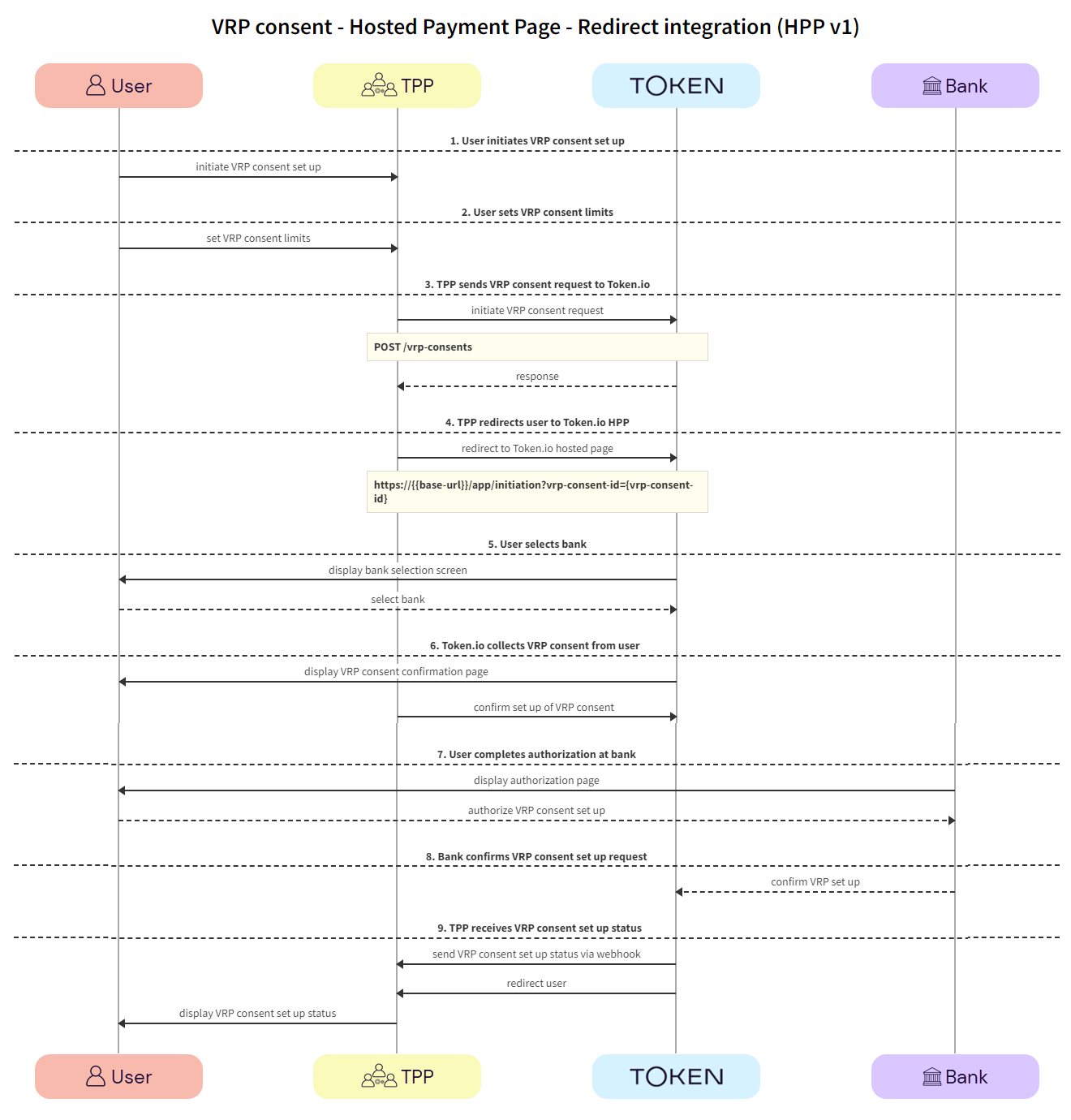
Click the image on the right to view a simplified swim lane diagram of the integration flow.

Details of the steps within the integration flow are shown below.

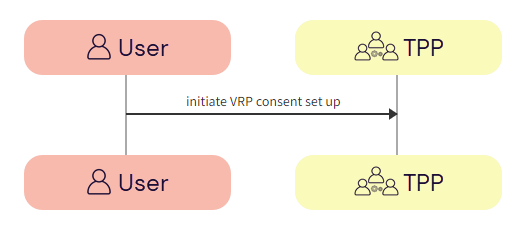
  1. User initiates VRP consent set up

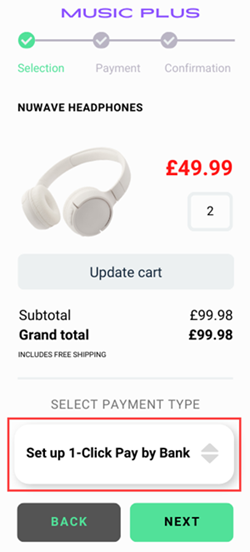
The user initiates the VRP consent set up with the TPP.

  1. User -> TPP - The user initiates a request to the TPP to grant consent for VRP. The initiation of consent uses the TPP's interface.

  1. User sets VRP consent limits

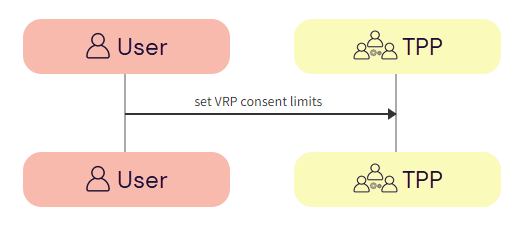
The user sets the limits of the VRP consent with the TPP.

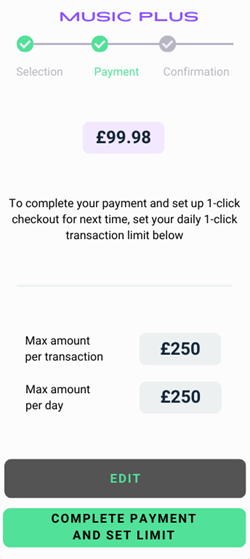
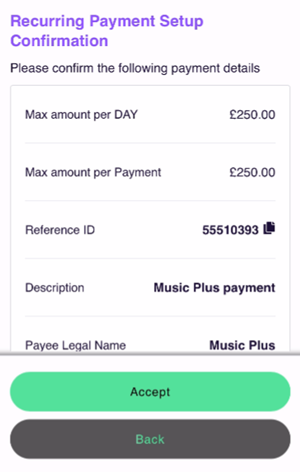
  1. User -> TPP - The user sets the limits of the VRP consent with the TPP. This is usually a maximum amount per transaction and a maximum amount per day.

  1. TPP sends VRP consent request to Token.io

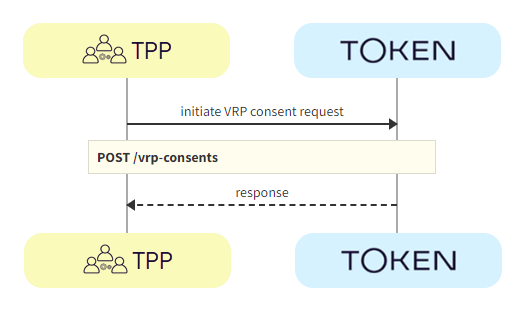
The TPP initiates the consent request with Token.io using the POST /vrp-consents call.

  1. TPP -> Token.io - The TPP initiates the consent request with Token.io, including the instruction details, using the POST /vrp-consents call.

  1. Token.io -> TPP - Token.io confirms receipt of the request from the TPP, which includes a VRP consent id in the response.

  1. TPP redirects user to Token.io HP

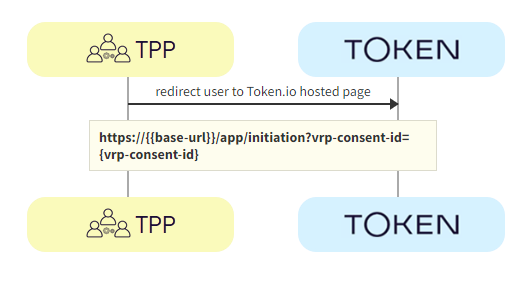
The TPP redirects the user to Token.io's HP for payment consent confirmation.

  1. TPP -> Token.io - The TPP redirects the user to the Token.io HP at https://{{base-url}}/app/initiation?vrp-consent-id={vrp-consent-id}.

    See Hosted Pages for details on how to construct the redirect URL.

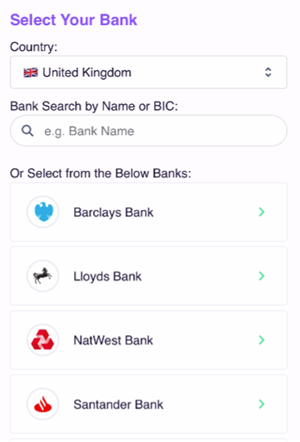
  1. User selects bank

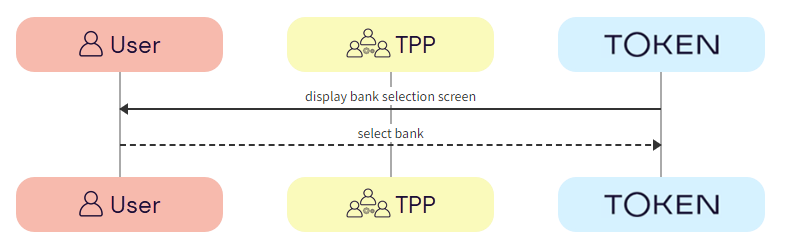
The user selects the bank from the Token.io HP.

  1. Token.io -> User - Token.io displays the bank selection screen.

We recommend using the countries parameter in the request here, which can be used to pre-populate the Country field.

  1. User -> Token.io - The user selects the bank.

  1. Token.io collects VRP consent from user

Token.io collects VRP consent from the user.

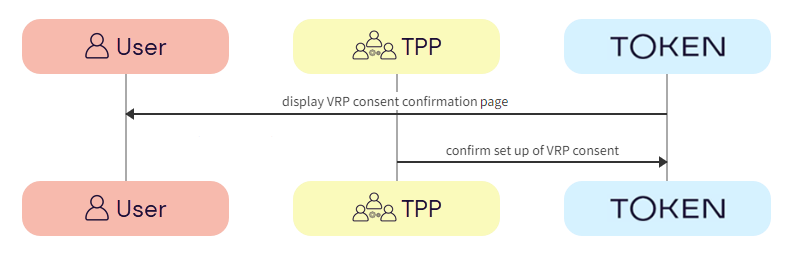
  1. Token.io -> User - Token.io displays the VRP consent confirmation page to the user.

  2. TPP -> Token.io - The TPP confirms consent with Token.io.

  1. User completes authorization with bank

The user completes authorization with the bank using the appropriate method; redirect, embedded or decoupled.

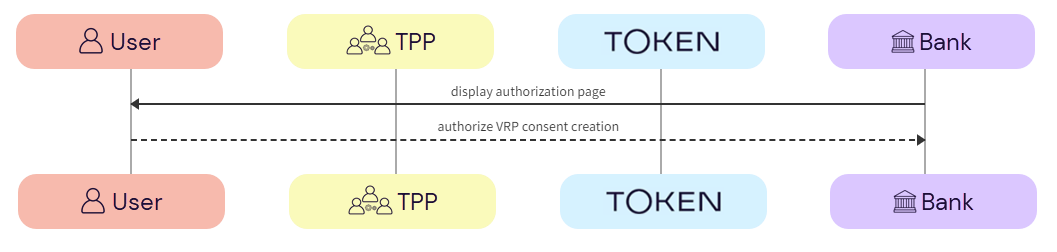
  1. Bank -> User - The bank displays the authorization page to the user.

  2. User -> Bank - The user authorizes the VRP consent creation with the bank.

  1. Bank confirms VRP consent set up request

The bank confirms that the VRP consent has been created.

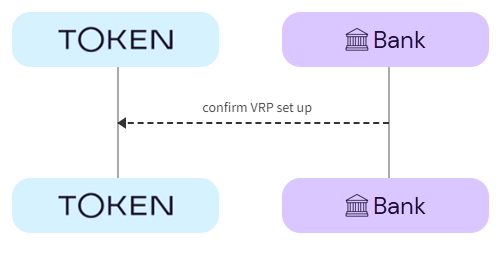
  1. Bank -> Token.io - The bank confirms with Token.io that the VRP consent has been created.

  1. TPP receives VRP consent set up status

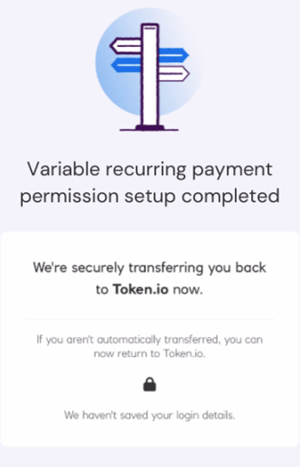
The TPP receives the confirmation that the VRP consent has been set up successfully and displays this to the user.

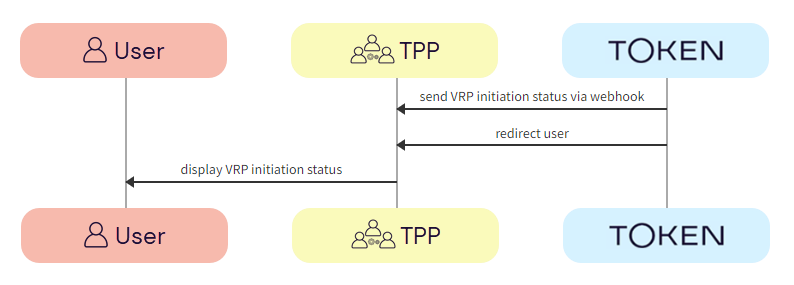
  1. Token.io -> TPP - Token.io sends the VRP consent status to the TPP in a webhook.

    If you're subscribed to webhooks, Token.io sends the consent status in a webhook every time a VRP consent is created or updated.

    See Webhooks for an example webhook notification.

  1. Token.io -> TPP - Token.io redirects the user to the TPP.

  2. TPP -> User - The TPP displays the VRP consent set up status to the user.

    If the consent set up request is successful, the status will be AUTHORIZED.

See HTTP errors for information on HTTP error status codes.

API-only integration

This section describes setting up VRP consent parameters using Token.io's API.

See Bank selection for information on selecting banks, mandatory fields, authentication models and supported payment rails for API-only integration.

See the Token.io API reference for details of the following endpoints:

Then use our Launchpad to test them.

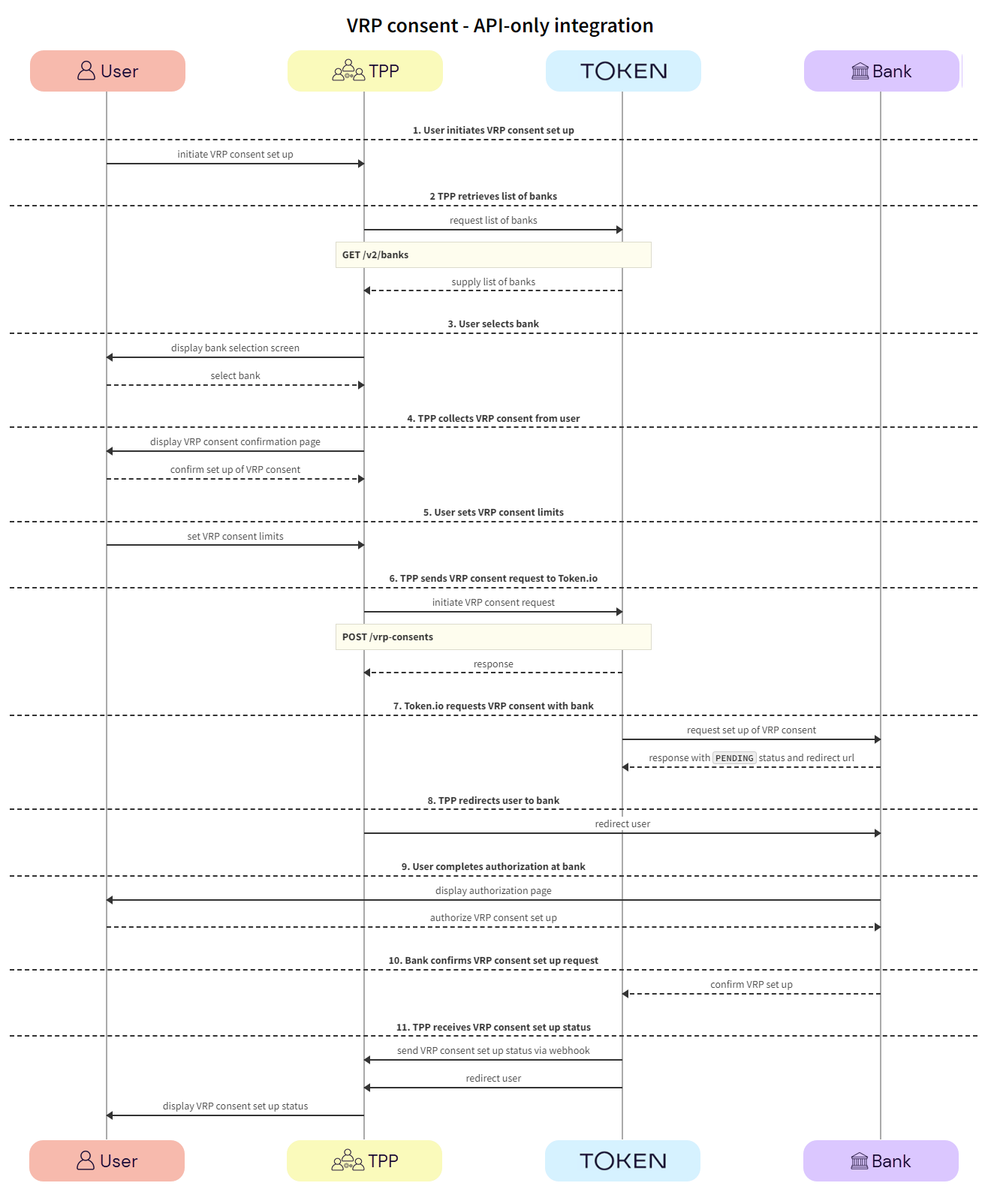
Click the image on the right to view a simplified swim lane diagram of the integration flow.

Details of the steps within the integration flow are shown below.

  1. User initiates VRP consent set up

The user initiates the VRP consent set up with the TPP.

  1. User -> TPP - The user initiates a request to the TPP to grant consent for VRP.

  1. TPP retrieves list of banks

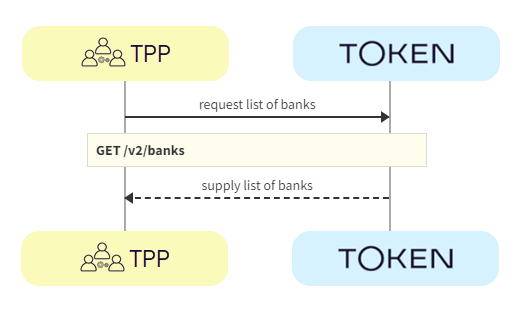
TPPs retrieve the list of available banks using the GET v2/banks call.

We recommend that this step is performed once daily, outside any VRP initiation, e.g., at 11pm UTC, and that the result is cached.

In the GET v2/banks request, there are numerous filtering criteria you can add as parameters to narrow your query. As a minimum, you should filter by your member ID.

See Mandatory fields for information on which fields must be provided for a given bank to accept a VRP initiation request.

  1. TPP -> Token.io - The TPP requests the list of banks from Token.io.

  1. Token.io -> TPP - Token.io supplies the list of banks to the TPP.

  1. User selects bank

The user selects the bank.

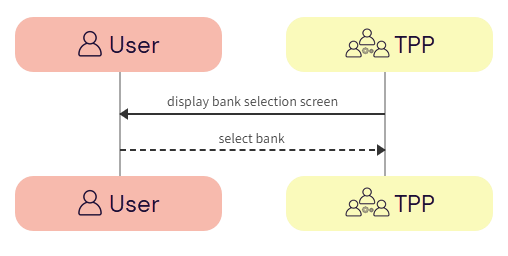
  1. TPP -> User - The TPP displays the bank selection screen.

  1. User -> TPP - The user selects the bank.

  1. TPP collects VRP consent from user

TPP collects VRP consent from the user.

  1. TPP -> User - TPP displays the VRP consent confirmation page to the user.

  2. User -> TPP - The user confirms the set up of the VRP consent with the TPP.

  1. User sets VRP consent limits

The user sets the limits of the VRP consent with the TPP.

  1. User -> TPP - The user sets the limits of the VRP consent with the TPP. This is usually a maximum amount per transaction and a maximum amount per day.

  1. TPP sends VRP consent request to Token.io

The TPP initiates the consent request with Token.io using the POST /vrp-consents call.

  1. TPP -> Token.io - The TPP initiates the consent request with Token.io, including the instruction details, using the POST /vrp-consents call.

  1. Token.io -> TPP - Token.io confirms receipt of the request from the TPP.

  1. Token.io requests VRP consent with bank

Token.io requests the creation of the VRP consent with the bank.

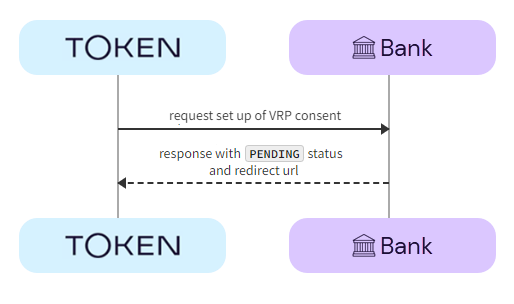
  1. Token.io -> Bank - Token.io requests permission to set up the VRP consent with the user's bank.

  1. Bank -> Token.io - The bank returns the consent with a PENDING status and a redirect URL.

  1. TPP redirects user to bank

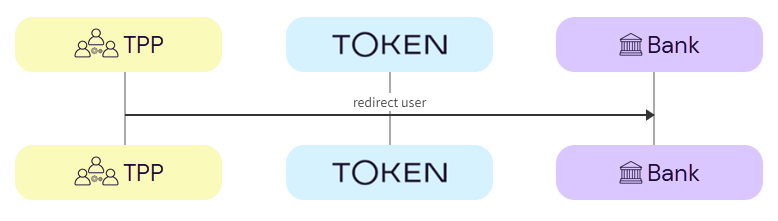
The TPP redirects the user to the bank for payment consent confirmation.

  1. TPP -> Bank - The TPP redirects the user to the bank to confirm the payment consent, using the redirectUrl.

  1. User completes authorization with bank

The user completes authorization with the bank using the appropriate method; redirect, embedded or decoupled.

  1. Bank -> User - The bank displays the authorization page to the user.

  2. User -> Bank - The user authorizes the VRP consent creation with the bank.

  1. Bank confirms VRP consent set up request

The bank confirms that the VRP consent has been created.

  1. Bank -> Token.io - The bank confirms with Token.io that the VRP consent has been created.

  1. TPP receives VRP consent set up status

The TPP receives the confirmation that the VRP consent has been set up successfully and displays this to the user.

  1. Token.io -> TPP - Token.io sends the VRP consent status to the TPP in a webhook.

    If you're subscribed to webhooks, Token.io sends the consent status in a webhook every time a VRP consent is created or updated.

    See Webhooks for an example webhook notification.

  1. Token.io -> TPP - Token.io redirects the user to the TPP.

  2. TPP -> User - The TPP displays the VRP consent set up status to the user.

    If the consent set up request is successful, the status will be AUTHORIZED.

See HTTP errors for information on HTTP error status codes.

VRP consent status

The following table describes the possible statuses that can be returned in the status field of the POST /vrp-consents, GET /vrp-consents and GET /vrp-consents/{id} endpoints.

VRP consent statuses
Status Description
AUTHORIZED The VRP consent setup request has been authorized by the bank.
PENDING The VRP consent setup request has passed Token.io's validation. If you are using HP and the VRP confirmation page is turned on, the VRP setup success page will be shown with status set as PENDING.
PENDING_MORE_INFO The VRP consent setup request lacks mandatory fields (e.g., bankId) that have to be collected before connecting to the bank. If you are using HP, Token.io may be waiting for the user to enter the required information. If you are not using HP, this is a non-recoverable state and you must populate the required information in a new POST /vrp-consents call.
PENDING_REDIRECT_AUTH The VRP consent setup request has been acknowledged by the bank and Token.io is awaiting user confirmation at the bank's page. If HP is in use and the VRP confirmation page is turned on, the VRP setup success page will be shown with status set as PENDING.
PENDING_REDIRECT_AUTH_VERIFICATION Token.io has received the bank callback information and is currently verifying it with the bank. If you are using HP and the VRP confirmation page is turned on, the VRP setup success page will be shown with status set as PENDING.
REJECTED The VRP consent setup request has been rejected. More details are shared in the corresponding status reason information. This status will be set whenever an unrecoverable error happens during the flow.
FAILED Token.io failed to proceed with the VRP consent setup request due to problems reaching the bank or the user abandoning the flow (all PENDING statuses are turned into FAILED 30 minutes after VRP consent setup request).
REVOKED The status indicates the VRP consent has been revoked. The user has potentially revoked consent through a different channel.

VRP initiation

Once a user has consented to the VRP parameter setup, multiple payment types are possible:

  • One-click transactions:

    • Sweeping - a user has set up a VRP consent to pay off their credit card bill. When they go back into their credit card account, they will have the option to pay in just one click. This is because the user has already granted authority to the merchant to take payments without further authentication.

    • Commercial - in an ecommerce scenario (non-sweeping use case), after a user has set up a VRP consent with a particular merchant, upon returning to that merchant’s checkout page, the user will have the option to pay in just one click. This is because the user has already granted authority to the merchant to take payments without further authentication.

  • Merchant-initiated transactions - a user instructs a service provider to initiate transactions based on an agreed schedule or set of rules, meaning that payments can be automated and effortless from the user’s perspective.

    • Periodic/recurring transactions:

      • Sweeping - a user can set up a VRP consent with a service provider, for example their credit card company, in order to facilitate regular billing on an agreed schedule; either for a fixed or variable amount. Once the consent is set up, the merchant is able to take payments as agreed without further authentication.

      • Commercial - in a recurring billing scenario, a user can set up a VRP consent with a particular merchant in order to facilitate regular billing on an agreed schedule, either for a fixed or variable amount. Once the consent is set up, the merchant is able to take payments as agreed without further authentication.

    • Rules-based - in some cases, a user may wish to instruct a service provider to take payments based on an agreed set of rules. By setting up a VRP consent, the service provider will be able to do so without further user authentication.

      • Sweeping - a user may instruct their credit card company to automatically make a repayment if their balance gets within 10% of their credit limit.

      • Commercial - if a user has a pay-as-you-go mobile phone plan, they may instruct their provider to automatically top up their account once their balance dips below £5.

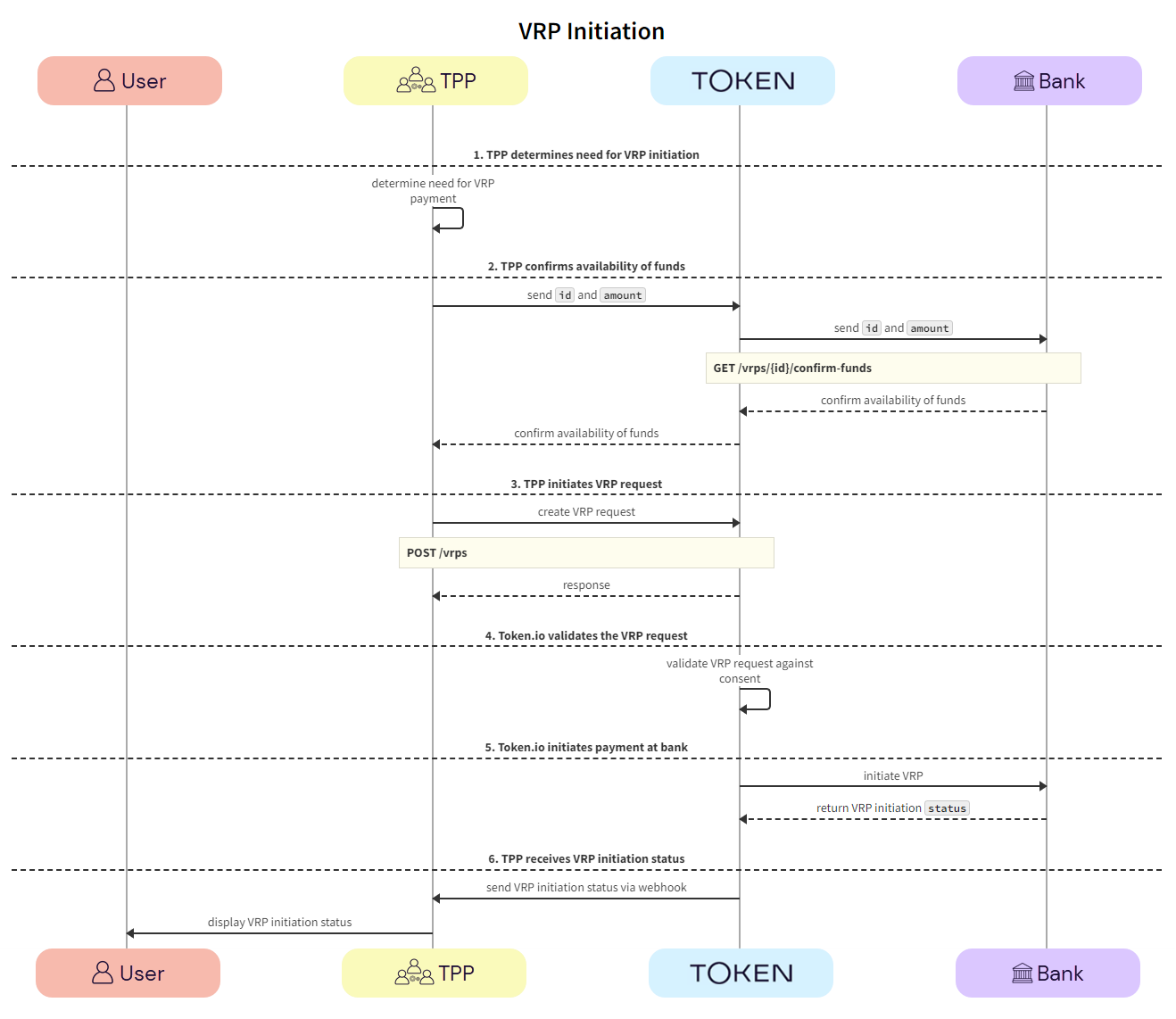
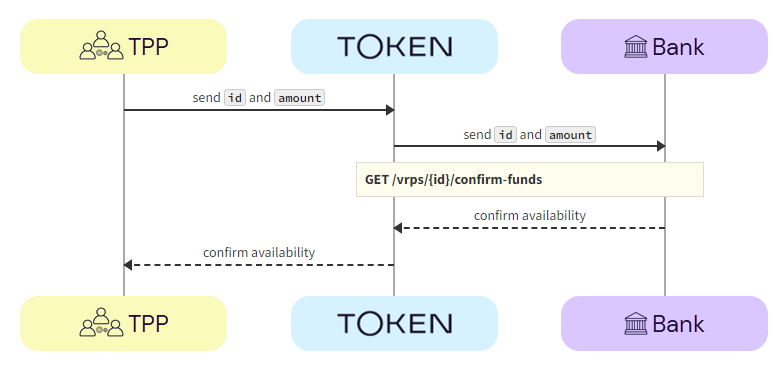
For merchant-initiated and user-initiated transactions (one-click use cases), VRP provides a confirmation of funds feature using the GET /vrps/{id}/confirm-funds endpoint, which enables you to check whether funds are available before initiating a payment. This feature is useful when the user is not in session and has authorized you to initiate VRP. You can confirm if the funds are available in the user’s account before initiating the VRP, thereby avoiding unnecessary charges on the user’s account should the funds not be available. Ideally, you should carry out the confirmation a few days before the VRP is due to be initiated so that the user can be notified if there are insufficient funds in their account.

This section describes a merchant-initiated VRP API redirect integration.

See the Token.io API reference for details of the following endpoints:

Then use our Launchpad to test them.

Click the image on the right to view a simplified swim lane diagram of the integration flow.

Details of the steps within the integration flow are shown below.

  1. TPP determines need for VRP initiation

The TPP determines the need to initiate a payment under a given VRP consent.

  1. TPP -> TPP - The TPP determines whether a payment should be made under a given VRP consent, based on the limits provided.

  1. TPP confirms availability of funds

The TPP confirms that there are sufficient funds for the payment using the GET /vrps/{id}/confirm-funds call.

  1. TPP -> Token.io - The TPP sends the id of the VRP consent and the amount to Token.io to confirm availability of funds.

  2. Token.io -> Bank - Token.io sends the id of the VRP consent and the amount to the bank to confirm availability of funds.

  3. Bank -> Token.io - The bank confirms the availability of the funds to Token.io.

  1. Token.io -> TPP - Token.io confirms the availability of the funds to the TPP.

    If there are insufficient funds, Token.io returns a status of fundsAvailable = False and the TPP notifies the user.

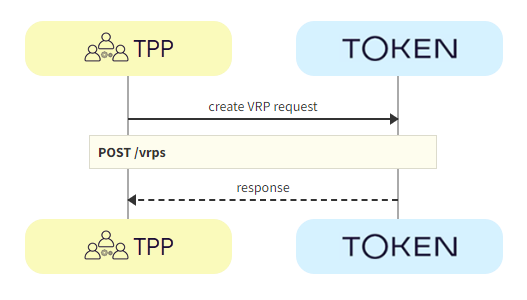
  1. TPP initiates VRP request

The TPP initiates the VRP request with Token.io using the POST /vrps call. Token.io responds by acknowledging the details of the request, and providing the details for the next step, e.g., where initiation moves directly to a processing, success or reject state.

  1. TPP -> Token.io - The TPP creates the VRP request using the POST /vrps call.

  1. Token.io -> TPP - Token.io generates a response to the payment initiation request.

    If you're subscribed to webhooks, Token.io sends the VRP status in a webhook every time an initiation is created or updated.

    See Webhooks for an example webhook notification.

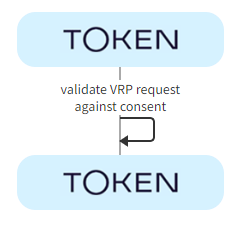
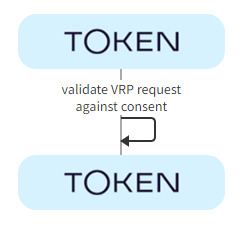
  1. Token.io validates VRP request

The VRP consent id is checked to ensure it's valid.

  1. Token.io -> Token.io - Token.io checks the VRP consent id to make sure it's valid.

    An error is displayed if the VRP consent id is invalid.

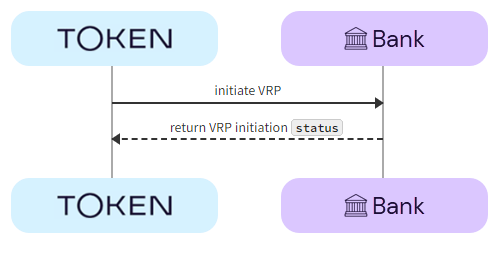
  1. Token.io initiates payment with bank

If funds are available with the bank, Token.io initiates the VRP with the bank.

  1. Token.io -> Bank - Token.io initiates the VRP with the bank.

  2. Bank -> Token.io - The bank returns the VRP initiation status to Token.io.

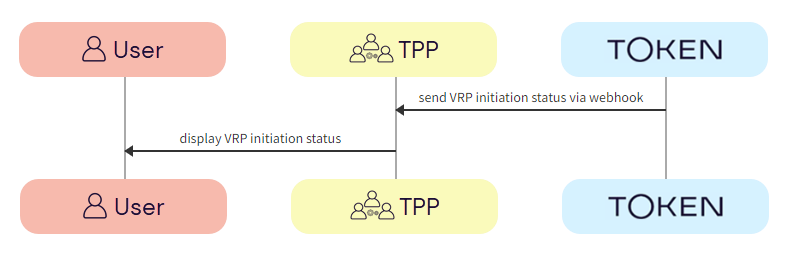
  1. TPP receives VRP initiation status

The TPP receives the VRP initiation status from Token.io and notifies the user.

  1. Token.io -> TPP - Token.io sends the VRP initiation status to the TPP in a webhook.

    If you're subscribed to webhooks, Token.io sends the VRP initiation status in a webhook every time a VRP initiation is created or updated.

    See Webhooks for an example webhook notification.

  1. TPP -> User - The TPP displays the VRP initiation status to the user.

    If the VRP initiation request is successful, the status will be INITIATION_COMPLETED.

See HTTP errors for information on HTTP error status codes.

VRP initiation status

The following table describes the possible statuses that can be returned in the status field of the POST /vrps, GET /vrps/{id}, and GET /vrp-consents/{id}/payments endpoints.

VRP initiation statuses
Status Description
INITIATION_COMPLETED The payment initiation under VRP has been completed successfully
INITIATION_PENDING The payment initiation under VRP has been received by Token.io and has passed validation
INITIATION_PROCESSING The payment initiation under VRP has been acknowledged by the bank and is processing
INITIATION_ REJECTED The payment initiation under VRP has been rejected. More details are shared in the corresponding status reason information.
INITIATION_REJECTED_INSUFFICIENT_FUNDS The payment initiation under VRP has been rejected because the funds check returned a negative result.
INITIATION_NO_FINAL_STATUS_AVAILABLE The status of the payment initiation under VRP has not been updated for some time and Token.io has stopped polling. This is a final status, but it does not indicate success or failure. Contact the bank to check actual payment initiation status.
INITIATION_FAILED Token.io failed to proceed with the payment initiation under VRP due to problems reaching the bank.

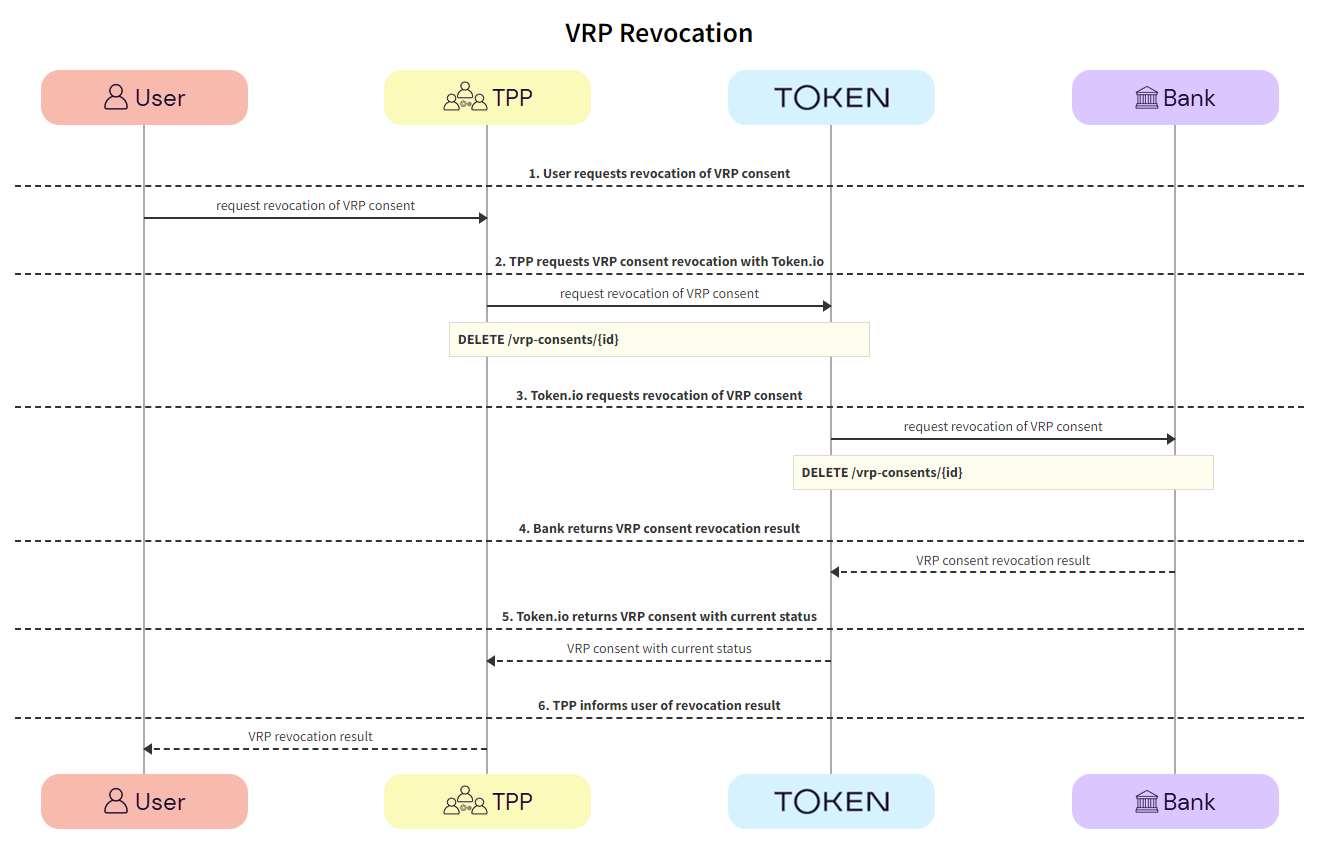
VRP consent revocation

Token.io provides the ability to revoke a VRP consent once it has been given.

This section describes the API integration for revoking a VRP consent.

See the Token.io API reference for details of the following endpoint:

Then use our Launchpad to test it.

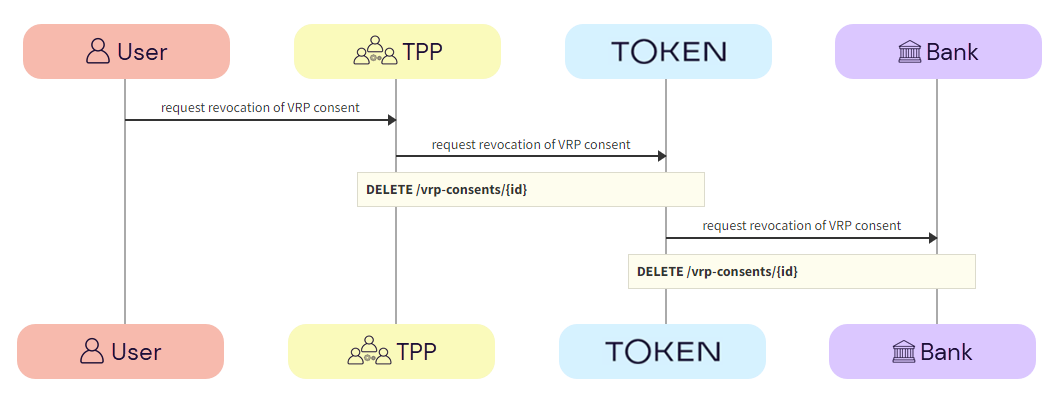
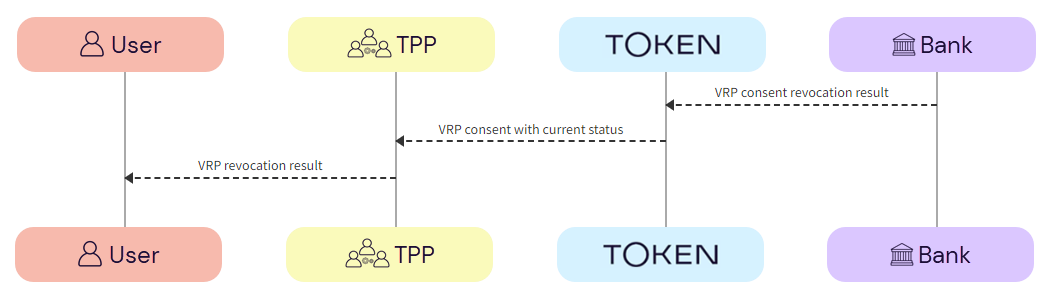
Click the image on the right to view a simplified swim lane diagram of the integration flow.

Details of the steps within the integration flow are shown below.

  1. User requests revocation of VRP consent

    1. User -> TPP - The user requests revocation of the VRP consent with the TPP.
    2. TPP -> Token.io - The TPP requests revocation of the VRP consent with Token.io, and passes in the VRP consent identifier using the DELETE /vrp-consents/{id}
    3. Token.io -> Bank - Token.io requests consent revocation with the bank using the VRP consent identifier.
  1. Bank revokes VRP consent

  1. Bank -> Token.io - the bank returns the VRP consent revocation result to Token.io.
  2. Token.io -> TPP - Token.io returns the VRP consent with the current status. The status is set to REVOKED on successful completion of the request with the bank.
  3. TPP -> User - The TPP informs the user of the VRP revocation result.

ON THIS PAGE

Variable Recurring Payments (VRP)

Variable Recurring Payments (VRP) enable a user to grant long-held consents to Payment Initiation Service Providers (PISP) to initiate future payments from users' bank accounts without users needing to authenticate each payment with the bank. VRP facilitates innovation in payment experiences, the creation of new types of financial services, and greater levels of consumer transparency and control. VRP should not be seen as a use case but rather as the underlying technical functionality upon which use cases can be developed. For more details on the experiences that can be enabled by VRP, see our blog post, Bringing the benefits of Variable Recurring Payments to life.

Token.io's VRP functionality consists of two main parts:

  • Consent set up - establishment of the long-held consent to allow a TPP to initiate payments on behalf of the user with a set of control parameters.

  • Payment initiation - initiation of a variable recurring payment adhering to the control parameters of the approved consent.

Token.io's API supports capabilities covering the end-to-end management, execution and monitoring of variable recurring payments. In addition, Token.io offers an out-of-the-box user experience to TPPs to help setup and initiate VRP payments.

The Token.io API supports the VRP OBIE 3.1.10 specification.

Sweeping and commercial VRP

Token.io supports both sweeping and commercial (also known as non-sweeping) VRP. As it stands today, there is no technical distinction between sweeping and commercial VRP; the distinction therefore relates not to what the service is, but rather what it is used for.

Sweeping

Sweeping VRP is defined as the movement of a user's own funds between the user's own accounts.

The OBIE VRP Proposition defines VRP transactions as 'sweeping', on a high level, when they meet the following criteria:

  1. The source account needs to be a current account

  2. The destination account is an account into which a domestic payment can be made by the payer’s bank’s direct channel, e.g., savings account, another current account, credit card repayment

  3. The transaction is between two accounts belonging to the same person or legal entity (“me-to-me”).

Further clarifications on what constitutes a sweeping use case can be sought in the OBIE VRP Proposition, the CMA’s March 2022 letter to the OBIE and the Q&As document published in July 2022. Please engage with your Token.io point of contact should you need any support in understanding whether your use case is sweeping or commercial VRP.

Examples of key sweeping VRP use cases include:

  • Automated (regular and scheduled) top-ups to savings and current accounts.

  • One-click top-ups to savings and current accounts.

  • Automated (regular and scheduled) repayments for credit cards.

  • One-click repayments for credit cards.

Commercial

Commercial VRP refers to any use of VRP functionality that lies outside the definition of sweeping. This can manifest itself in two ways:

  • Me-to-me transfer - where the source and destination accounts belong to the same person or legal entity, but where the destination account is a type of account that does not have the features of a current account or is not used as an alternative to a traditional current account

  • Me-to-them transfer - where the source and destination accounts do not belong to the same person or legal entity. This use of VRP is often for the purpose of paying for goods or services

Examples of commercial VRP use cases include:

  • One-click ecommerce purchases.

  • Recurring payments (e.g., utility bill payments, subscription payments, government payments).

  • Account top-ups (e.g., transfer of funds to an investment account, transfer of funds to any other account that can have a balance, like a mobile phone pay-as-you-go account).

VRP consent set up

VRP requires a one-time bank authentication and authorization that defines the parameters within which future transactions can be initiated without authentication. These parameters can include end date, maximum aggregate amount per period (e.g., month) and maximum amount per individual transaction.

This consent may be set up using either:

  • the Hosted Pages (HP) integration - the TPP uses Token.io's HP to display the parameters of the VRP consent setup.

See Hosted Pages v2 and Hosted Pages v1 for more information on how to implement the Hosted Pages for VRP.

  • the API-only integration - the TPP owns the user experience for VRP consent set up.

The user may revoke consent with the bank at any time via the TPP.

Hosted Pages (HP) integration

This section describes the integration where the TPP uses Token.io's HP for all or some of the steps in the user journey for setting up VRP consent.

Click the image on the right to view a simplified swim lane diagram of the integration flow.

Details of the steps within the integration flow are shown below.

  1. User initiates VRP consent set up

The user initiates the VRP consent set up with the TPP.

  1. User -> TPP - The user initiates a request to the TPP to grant consent for VRP. The initiation of consent uses the TPP's interface.

  1. User sets VRP consent limits

The user sets the limits of the VRP consent with the TPP.

  1. User -> TPP - The user sets the limits of the VRP consent with the TPP. This is usually a maximum amount per transaction and a maximum amount per day.

  1. TPP sends VRP consent request to Token.io

The TPP initiates the consent request with Token.io using the POST /vrp-consents call.

  1. TPP -> Token.io - The TPP initiates the consent request with Token.io, including the instruction details, using the POST /vrp-consents call.

  1. Token.io -> TPP - Token.io confirms receipt of the request from the TPP, which includes a VRP consent id in the response.

  1. TPP redirects user to Token.io HP

The TPP redirects the user to Token.io's HP for payment consent confirmation.

  1. TPP -> Token.io - The TPP redirects the user to the Token.io HP at https://{{base-url}}/app/initiation?vrp-consent-id={vrp-consent-id}.

    See Hosted Pages for details on how to construct the redirect URL.

  1. User selects bank

The user selects the bank from the Token.io HP.

  1. Token.io -> User - Token.io displays the bank selection screen.

We recommend using the countries parameter in the request here, which can be used to pre-populate the Country field.

  1. User -> Token.io - The user selects the bank.

  1. Token.io collects VRP consent from user

Token.io collects VRP consent from the user.

  1. Token.io -> User - Token.io displays the VRP consent confirmation page to the user.

  2. TPP -> Token.io - The TPP confirms consent with Token.io.

  1. User completes authorization with bank

The user completes authorization with the bank using the appropriate method; redirect, embedded or decoupled.

  1. Bank -> User - The bank displays the authorization page to the user.

  2. User -> Bank - The user authorizes the VRP consent creation with the bank.

  1. Bank confirms VRP consent set up request

The bank confirms that the VRP consent has been created.

  1. Bank -> Token.io - The bank confirms with Token.io that the VRP consent has been created.

  1. TPP receives VRP consent set up status

The TPP receives the confirmation that the VRP consent has been set up successfully and displays this to the user.

  1. Token.io -> TPP - Token.io sends the VRP consent status to the TPP in a webhook.

    If you're subscribed to webhooks, Token.io sends the consent status in a webhook every time a VRP consent is created or updated.

    See Webhooks for an example webhook notification.

  1. Token.io -> TPP - Token.io redirects the user to the TPP.

  2. TPP -> User - The TPP displays the VRP consent set up status to the user.

    If the consent set up request is successful, the status will be AUTHORIZED.

See HTTP errors for information on HTTP error status codes.

API-only integration

This section describes setting up VRP consent parameters using Token.io's API.

See Bank selection for information on selecting banks, mandatory fields, authentication models and supported payment rails for API-only integration.

See the Token.io API reference for details of the following endpoints:

Then use our Launchpad to test them.

Click the image on the right to view a simplified swim lane diagram of the integration flow.

Details of the steps within the integration flow are shown below.

  1. User initiates VRP consent set up

The user initiates the VRP consent set up with the TPP.

  1. User -> TPP - The user initiates a request to the TPP to grant consent for VRP.

  1. TPP retrieves list of banks

TPPs retrieve the list of available banks using the GET v2/banks call.

We recommend that this step is performed once daily, outside any VRP initiation, e.g., at 11pm UTC, and that the result is cached.

In the GET v2/banks request, there are numerous filtering criteria you can add as parameters to narrow your query. As a minimum, you should filter by your member ID.

See Mandatory fields for information on which fields must be provided for a given bank to accept a VRP initiation request.

  1. TPP -> Token.io - The TPP requests the list of banks from Token.io.

  1. Token.io -> TPP - Token.io supplies the list of banks to the TPP.

  1. User selects bank

The user selects the bank.

  1. TPP -> User - The TPP displays the bank selection screen.

  1. User -> TPP - The user selects the bank.

  1. TPP collects VRP consent from user

TPP collects VRP consent from the user.

  1. TPP -> User - TPP displays the VRP consent confirmation page to the user.

  2. User -> TPP - The user confirms the set up of the VRP consent with the TPP.

  1. User sets VRP consent limits

The user sets the limits of the VRP consent with the TPP.

  1. User -> TPP - The user sets the limits of the VRP consent with the TPP. This is usually a maximum amount per transaction and a maximum amount per day.

  1. TPP sends VRP consent request to Token.io

The TPP initiates the consent request with Token.io using the POST /vrp-consents call.

  1. TPP -> Token.io - The TPP initiates the consent request with Token.io, including the instruction details, using the POST /vrp-consents call.

  1. Token.io -> TPP - Token.io confirms receipt of the request from the TPP.

  1. Token.io requests VRP consent with bank

Token.io requests the creation of the VRP consent with the bank.

  1. Token.io -> Bank - Token.io requests permission to set up the VRP consent with the user's bank.

  1. Bank -> Token.io - The bank returns the consent with a PENDING status and a redirect URL.

  1. TPP redirects user to bank

The TPP redirects the user to the bank for payment consent confirmation.

  1. TPP -> Bank - The TPP redirects the user to the bank to confirm the payment consent, using the redirectUrl.

  1. User completes authorization with bank

The user completes authorization with the bank using the appropriate method; redirect, embedded or decoupled.

  1. Bank -> User - The bank displays the authorization page to the user.

  2. User -> Bank - The user authorizes the VRP consent creation with the bank.

  1. Bank confirms VRP consent set up request

The bank confirms that the VRP consent has been created.

  1. Bank -> Token.io - The bank confirms with Token.io that the VRP consent has been created.

  1. TPP receives VRP consent set up status

The TPP receives the confirmation that the VRP consent has been set up successfully and displays this to the user.

  1. Token.io -> TPP - Token.io sends the VRP consent status to the TPP in a webhook.

    If you're subscribed to webhooks, Token.io sends the consent status in a webhook every time a VRP consent is created or updated.

    See Webhooks for an example webhook notification.

  1. Token.io -> TPP - Token.io redirects the user to the TPP.

  2. TPP -> User - The TPP displays the VRP consent set up status to the user.

    If the consent set up request is successful, the status will be AUTHORIZED.

See HTTP errors for information on HTTP error status codes.

VRP consent status

The following table describes the possible statuses that can be returned in the status field of the POST /vrp-consents, GET /vrp-consents and GET /vrp-consents/{id} endpoints.

VRP consent statuses
Status Description
AUTHORIZED The VRP consent setup request has been authorized by the bank.
PENDING The VRP consent setup request has passed Token.io's validation. If you are using HP and the VRP confirmation page is turned on, the VRP setup success page will be shown with status set as PENDING.
PENDING_MORE_INFO The VRP consent setup request lacks mandatory fields (e.g., bankId) that have to be collected before connecting to the bank. If you are using HP, Token.io may be waiting for the user to enter the required information. If you are not using HP, this is a non-recoverable state and you must populate the required information in a new POST /vrp-consents call.
PENDING_REDIRECT_AUTH The VRP consent setup request has been acknowledged by the bank and Token.io is awaiting user confirmation at the bank's page. If HP is in use and the VRP confirmation page is turned on, the VRP setup success page will be shown with status set as PENDING.
PENDING_REDIRECT_AUTH_VERIFICATION Token.io has received the bank callback information and is currently verifying it with the bank. If you are using HP and the VRP confirmation page is turned on, the VRP setup success page will be shown with status set as PENDING.
REJECTED The VRP consent setup request has been rejected. More details are shared in the corresponding status reason information. This status will be set whenever an unrecoverable error happens during the flow.
FAILED Token.io failed to proceed with the VRP consent setup request due to problems reaching the bank or the user abandoning the flow (all PENDING statuses are turned into FAILED 30 minutes after VRP consent setup request).
REVOKED The status indicates the VRP consent has been revoked. The user has potentially revoked consent through a different channel.

VRP initiation

Once a user has consented to the VRP parameter setup, multiple payment types are possible:

  • One-click transactions:

    • Sweeping - a user has set up a VRP consent to pay off their credit card bill. When they go back into their credit card account, they will have the option to pay in just one click. This is because the user has already granted authority to the merchant to take payments without further authentication.

    • Commercial - in an ecommerce scenario (non-sweeping use case), after a user has set up a VRP consent with a particular merchant, upon returning to that merchant’s checkout page, the user will have the option to pay in just one click. This is because the user has already granted authority to the merchant to take payments without further authentication.

  • Merchant-initiated transactions - a user instructs a service provider to initiate transactions based on an agreed schedule or set of rules, meaning that payments can be automated and effortless from the user’s perspective.

    • Periodic/recurring transactions:

      • Sweeping - a user can set up a VRP consent with a service provider, for example their credit card company, in order to facilitate regular billing on an agreed schedule; either for a fixed or variable amount. Once the consent is set up, the merchant is able to take payments as agreed without further authentication.

      • Commercial - in a recurring billing scenario, a user can set up a VRP consent with a particular merchant in order to facilitate regular billing on an agreed schedule, either for a fixed or variable amount. Once the consent is set up, the merchant is able to take payments as agreed without further authentication.

    • Rules-based - in some cases, a user may wish to instruct a service provider to take payments based on an agreed set of rules. By setting up a VRP consent, the service provider will be able to do so without further user authentication.

      • Sweeping - a user may instruct their credit card company to automatically make a repayment if their balance gets within 10% of their credit limit.

      • Commercial - if a user has a pay-as-you-go mobile phone plan, they may instruct their provider to automatically top up their account once their balance dips below £5.

For merchant-initiated and user-initiated transactions (one-click use cases), VRP provides a confirmation of funds feature using the GET /vrps/{id}/confirm-funds endpoint, which enables you to check whether funds are available before initiating a payment. This feature is useful when the user is not in session and has authorized you to initiate VRP. You can confirm if the funds are available in the user’s account before initiating the VRP, thereby avoiding unnecessary charges on the user’s account should the funds not be available. Ideally, you should carry out the confirmation a few days before the VRP is due to be initiated so that the user can be notified if there are insufficient funds in their account.

This section describes a merchant-initiated VRP API redirect integration.

See the Token.io API reference for details of the following endpoints:

Then use our Launchpad to test them.

Click the image on the right to view a simplified swim lane diagram of the integration flow.

Details of the steps within the integration flow are shown below.

  1. TPP determines need for VRP initiation

The TPP determines the need to initiate a payment under a given VRP consent.

  1. TPP -> TPP - The TPP determines whether a payment should be made under a given VRP consent, based on the limits provided.

  1. TPP confirms availability of funds

The TPP confirms that there are sufficient funds for the payment using the GET /vrps/{id}/confirm-funds call.

  1. TPP -> Token.io - The TPP sends the id of the VRP consent and the amount to Token.io to confirm availability of funds.

  2. Token.io -> Bank - Token.io sends the id of the VRP consent and the amount to the bank to confirm availability of funds.

  3. Bank -> Token.io - The bank confirms the availability of the funds to Token.io.

  1. Token.io -> TPP - Token.io confirms the availability of the funds to the TPP.

    If there are insufficient funds, Token.io returns a status of fundsAvailable = False and the TPP notifies the user.

  1. TPP initiates VRP request

The TPP initiates the VRP request with Token.io using the POST /vrps call. Token.io responds by acknowledging the details of the request, and providing the details for the next step, e.g., where initiation moves directly to a processing, success or reject state.

  1. TPP -> Token.io - The TPP creates the VRP request using the POST /vrps call.

  1. Token.io -> TPP - Token.io generates a response to the payment initiation request.

    If you're subscribed to webhooks, Token.io sends the VRP status in a webhook every time an initiation is created or updated.

    See Webhooks for an example webhook notification.

  1. Token.io validates VRP request

The VRP consent id is checked to ensure it's valid.

  1. Token.io -> Token.io - Token.io checks the VRP consent id to make sure it's valid.

    An error is displayed if the VRP consent id is invalid.

  1. Token.io initiates payment with bank

If funds are available with the bank, Token.io initiates the VRP with the bank.

  1. Token.io -> Bank - Token.io initiates the VRP with the bank.

  2. Bank -> Token.io - The bank returns the VRP initiation status to Token.io.

  1. TPP receives VRP initiation status

The TPP receives the VRP initiation status from Token.io and notifies the user.

  1. Token.io -> TPP - Token.io sends the VRP initiation status to the TPP in a webhook.

    If you're subscribed to webhooks, Token.io sends the VRP initiation status in a webhook every time a VRP initiation is created or updated.

    See Webhooks for an example webhook notification.

  1. TPP -> User - The TPP displays the VRP initiation status to the user.

    If the VRP initiation request is successful, the status will be INITIATION_COMPLETED.

See HTTP errors for information on HTTP error status codes.

VRP initiation status

The following table describes the possible statuses that can be returned in the status field of the POST /vrps, GET /vrps/{id}, and GET /vrp-consents/{id}/payments endpoints.

VRP initiation statuses
Status Description
INITIATION_COMPLETED The payment initiation under VRP has been completed successfully
INITIATION_PENDING The payment initiation under VRP has been received by Token.io and has passed validation
INITIATION_PROCESSING The payment initiation under VRP has been acknowledged by the bank and is processing
INITIATION_ REJECTED The payment initiation under VRP has been rejected. More details are shared in the corresponding status reason information.
INITIATION_REJECTED_INSUFFICIENT_FUNDS The payment initiation under VRP has been rejected because the funds check returned a negative result.
INITIATION_NO_FINAL_STATUS_AVAILABLE The status of the payment initiation under VRP has not been updated for some time and Token.io has stopped polling. This is a final status, but it does not indicate success or failure. Contact the bank to check actual payment initiation status.
INITIATION_FAILED Token.io failed to proceed with the payment initiation under VRP due to problems reaching the bank.

VRP consent revocation

Token.io provides the ability to revoke a VRP consent once it has been given.

This section describes the API integration for revoking a VRP consent.

See the Token.io API reference for details of the following endpoint:

Then use our Launchpad to test it.

Click the image on the right to view a simplified swim lane diagram of the integration flow.

Details of the steps within the integration flow are shown below.

  1. User requests revocation of VRP consent

    1. User -> TPP - The user requests revocation of the VRP consent with the TPP.
    2. TPP -> Token.io - The TPP requests revocation of the VRP consent with Token.io, and passes in the VRP consent identifier using the DELETE /vrp-consents/{id}
    3. Token.io -> Bank - Token.io requests consent revocation with the bank using the VRP consent identifier.
  1. Bank revokes VRP consent

  1. Bank -> Token.io - the bank returns the VRP consent revocation result to Token.io.
  2. Token.io -> TPP - Token.io returns the VRP consent with the current status. The status is set to REVOKED on successful completion of the request with the bank.
  3. TPP -> User - The TPP informs the user of the VRP revocation result.

ON THIS PAGE

Variable Recurring Payments (VRP)

Variable Recurring Payments (VRP) enable a user to grant long-held consents to Payment Initiation Service Providers (PISP) to initiate future payments from users' bank accounts without users needing to authenticate each payment with the bank. VRP facilitates innovation in payment experiences, the creation of new types of financial services, and greater levels of consumer transparency and control. VRP should not be seen as a use case but rather as the underlying technical functionality upon which use cases can be developed. For more details on the experiences that can be enabled by VRP, see our blog post, Bringing the benefits of Variable Recurring Payments to life.

Token.io's VRP functionality consists of two main parts:

  • Consent set up - establishment of the long-held consent to allow a TPP to initiate payments on behalf of the user with a set of control parameters.

  • Payment initiation - initiation of a variable recurring payment adhering to the control parameters of the approved consent.

Token.io's API supports capabilities covering the end-to-end management, execution and monitoring of variable recurring payments. In addition, Token.io offers an out-of-the-box user experience to TPPs to help setup and initiate VRP payments.

The Token.io API supports the VRP OBIE 3.1.10 specification.

Sweeping and commercial VRP

Token.io supports both sweeping and commercial (also known as non-sweeping) VRP. As it stands today, there is no technical distinction between sweeping and commercial VRP; the distinction therefore relates not to what the service is, but rather what it is used for.

Sweeping

Sweeping VRP is defined as the movement of a user's own funds between the user's own accounts.

The OBIE VRP Proposition defines VRP transactions as 'sweeping', on a high level, when they meet the following criteria:

  1. The source account needs to be a current account

  2. The destination account is an account into which a domestic payment can be made by the payer’s bank’s direct channel, e.g., savings account, another current account, credit card repayment

  3. The transaction is between two accounts belonging to the same person or legal entity (“me-to-me”).

Further clarifications on what constitutes a sweeping use case can be sought in the OBIE VRP Proposition, the CMA’s March 2022 letter to the OBIE and the Q&As document published in July 2022. Please engage with your Token.io point of contact should you need any support in understanding whether your use case is sweeping or commercial VRP.

Examples of key sweeping VRP use cases include:

  • Automated (regular and scheduled) top-ups to savings and current accounts.

  • One-click top-ups to savings and current accounts.

  • Automated (regular and scheduled) repayments for credit cards.

  • One-click repayments for credit cards.

Commercial

Commercial VRP refers to any use of VRP functionality that lies outside the definition of sweeping. This can manifest itself in two ways:

  • Me-to-me transfer - where the source and destination accounts belong to the same person or legal entity, but where the destination account is a type of account that does not have the features of a current account or is not used as an alternative to a traditional current account

  • Me-to-them transfer - where the source and destination accounts do not belong to the same person or legal entity. This use of VRP is often for the purpose of paying for goods or services

Examples of commercial VRP use cases include:

  • One-click ecommerce purchases.

  • Recurring payments (e.g., utility bill payments, subscription payments, government payments).

  • Account top-ups (e.g., transfer of funds to an investment account, transfer of funds to any other account that can have a balance, like a mobile phone pay-as-you-go account).

VRP consent set up

VRP requires a one-time bank authentication and authorization that defines the parameters within which future transactions can be initiated without authentication. These parameters can include end date, maximum aggregate amount per period (e.g., month) and maximum amount per individual transaction.

This consent may be set up using either:

  • the Hosted Pages (HP) integration - the TPP uses Token.io's HP to display the parameters of the VRP consent setup.

See Hosted Pages v2 and Hosted Pages v1 for more information on how to implement the Hosted Pages for VRP.

  • the API-only integration - the TPP owns the user experience for VRP consent set up.

The user may revoke consent with the bank at any time via the TPP.

Hosted Pages (HP) integration

This section describes the integration where the TPP uses Token.io's HP for all or some of the steps in the user journey for setting up VRP consent.

Click the image on the right to view a simplified swim lane diagram of the integration flow.

Details of the steps within the integration flow are shown below.

  1. User initiates VRP consent set up

The user initiates the VRP consent set up with the TPP.

  1. User -> TPP - The user initiates a request to the TPP to grant consent for VRP. The initiation of consent uses the TPP's interface.

  1. User sets VRP consent limits

The user sets the limits of the VRP consent with the TPP.

  1. User -> TPP - The user sets the limits of the VRP consent with the TPP. This is usually a maximum amount per transaction and a maximum amount per day.

  1. TPP sends VRP consent request to Token.io

The TPP initiates the consent request with Token.io using the POST /vrp-consents call.

  1. TPP -> Token.io - The TPP initiates the consent request with Token.io, including the instruction details, using the POST /vrp-consents call.

  1. Token.io -> TPP - Token.io confirms receipt of the request from the TPP, which includes a VRP consent id in the response.

  1. TPP redirects user to Token.io HP

The TPP redirects the user to Token.io's HP for payment consent confirmation.

  1. TPP -> Token.io - The TPP redirects the user to the Token.io HP at https://{{base-url}}/app/initiation?vrp-consent-id={vrp-consent-id}.

    See Hosted Pages for details on how to construct the redirect URL.

  1. User selects bank

The user selects the bank from the Token.io HP.

  1. Token.io -> User - Token.io displays the bank selection screen.

We recommend using the countries parameter in the request here, which can be used to pre-populate the Country field.

  1. User -> Token.io - The user selects the bank.

  1. Token.io collects VRP consent from user

Token.io collects VRP consent from the user.

  1. Token.io -> User - Token.io displays the VRP consent confirmation page to the user.

  2. TPP -> Token.io - The TPP confirms consent with Token.io.

  1. User completes authorization with bank

The user completes authorization with the bank using the appropriate method; redirect, embedded or decoupled.

  1. Bank -> User - The bank displays the authorization page to the user.

  2. User -> Bank - The user authorizes the VRP consent creation with the bank.

  1. Bank confirms VRP consent set up request

The bank confirms that the VRP consent has been created.

  1. Bank -> Token.io - The bank confirms with Token.io that the VRP consent has been created.

  1. TPP receives VRP consent set up status

The TPP receives the confirmation that the VRP consent has been set up successfully and displays this to the user.

  1. Token.io -> TPP - Token.io sends the VRP consent status to the TPP in a webhook.

    If you're subscribed to webhooks, Token.io sends the consent status in a webhook every time a VRP consent is created or updated.

    See Webhooks for an example webhook notification.

  1. Token.io -> TPP - Token.io redirects the user to the TPP.

  2. TPP -> User - The TPP displays the VRP consent set up status to the user.

    If the consent set up request is successful, the status will be AUTHORIZED.

See HTTP errors for information on HTTP error status codes.

API-only integration

This section describes setting up VRP consent parameters using Token.io's API.

See Bank selection for information on selecting banks, mandatory fields, authentication models and supported payment rails for API-only integration.

See the Token.io API reference for details of the following endpoints:

Then use our Launchpad to test them.

Click the image on the right to view a simplified swim lane diagram of the integration flow.

Details of the steps within the integration flow are shown below.

  1. User initiates VRP consent set up

The user initiates the VRP consent set up with the TPP.

  1. User -> TPP - The user initiates a request to the TPP to grant consent for VRP.

  1. TPP retrieves list of banks

TPPs retrieve the list of available banks using the GET v2/banks call.

We recommend that this step is performed once daily, outside any VRP initiation, e.g., at 11pm UTC, and that the result is cached.

In the GET v2/banks request, there are numerous filtering criteria you can add as parameters to narrow your query. As a minimum, you should filter by your member ID.

See Mandatory fields for information on which fields must be provided for a given bank to accept a VRP initiation request.

  1. TPP -> Token.io - The TPP requests the list of banks from Token.io.

  1. Token.io -> TPP - Token.io supplies the list of banks to the TPP.

  1. User selects bank

The user selects the bank.

  1. TPP -> User - The TPP displays the bank selection screen.

  1. User -> TPP - The user selects the bank.

  1. TPP collects VRP consent from user

TPP collects VRP consent from the user.

  1. TPP -> User - TPP displays the VRP consent confirmation page to the user.

  2. User -> TPP - The user confirms the set up of the VRP consent with the TPP.

  1. User sets VRP consent limits

The user sets the limits of the VRP consent with the TPP.

  1. User -> TPP - The user sets the limits of the VRP consent with the TPP. This is usually a maximum amount per transaction and a maximum amount per day.

  1. TPP sends VRP consent request to Token.io

The TPP initiates the consent request with Token.io using the POST /vrp-consents call.

  1. TPP -> Token.io - The TPP initiates the consent request with Token.io, including the instruction details, using the POST /vrp-consents call.

  1. Token.io -> TPP - Token.io confirms receipt of the request from the TPP.

  1. Token.io requests VRP consent with bank

Token.io requests the creation of the VRP consent with the bank.

  1. Token.io -> Bank - Token.io requests permission to set up the VRP consent with the user's bank.

  1. Bank -> Token.io - The bank returns the consent with a PENDING status and a redirect URL.

  1. TPP redirects user to bank

The TPP redirects the user to the bank for payment consent confirmation.

  1. TPP -> Bank - The TPP redirects the user to the bank to confirm the payment consent, using the redirectUrl.

  1. User completes authorization with bank

The user completes authorization with the bank using the appropriate method; redirect, embedded or decoupled.

  1. Bank -> User - The bank displays the authorization page to the user.

  2. User -> Bank - The user authorizes the VRP consent creation with the bank.

  1. Bank confirms VRP consent set up request

The bank confirms that the VRP consent has been created.

  1. Bank -> Token.io - The bank confirms with Token.io that the VRP consent has been created.

  1. TPP receives VRP consent set up status

The TPP receives the confirmation that the VRP consent has been set up successfully and displays this to the user.

  1. Token.io -> TPP - Token.io sends the VRP consent status to the TPP in a webhook.

    If you're subscribed to webhooks, Token.io sends the consent status in a webhook every time a VRP consent is created or updated.

    See Webhooks for an example webhook notification.

  1. Token.io -> TPP - Token.io redirects the user to the TPP.

  2. TPP -> User - The TPP displays the VRP consent set up status to the user.

    If the consent set up request is successful, the status will be AUTHORIZED.

See HTTP errors for information on HTTP error status codes.

VRP consent status

The following table describes the possible statuses that can be returned in the status field of the POST /vrp-consents, GET /vrp-consents and GET /vrp-consents/{id} endpoints.

VRP consent statuses
Status Description
AUTHORIZED The VRP consent setup request has been authorized by the bank.
PENDING The VRP consent setup request has passed Token.io's validation. If you are using HP and the VRP confirmation page is turned on, the VRP setup success page will be shown with status set as PENDING.
PENDING_MORE_INFO The VRP consent setup request lacks mandatory fields (e.g., bankId) that have to be collected before connecting to the bank. If you are using HP, Token.io may be waiting for the user to enter the required information. If you are not using HP, this is a non-recoverable state and you must populate the required information in a new POST /vrp-consents call.
PENDING_REDIRECT_AUTH The VRP consent setup request has been acknowledged by the bank and Token.io is awaiting user confirmation at the bank's page. If HP is in use and the VRP confirmation page is turned on, the VRP setup success page will be shown with status set as PENDING.
PENDING_REDIRECT_AUTH_VERIFICATION Token.io has received the bank callback information and is currently verifying it with the bank. If you are using HP and the VRP confirmation page is turned on, the VRP setup success page will be shown with status set as PENDING.
REJECTED The VRP consent setup request has been rejected. More details are shared in the corresponding status reason information. This status will be set whenever an unrecoverable error happens during the flow.
FAILED Token.io failed to proceed with the VRP consent setup request due to problems reaching the bank or the user abandoning the flow (all PENDING statuses are turned into FAILED 30 minutes after VRP consent setup request).
REVOKED The status indicates the VRP consent has been revoked. The user has potentially revoked consent through a different channel.

VRP initiation

Once a user has consented to the VRP parameter setup, multiple payment types are possible:

  • One-click transactions:

    • Sweeping - a user has set up a VRP consent to pay off their credit card bill. When they go back into their credit card account, they will have the option to pay in just one click. This is because the user has already granted authority to the merchant to take payments without further authentication.

    • Commercial - in an ecommerce scenario (non-sweeping use case), after a user has set up a VRP consent with a particular merchant, upon returning to that merchant’s checkout page, the user will have the option to pay in just one click. This is because the user has already granted authority to the merchant to take payments without further authentication.

  • Merchant-initiated transactions - a user instructs a service provider to initiate transactions based on an agreed schedule or set of rules, meaning that payments can be automated and effortless from the user’s perspective.

    • Periodic/recurring transactions:

      • Sweeping - a user can set up a VRP consent with a service provider, for example their credit card company, in order to facilitate regular billing on an agreed schedule; either for a fixed or variable amount. Once the consent is set up, the merchant is able to take payments as agreed without further authentication.

      • Commercial - in a recurring billing scenario, a user can set up a VRP consent with a particular merchant in order to facilitate regular billing on an agreed schedule, either for a fixed or variable amount. Once the consent is set up, the merchant is able to take payments as agreed without further authentication.

    • Rules-based - in some cases, a user may wish to instruct a service provider to take payments based on an agreed set of rules. By setting up a VRP consent, the service provider will be able to do so without further user authentication.

      • Sweeping - a user may instruct their credit card company to automatically make a repayment if their balance gets within 10% of their credit limit.

      • Commercial - if a user has a pay-as-you-go mobile phone plan, they may instruct their provider to automatically top up their account once their balance dips below £5.

For merchant-initiated and user-initiated transactions (one-click use cases), VRP provides a confirmation of funds feature using the GET /vrps/{id}/confirm-funds endpoint, which enables you to check whether funds are available before initiating a payment. This feature is useful when the user is not in session and has authorized you to initiate VRP. You can confirm if the funds are available in the user’s account before initiating the VRP, thereby avoiding unnecessary charges on the user’s account should the funds not be available. Ideally, you should carry out the confirmation a few days before the VRP is due to be initiated so that the user can be notified if there are insufficient funds in their account.

This section describes a merchant-initiated VRP API redirect integration.

See the Token.io API reference for details of the following endpoints:

Then use our Launchpad to test them.

Click the image on the right to view a simplified swim lane diagram of the integration flow.

Details of the steps within the integration flow are shown below.

  1. TPP determines need for VRP initiation

The TPP determines the need to initiate a payment under a given VRP consent.

  1. TPP -> TPP - The TPP determines whether a payment should be made under a given VRP consent, based on the limits provided.

  1. TPP confirms availability of funds

The TPP confirms that there are sufficient funds for the payment using the GET /vrps/{id}/confirm-funds call.

  1. TPP -> Token.io - The TPP sends the id of the VRP consent and the amount to Token.io to confirm availability of funds.

  2. Token.io -> Bank - Token.io sends the id of the VRP consent and the amount to the bank to confirm availability of funds.

  3. Bank -> Token.io - The bank confirms the availability of the funds to Token.io.

  1. Token.io -> TPP - Token.io confirms the availability of the funds to the TPP.

    If there are insufficient funds, Token.io returns a status of fundsAvailable = False and the TPP notifies the user.

  1. TPP initiates VRP request

The TPP initiates the VRP request with Token.io using the POST /vrps call. Token.io responds by acknowledging the details of the request, and providing the details for the next step, e.g., where initiation moves directly to a processing, success or reject state.

  1. TPP -> Token.io - The TPP creates the VRP request using the POST /vrps call.

  1. Token.io -> TPP - Token.io generates a response to the payment initiation request.

    If you're subscribed to webhooks, Token.io sends the VRP status in a webhook every time an initiation is created or updated.

    See Webhooks for an example webhook notification.

  1. Token.io validates VRP request

The VRP consent id is checked to ensure it's valid.

  1. Token.io -> Token.io - Token.io checks the VRP consent id to make sure it's valid.

    An error is displayed if the VRP consent id is invalid.

  1. Token.io initiates payment with bank

If funds are available with the bank, Token.io initiates the VRP with the bank.

  1. Token.io -> Bank - Token.io initiates the VRP with the bank.

  2. Bank -> Token.io - The bank returns the VRP initiation status to Token.io.

  1. TPP receives VRP initiation status

The TPP receives the VRP initiation status from Token.io and notifies the user.

  1. Token.io -> TPP - Token.io sends the VRP initiation status to the TPP in a webhook.

    If you're subscribed to webhooks, Token.io sends the VRP initiation status in a webhook every time a VRP initiation is created or updated.

    See Webhooks for an example webhook notification.

  1. TPP -> User - The TPP displays the VRP initiation status to the user.

    If the VRP initiation request is successful, the status will be INITIATION_COMPLETED.

See HTTP errors for information on HTTP error status codes.

VRP initiation status

The following table describes the possible statuses that can be returned in the status field of the POST /vrps, GET /vrps/{id}, and GET /vrp-consents/{id}/payments endpoints.

VRP initiation statuses
Status Description
INITIATION_COMPLETED The payment initiation under VRP has been completed successfully
INITIATION_PENDING The payment initiation under VRP has been received by Token.io and has passed validation
INITIATION_PROCESSING The payment initiation under VRP has been acknowledged by the bank and is processing
INITIATION_ REJECTED The payment initiation under VRP has been rejected. More details are shared in the corresponding status reason information.
INITIATION_REJECTED_INSUFFICIENT_FUNDS The payment initiation under VRP has been rejected because the funds check returned a negative result.
INITIATION_NO_FINAL_STATUS_AVAILABLE The status of the payment initiation under VRP has not been updated for some time and Token.io has stopped polling. This is a final status, but it does not indicate success or failure. Contact the bank to check actual payment initiation status.
INITIATION_FAILED Token.io failed to proceed with the payment initiation under VRP due to problems reaching the bank.

VRP consent revocation

Token.io provides the ability to revoke a VRP consent once it has been given.

This section describes the API integration for revoking a VRP consent.

See the Token.io API reference for details of the following endpoint:

Then use our Launchpad to test it.

Click the image on the right to view a simplified swim lane diagram of the integration flow.

Details of the steps within the integration flow are shown below.

  1. User requests revocation of VRP consent

    1. User -> TPP - The user requests revocation of the VRP consent with the TPP.
    2. TPP -> Token.io - The TPP requests revocation of the VRP consent with Token.io, and passes in the VRP consent identifier using the DELETE /vrp-consents/{id}
    3. Token.io -> Bank - Token.io requests consent revocation with the bank using the VRP consent identifier.
  1. Bank revokes VRP consent

  1. Bank -> Token.io - the bank returns the VRP consent revocation result to Token.io.
  2. Token.io -> TPP - Token.io returns the VRP consent with the current status. The status is set to REVOKED on successful completion of the request with the bank.
  3. TPP -> User - The TPP informs the user of the VRP revocation result.

ON THIS PAGE


If you have any feedback about the developer documentation, please contact devdocs@token.io

© 2025 TOKEN, INC.     ALL RIGHTS RESERVED.