Settlements
Settlement refers to the process when funds are transferred from the TPP’s settlement account to the TPP’s corporate account, or sub-TPP’s corporate account. This can take place on a periodic basis.
To initiate settlement you will need to use the payouts API. In this case the Token.io settlement account is the debtor. The beneficiary or payee could be a sub-TPP or another TPP-owned corporate account.
For more information on the payouts capability refer to Payouts.
Settlement status
The following table describes the possible statuses that can be returned in the status field during a settlement.
| status | Description |
|---|---|
|
|
This status is provided when a Token.io settlement account is used as the beneficiary for the payment, and replaces the payment initiation status. Token.io is waiting for the payment to reach the payee bank. No action is required; await the next step, e.g., Token.io sends a webhook (see Webhooks) with the status update, or a polling call. The status will change to |
|
|
This status is provided when a Token.io settlement account is used as the beneficiary for the payment, and replaces the payment initiation status. The payment has reached the payee bank and Token.io has matched the transaction in the TPP’s settlement account to the initiated payment. For instant payments, For non-instant payments, the time to reach |
|
|
This status is provided when a Token.io settlement account is used as the beneficiary for the payment, and replaces the payment initiation status. Reconciliation has failed. This happens when Token.io doesn't find the corresponding transaction in the TPP's settlement account automatically. See Settlement status for SEPA and SEPA Instant payments for more information. |
Settlement status for SEPA and SEPA Instant payments
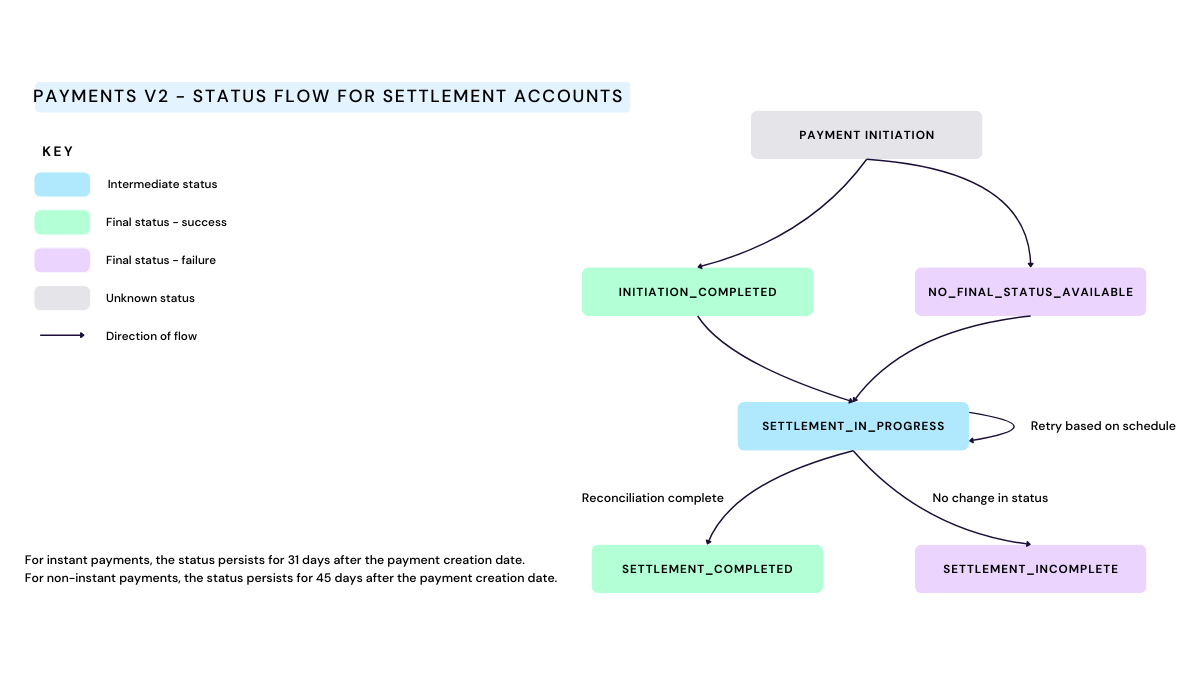
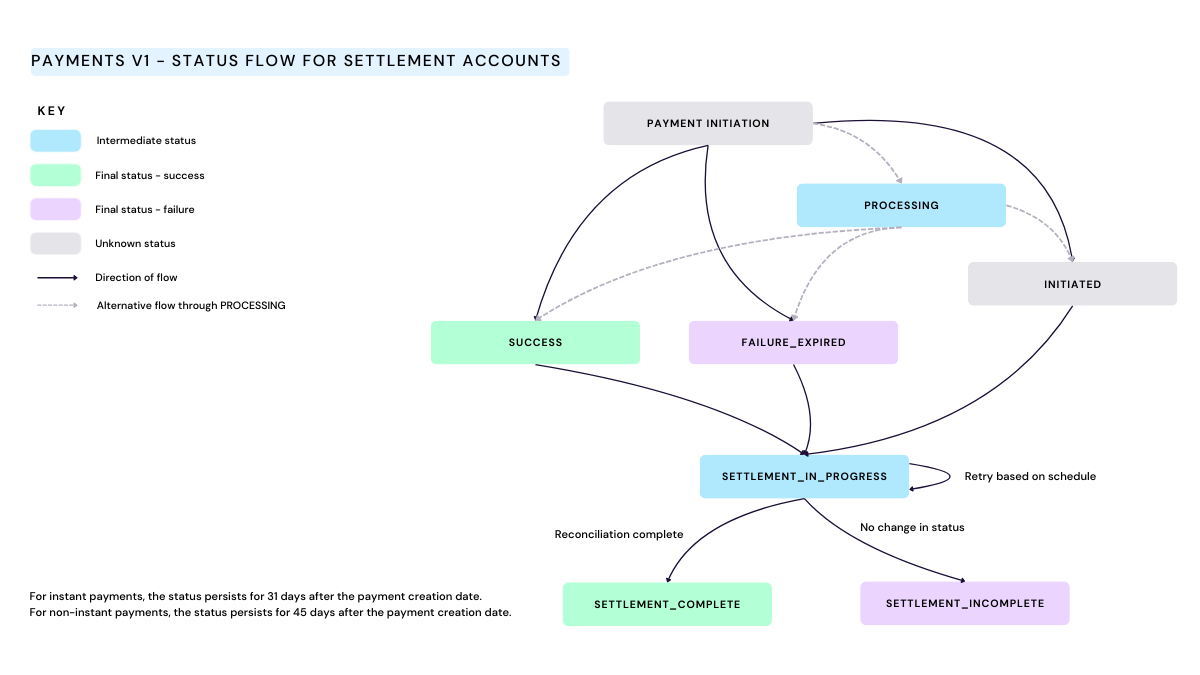
During settlement of a settlement accounts payment, the status update job will run first for up to 30 days. Payment will then enter into a 'final' status, normally INITIATION_COMPLETED (v2) or SUCCESS (v1).
Once the status update job has run, the reconciliation job looks for matching inbound payments.
For SEPA payments:
-
if a matching inbound payment is found within 15 days of the final payment status update ->
SETTLEMENT_COMPLETED -
if no matching inbound payment is found within 15 days of the final payment status update ->
SETTLEMENT_INCOMPLETE
For SEPA Instant payments:
-
if a matching inbound payment is found within 1 day of the final payment status update ->
SETTLEMENT_COMPLETED -
if no matching inbound payment is found within 1 day of the final payment status update ->
SETTLEMENT_INCOMPLETE
v1 settlement status
For v1 payments, the INITIATED, SUCCESS and FAILURE_EXPIRED statuses can transition to SETTLEMENT_IN_PROGRESS when using Settlement accounts. From SETTLEMENT_IN_PROGRESS, the status can transition to either SETTLEMENT_COMPLETED or SETTLEMENT_INCOMPLETE.
v2 settlement status
For v2 payments, the NO_FINAL_STATUS_AVAILABLE and INITIATION_COMPLETED statuses can transition to SETTLEMENT_IN_PROGRESS when using settlement accounts. From SETTLEMENT_IN_PROGRESS, the status can transition to either SETTLEMENT_COMPLETED or SETTLEMENT_INCOMPLETE.