Data (Account Information Services)

Data, powered by Account Information Services (AIS), allows users to grant consent for their bank to share balance, transactions and/or account details associated with their bank account with a third party in order to enable a specified service. Examples of AIS use cases are as follows:

  • Creditworthiness assessment - a user may wish to share their bank transactions with a credit card provider during an application process, in order for the provider to analyse their income and expenditure and offer them a preferable credit limit.

  • Account ownership verification - a user may wish to share their bank account details with a service provider, such as a gaming website or a credit card provider, in order to simplify the onboarding process. These merchants must verify that users’ associated accounts are indeed owned by the user that is setting up the account, and AIS enables a frictionless way of instructing a bank to immutably share this information with a merchant, thus satisfying Know Your Customer requirements.

  • Autofill - instead of manually typing in their bank details, a user may complete an AIS journey to fill in their bank account details in a way that is guaranteed to be error-free.

  • Personal financial management - a user may wish to share their bank transactions with a fintech app that is able to analyze the income and expenditure to offer them budgeting advice, categorisation and recommendations on how to manage their finances.

  • Balance display - a user may wish to see their bank balance within a payment wallet, so that they have a real-time indication of whether they have sufficient funds to make a particular transaction.

Under Open Banking (OB) protocols, banks allow TPPs access to a customer's account data only if the customer (user) explicitly gives consent to the bank to allow such access. Token.io's AIS ensures that all OB protocols are met.

Integration to Token.io's AIS varies depending on whether you use Token.io's Hosted Pages (HP) or the API-only integration.

These integration options are detailed below:

See Hosted Pages v1 for more information on how to implement the Hosted Pages for AIS.

  • API-only integration – the TPP owns the full user experience, including bank selection logic, collecting mandatory fields, and embedded and decoupled authorization flows.

Hosted Pages (HP) integration

Token.io offers the Redirect integration HP option for Data (AIS).

The Redirect integration directs the user from your website to open Token.io's HP in a new tab, using a redirect URL. Redirect integration for Data (AIS) is available for HP v1.

Redirect integration (HP v1)

This section describes the integration where the TPP uses Token.io's HP for some of the steps in the user journey. Authentication methods will be handled entirely by the HP.

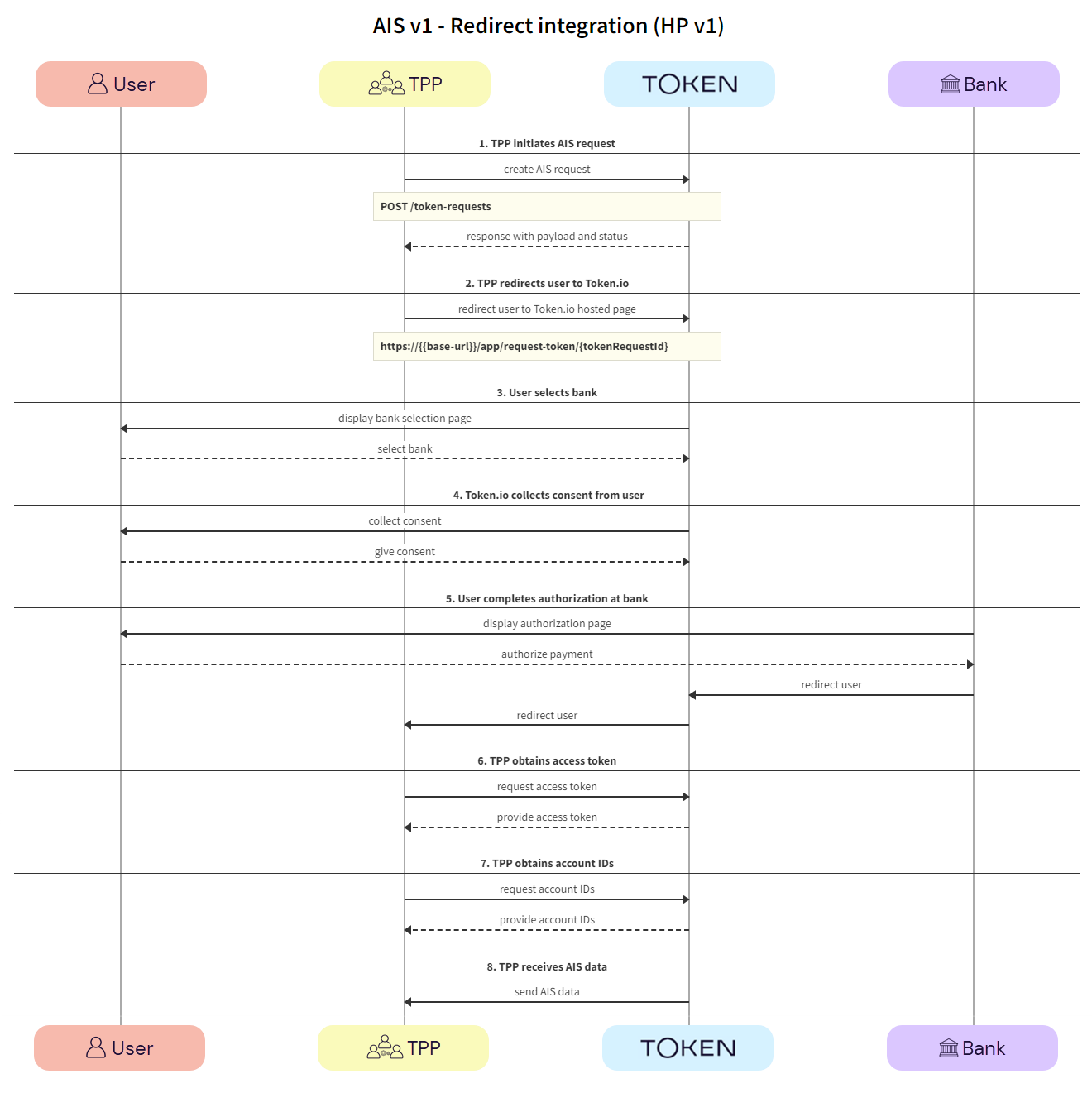
Click the image on the right to view a simplified swim lane diagram of the integration flow.

Details of the steps within the integration flow are shown below.

  1. TPP initiates AIS request

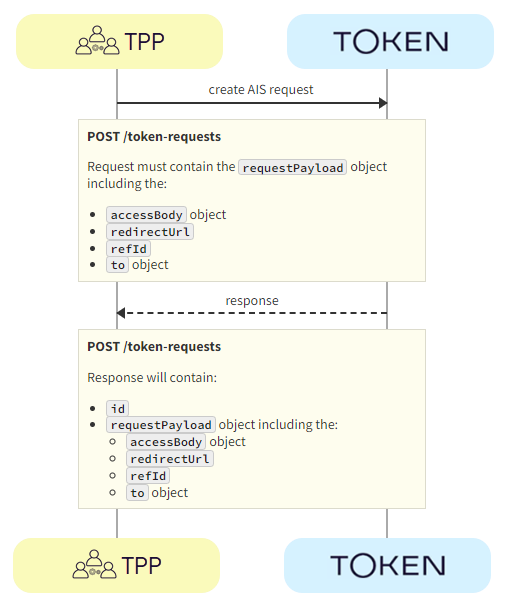
The TPP initiates the AIS request with Token.io using the POST /token-requests call. Token.io responds by acknowledging the details of the request.

  1. TPP -> Token.io - The TPP creates the AIS request using the POST /token-requests call.

  1. Token.io -> TPP - Token.io generates a response to the AIS request.

  1. TPP redirects user to Token.io

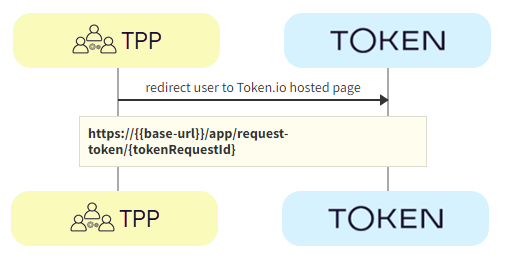
The TPP redirects the user to the Token.io HP.

  1. TPP -> Token.io - The TPP redirects the user to the Token.io HP at https://{{base-url}}/app/request-token/{tokenRequestId}.

    See Hosted Pages for details on how to construct the redirect URL.

  1. User selects bank

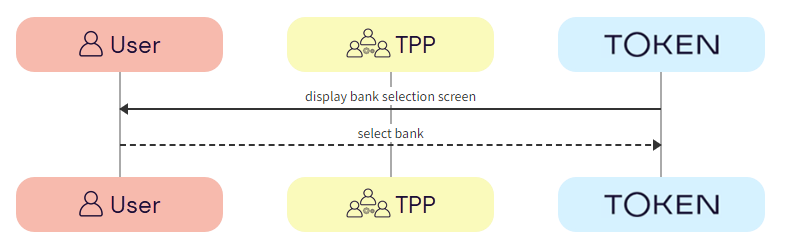
The user selects the bank from the Token.io HP.

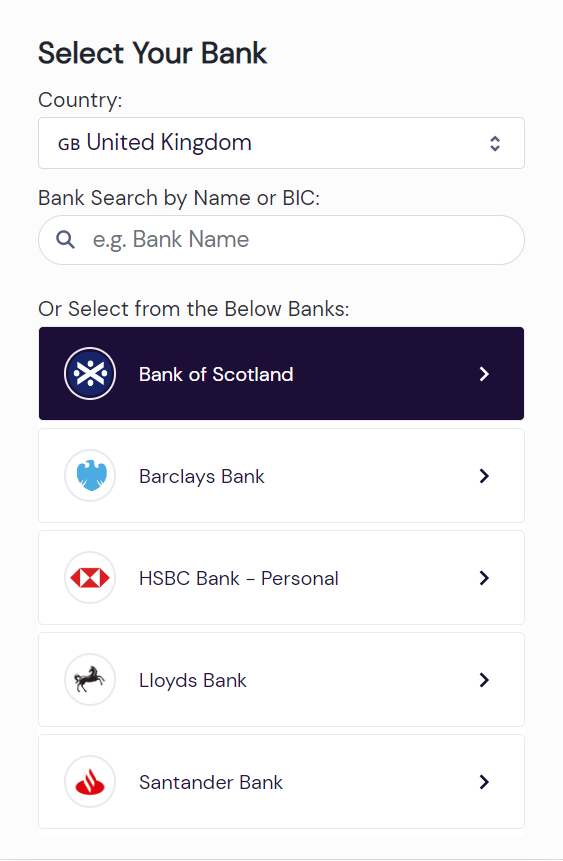
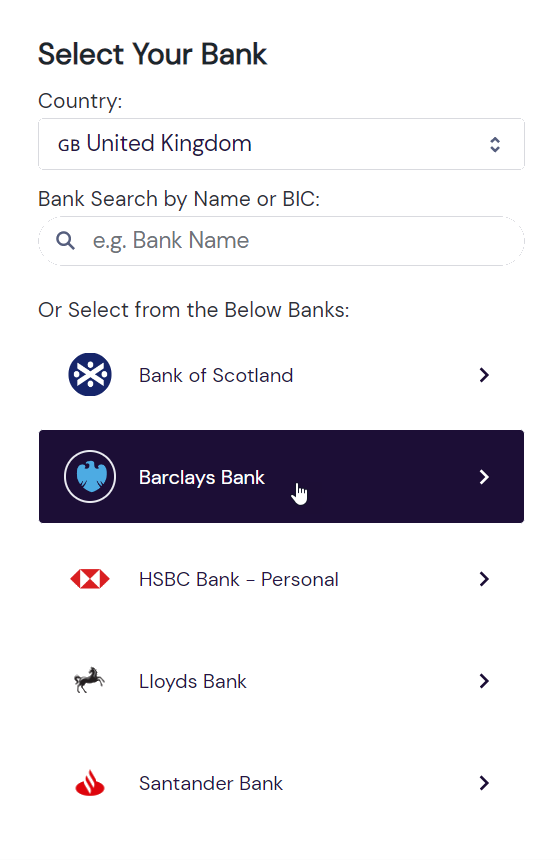
  1. Token.io -> User - Token.io displays the bank selection screen.

You can limit the countries available for selection in the HP by sending the countries parameter in the POST /token-requests request. If you limit it to just one, it effectively becomes pre-populated.

You can also pre-populate the country in the HP by including the country code in the HP URL.

See Token.io Hosted Pages v1 for more information.

  1. User -> Token.io - The user selects the bank.

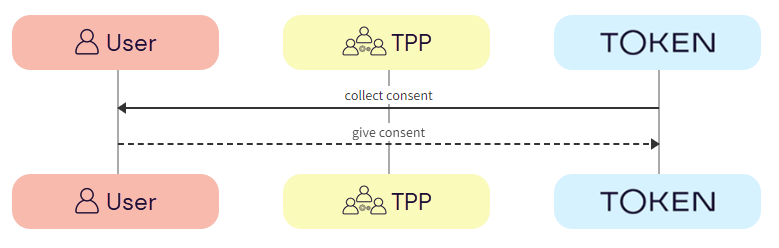
  1. Token.io collects consent from user

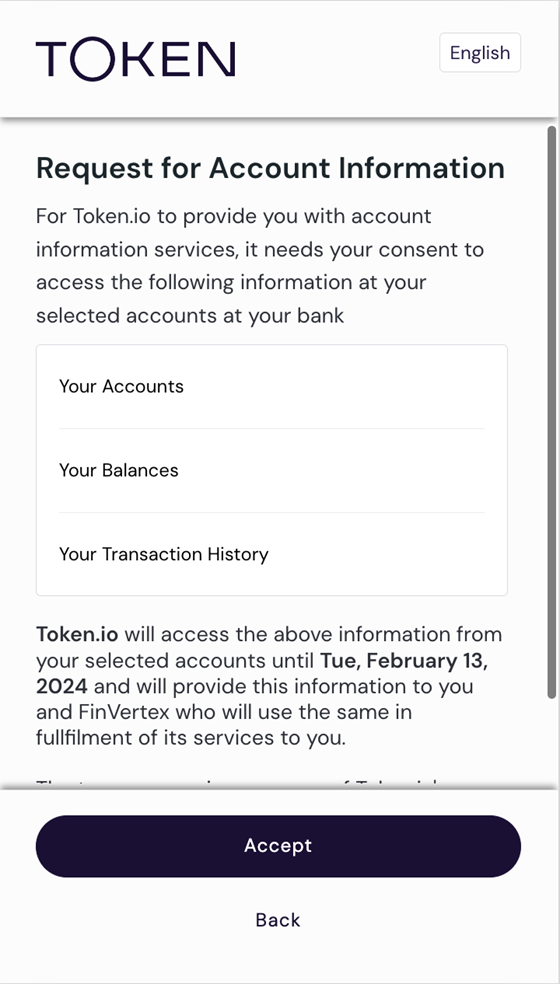
Token.io collects consent from the user.

  1. User -> Token.io - The user provides consent to Token.io.

If the selected bank uses the redirect flow, clicking on Accept will initiate the redirect to the user’s bank at this point.

  1. User completes authorization with bank

The user completes authorization with the bank using the appropriate method; redirect, embedded or decoupled.

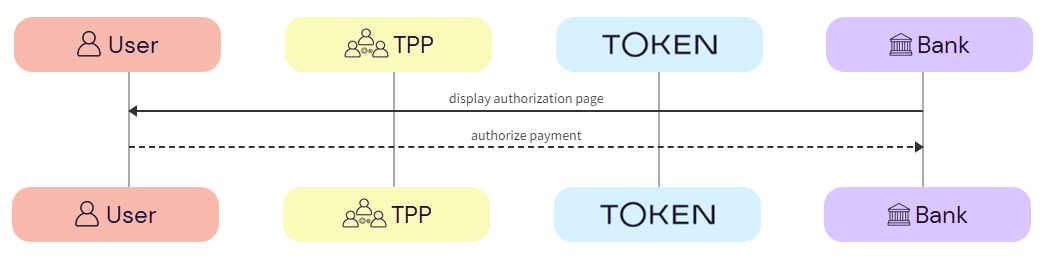
  1. Bank -> User - The bank displays the authorization page to the user.

  2. User -> Bank - The user authorizes the AIS request with the bank.

    See Hosted pages callback response for more information about the TPP callback response.

  1. TPP obtains access token

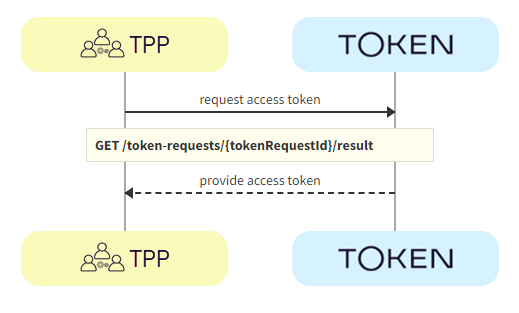
The TPP calls GET /token-requests/{tokenRequestId}/result to obtain the access token.

  1. TPP -> Token.io - The TPP calls Token.io using GET /token-requests/{tokenRequestId}/result to obtain the access token.

  2. Token.io -> TPP - Token.io responds with details of the access token.

  1. TPP obtains account IDs

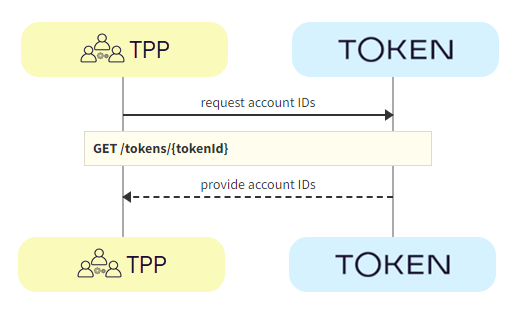
The TPP calls GET /tokens/{tokenId} using the access token ID obtained in the previous step. The response contains the account IDs used for calls to the endpoints in the next step.

  1. TPP -> Token.io - The TPP calls Token.io using GET /tokens/{tokenId} to obtain the account IDs to use to retrieve the AIS data.

  2. Token.io -> TPP - Token.io responds with details of the account IDs.

  1. TPP receives AIS data

Depending on your use case, you can use one or more of the Accounts endpoints to retrieve relevant account information.

See HTTP errors for information on HTTP error status codes.

Hosted Pages callback response

The following is an example callback response for AIS with Hosted Pages v1:

Example callback for AIS

{

    "request-id": "rq:bshuWJZ4JRuYPrrn5pvu5ALpRuA:5zKtXEAq",

    "token-id": "tt:7C5z19gjMir3pYHZnS39bXC3pJHP9vaEsiPHLNGZXWiG:3VMczyq7r7b6HwC"

    "signature": {

        "memberId": "m:2MsNiHgYNphSz2j9GbE83Yqr7iod:5zKtXEAq",

        "keyId": "1x7df4vuFUHYQCa7",

        "signature": "s4INmvY_d5GpYD21Vvma76mz5MpM___B2svn6RSS7fC5p1-WhNJjYQziD6wlw8Ab0bS-gvvGwaP8vYB2JGywBg"

    }

    "status": "PROCESSED",

    "state": "%7B%22innerState%22%3A%7B%22a%22%3A1%7D%7D"

}

The request-id is always returned in the callback for AIS.

token-id is not always returned, for example, if there is an error and the token isn't created, there will be no token-id, as shown below,

Example callback for AIS with error

{

    "error": "EXCEPTION_INITIATE_BANK_AUTH",

    "message": "INTERNAL: InitiateBankAuth failed for TokenRequest: rq:7oJUVi8s129JcYdzK1uGo2PTw81:5zKtXEAq due to INVALID_ARGUMENT: Expected username or OTP credential.",

    "request-id": "rq:7oJUVi8s129JcYdzK1uGo2PTw81:5zKtXEAq",

}

For Hosted Pages v1, the state is not returned, except in specific cases where this is flagged as a feature.

API-only integration

The following SCA methods can be handled using Token.io's API:

See Bank selection for information on selecting banks, mandatory fields and authentication models.

Redirect authentication flow

This section describes the API AIS integration where the TPP owns the full user experience.

See the Token.io API reference for details of the following endpoints:

Then use our Launchpad to test them.

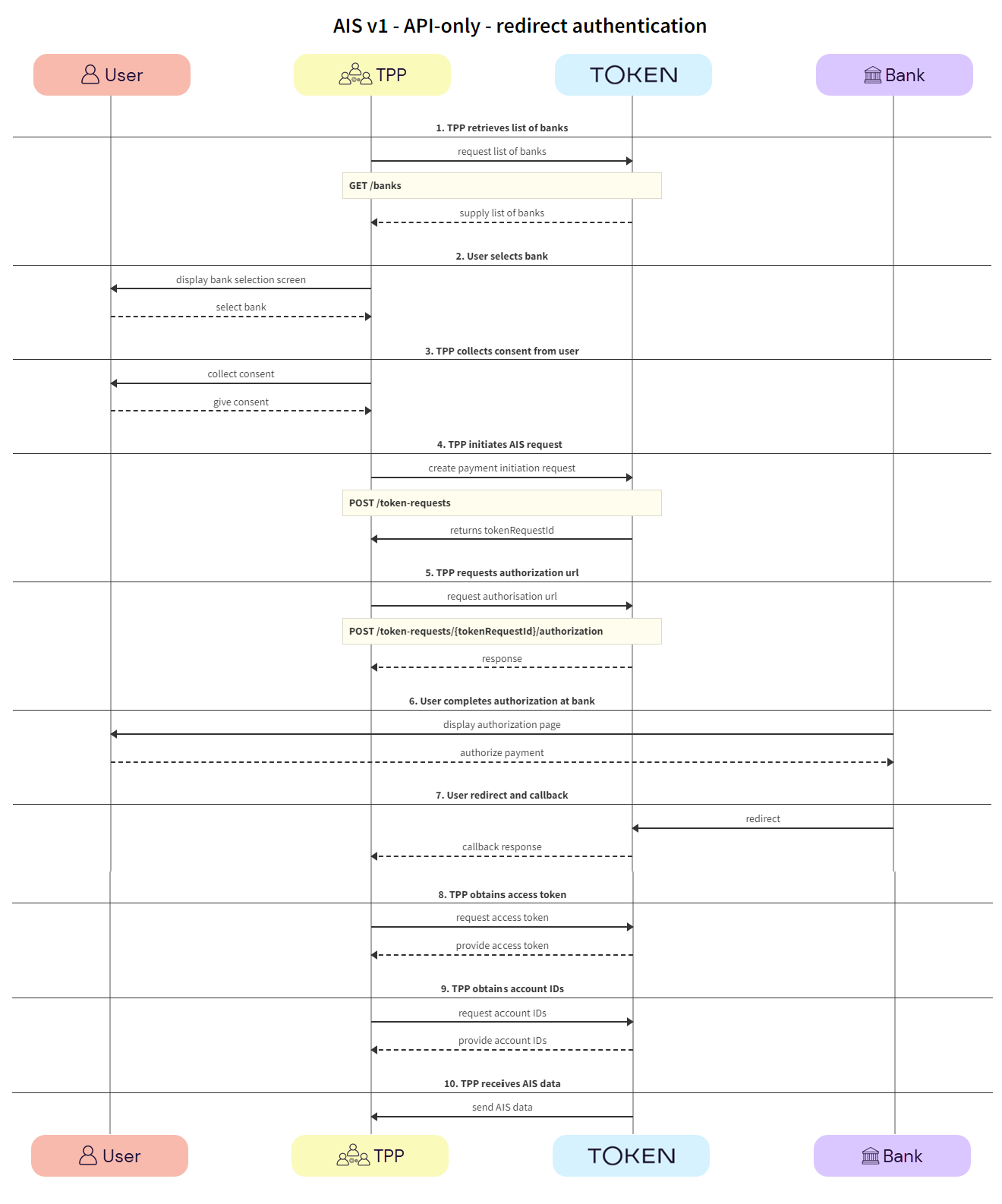
Click the image on the right to view a simplified swim lane diagram of the integration flow.

Details of the steps within the integration flow are shown below.

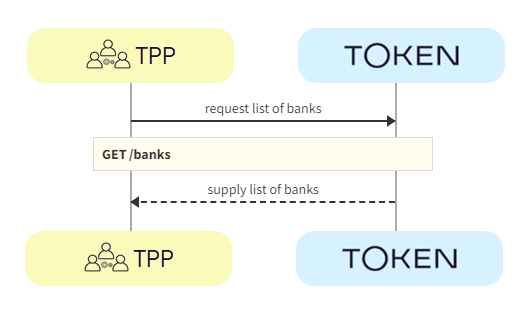
  1. TPP retrieves list of banks

TPPs retrieve the list of available banks using the GET /banks call.

We recommend that this step is performed once daily, outside any AIS request, e.g., at 11pm UTC, and that the result is cached.

In the GET /banks request, there are numerous filtering criteria you can add as parameters to narrow your query. As a minimum, you should filter by your member ID.

See Mandatory fields for information on which fields must be provided for a given bank to accept an AIS request.

  1. TPP -> Token.io - The TPP requests the list of banks from Token.io.

  1. Token.io -> TPP - Token.io supplies the list of banks to the TPP.

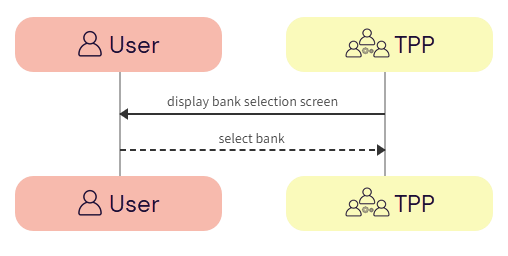
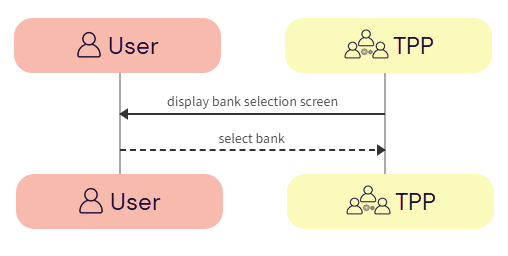
  1. User selects bank

The user selects the bank.

  1. TPP -> User - The TPP displays the bank selection screen.

  1. User -> TPP - The user selects the bank.

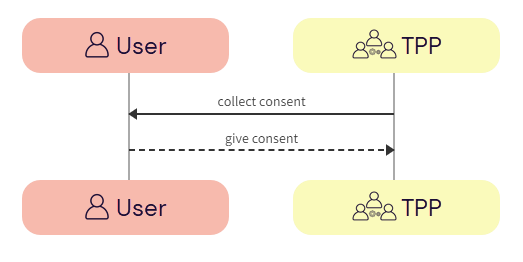
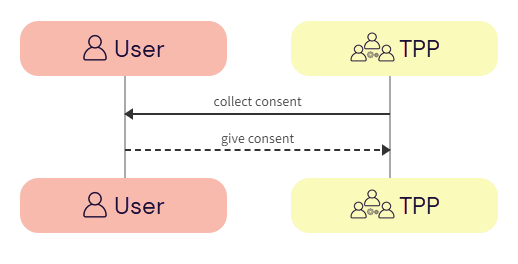
  1. TPP collects consent from user

The TPP collects consent from the user. For more information, see User consent collection.

  1. TPP -> User - The TPP initiates consent acceptance from the user.

  2. User -> TPP - The user gives consent to the TPP.

  1. TPP initiates AIS request

The TPP initiates the token request with Token.io using the POST /token-requests call. Token.io responds by acknowledging the details of the request.

  1. TPP -> Token.io - The TPP creates the token request using the POST /token-requests call.

  1. Token.io -> TPP - Token.io generates a response to the token request.

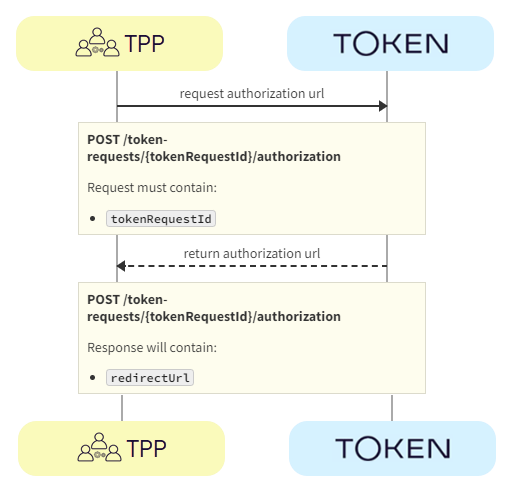
  1. TPP requests authorization URL

The TPP requests authorization using the POST /token-requests/{tokenRequestId}/authorization call. Token.io responds with the authorization URL.

  1. TPP -> Token.io - The TPP requests the bank authorization URL using the POST /token-requests/{tokenRequestId}/authorization call.

  2. Token.io -> TPP - Token.io returns the redirectUrl provided by the bank.

  1. User completes authorization with bank

The user completes authorization with the bank.

  1. Bank -> User - The bank displays the authorization page to the user.

  2. User -> Bank - The user authorizes the AIS request with the bank.

  1. User redirect and callback

The user is redirected and the TPP consumes the Token.io callback response.

  1. Bank -> Token.io - The bank redirects the user to Token.io.

  2. Token.io -> TPP - Token.io immediately redirects the user to the redirect URL provided by the TPP in the redirect URL parameter of the token-request call. The TPP then consumes the callback from Token.io.

    In the API-only integration with redirect authentication and TPP callback, only the request-id is returned in the callback response.

    If Token.io callback is in use, refer to Token.io callback response (API-only) for more details.

  1. TPP obtains access token

The TPP calls GET /token-requests/{tokenRequestId}/result to obtain the access token.

  1. TPP -> Token.io - The TPP calls Token.io using GET /token-requests/{tokenRequestId}/result to obtain the access token.

  2. Token.io -> TPP - Token.io responds with details of the access token.

  1. TPP obtains account IDs

The TPP calls GET /tokens/{tokenId} using the access token ID obtained in the previous step. The response contains the account IDs used for calls to the endpoints in the next step.

  1. TPP -> Token.io - The TPP calls Token.io using GET /tokens/{tokenId} to obtain the account IDs to use to retrieve the AIS data.

  2. Token.io -> TPP - Token.io responds with details of the account IDs.

  1. TPP receives AIS data

Depending on your use case, you can use one or more of the Accounts endpoints to retrieve relevant account information.

See HTTP errors for information on HTTP error status codes.

Other user authentication methods

Some banks require additional credential information for successful authentication and authorization with the bank:

Embedded authentication flow

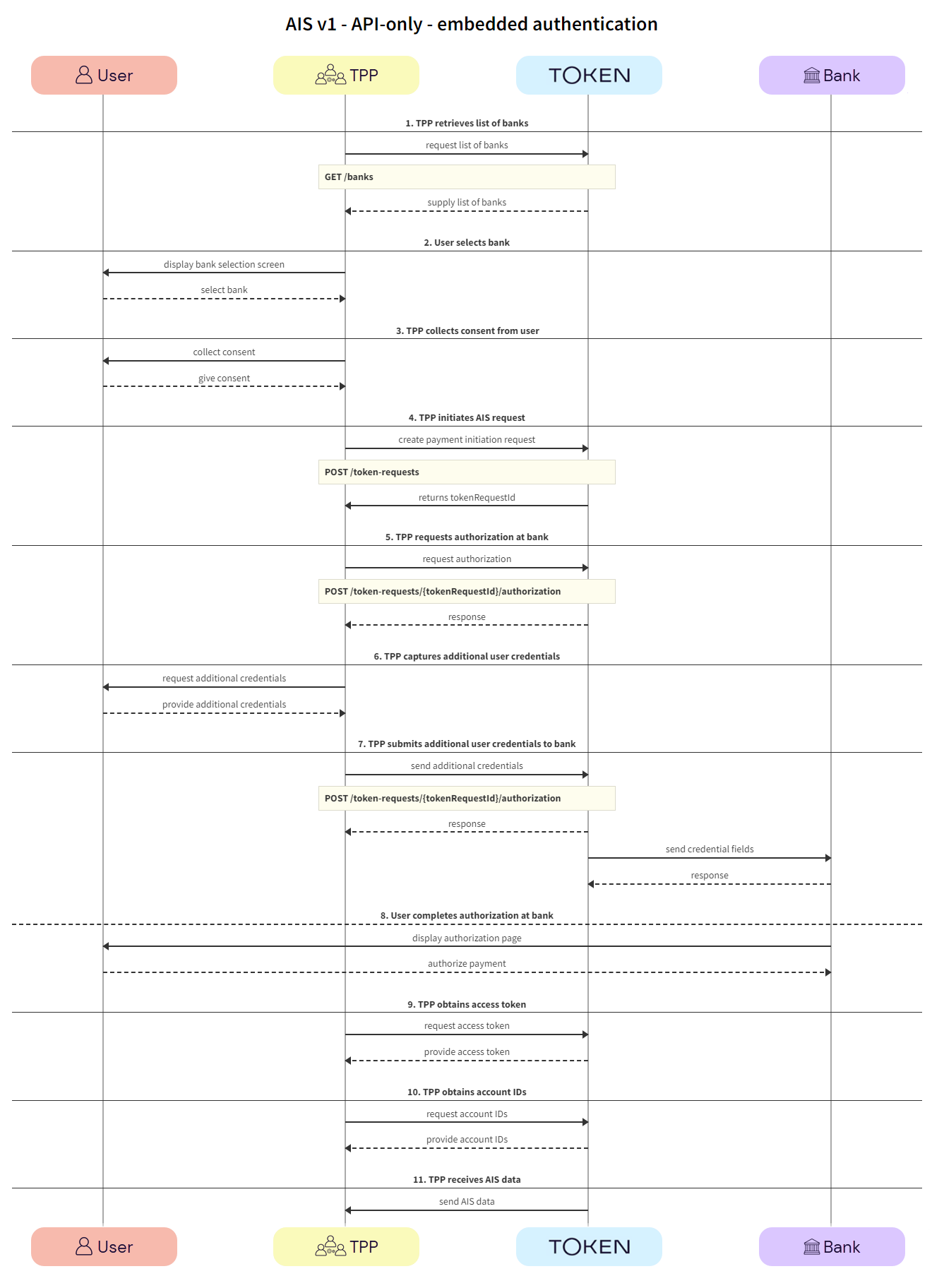
In most cases, banks will redirect users to their website or mobile app. However, there are some scenarios where the bank requires the TPP to capture the fields needed for user authentication. This experience is referred to as embedded authentication.

See the Token.io API reference for details of the following endpoints:

Then use our Launchpad to test them.

Click the image on the right to view a simplified swim lane diagram of the integration flow.

Details of the steps within the integration flow are shown below.

  1. TPP retrieves list of banks

TPPs retrieve the list of available banks using the GET /banks call.

We recommend that this step is performed once daily, outside any AIS request, e.g., at 11pm UTC, and that the result is cached.

In the GET /banks request, there are numerous filtering criteria you can add as parameters to narrow your query. As a minimum, you should filter by your member ID.

See Mandatory fields for information on which fields must be provided for a given bank to accept an AIS request.

  1. TPP -> Token.io - The TPP requests the list of banks from Token.io.

  1. Token.io -> TPP - Token.io supplies the list of banks to the TPP.

  1. User selects bank

The user selects the bank.

  1. TPP -> User - The TPP displays the bank selection screen.

  1. User -> TPP - The user selects the bank.

  1. TPP collects consent from user

The TPP collects consent from the user. For more information see User consent collection.

  1. TPP -> User - The TPP initiates consent acceptance from the user.

  2. User -> TPP - The user gives consent to the TPP.

  1. TPP initiates AIS request

The TPP initiates the token request with Token.io using the POST /token-requests call. Token.io responds by acknowledging the details of the request.

  1. TPP -> Token.io - The TPP creates the token request using the POST /token-requests call.

  1. Token.io -> TPP - Token.io generates a response to the token request.

  1. TPP requests authorization with bank

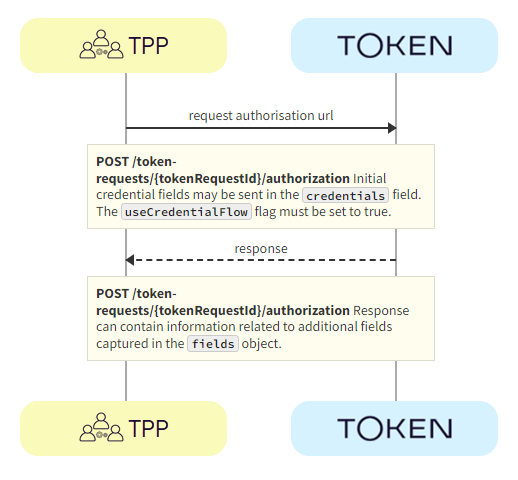
The TPP requests authorization using the POST /token-requests/{tokenRequestId}/authorization call. Token.io responds with the fields object, containing the initial fields required for the embedded flow.

  1. TPP -> Token.io - The TPP requests the authorization URL using the POST /token-requests/{tokenRequestId}/authorization call. Initial credentialFields from the response to GET /banks may be sent in the credentials field. The useCredentialFlow flag must be set to true. When this flag is set to true, the credential flow is triggered. The credentials map must be populated if required by the bank (see the credentialFields in the response to GET /banks), otherwise empty credentials are used.

The useCredentialFlow field should not be confused with the useWebAppCredentialsFlow.

When useWebAppCredentialsFlow is set to true and the bank's flow includes embedded steps, these steps are handled by Token.io's HP, rather than by the customer's own pages.

See the POST /token-requests/{tokenRequestId}/authorization request for more details.

  1. Token.io -> TPP - Token.io returns the fields to be used in the embedded flow. The response can contain information relating to additional fields to be captured in the fields object.

  1. TPP captures additional user credentials

The TPP captures additional credentials from the user.

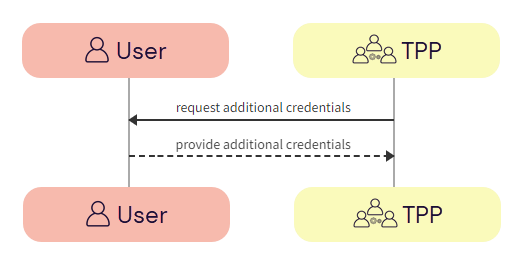
  1. TPP -> User - The TPP requests additional credentials from the user.

  1. User -> TPP - The user provides additional credentials to the TPP.

  1. TPP submits additional user credentials to bank

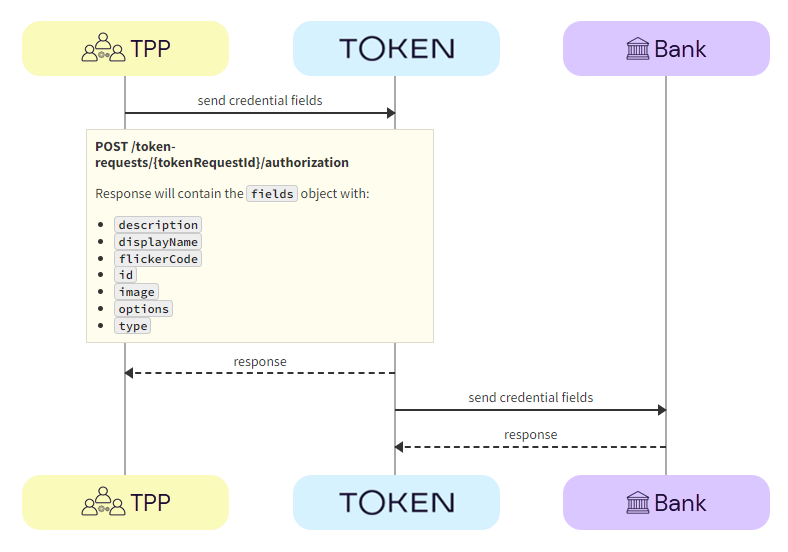
Using the POST /token-requests/{tokenRequestId}/authorization call, the TPP submits the additional credentials to the bank via Token.io.

  1. TPP -> Token.io - The TPP sends additional credentials using the POST /token-requests/{tokenRequestId}/authorization call.

  2. Token.io -> TPP - Token.io acknowledges receipt of the additional credentials and requests more, if required.

  3. Token.io -> Bank - Token.io sends this additional information to the bank.

  4. Bank -> Token.io - The bank confirms receipt of the information from Token.io.

  1. User completes authorization with bank

The user completes authorization with the bank.

This is an optional step. For some banks, the user may not be redirected to the bank page for completing authorization.

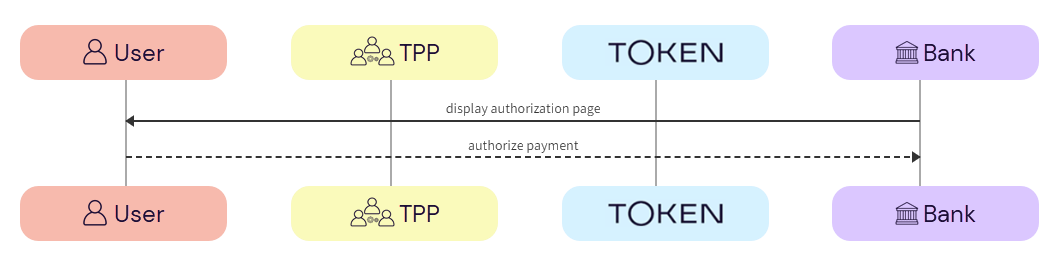
  1. Bank -> User - The bank displays the authorization page to the user.

  2. User -> Bank - The user authorizes the AIS request with the bank.

  1. TPP obtains access token

The TPP calls GET /token-requests/{tokenRequestId}/result to obtain the access token.

  1. TPP -> Token.io - The TPP calls Token.io using GET /token-requests/{tokenRequestId}/result to obtain the access token.

  2. Token.io -> TPP - Token.io responds with details of the access token.

  1. TPP obtains account IDs

The TPP calls GET /tokens/{tokenId} using the access token ID obtained in the previous step. The response contains the account IDs used for calls to the endpoints in the next step.

  1. TPP -> Token.io - The TPP calls Token.io using GET /tokens/{tokenId} to obtain the account IDs to use to retrieve the AIS data.

  2. Token.io -> TPP - Token.io responds with details of the account IDs.

  1. TPP receives AIS data

Depending on your use case, you can use one or more of the Accounts endpoints to retrieve relevant account information.

See HTTP errors for information on HTTP error status codes.

Decoupled authentication flow

With decoupled authentication the bank carries out an additional form of authentication external to the API AIS integration. This model allows for a number of solutions, for example using a mobile phone to authenticate, or using biometrics for authentication through a separate terminal, such as a point of sale (POS) device.

See the Token.io API reference for details of the following endpoints:

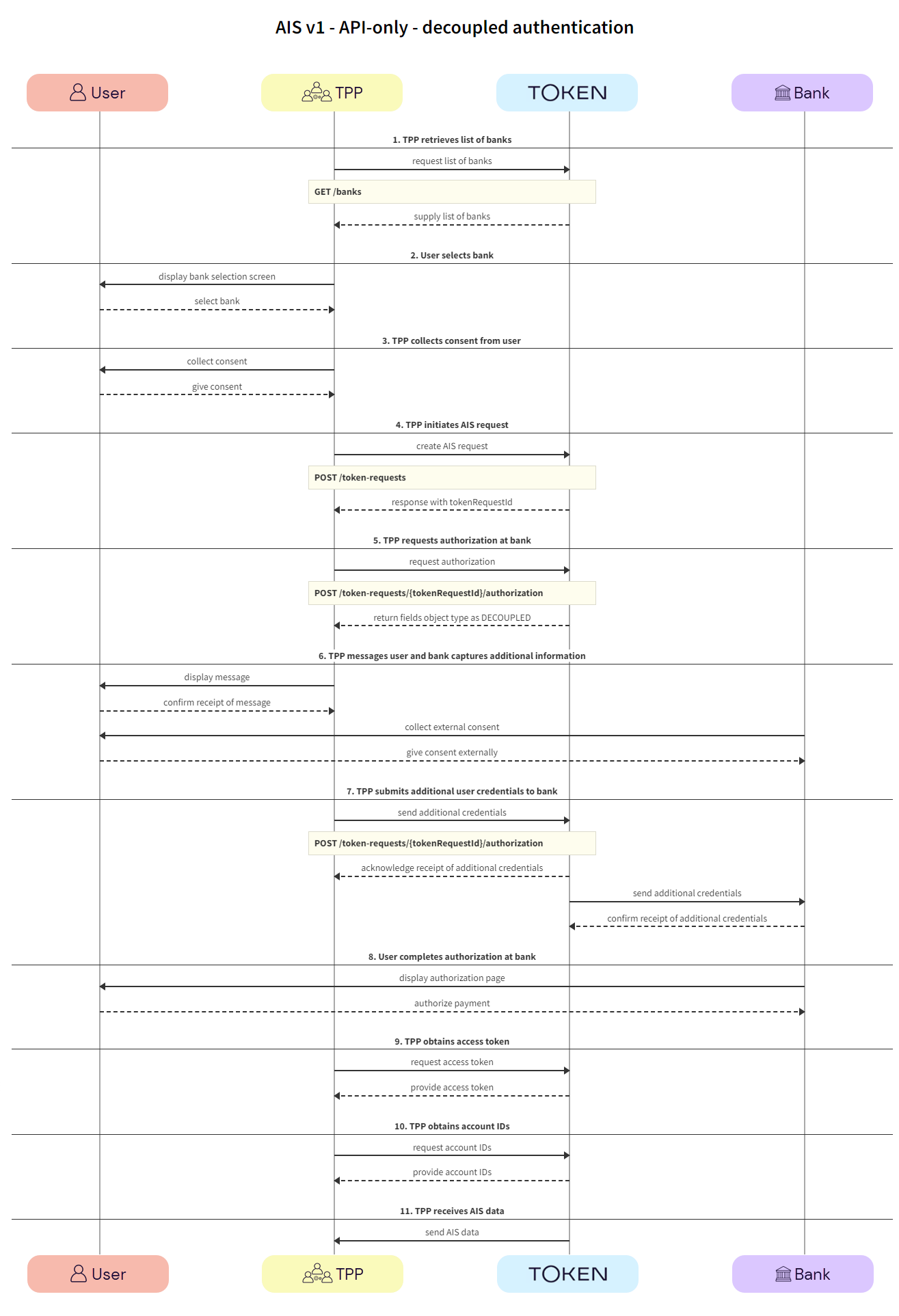
    Click the image on the right to view a simplified swim lane diagram of the integration flow.

    Details of the steps within the integration flow are shown below.

  1. TPP retrieves list of banks

The TPP retrieves the list of available banks using the GET /banks call.

We recommend that this step is performed once daily, outside any AIS request, e.g., at 11pm UTC, and that the result is cached.

In the GET /banks request, there are numerous filtering criteria you can add as parameters to narrow your query. As a minimum, you should filter by your member ID.

See Mandatory fields for information on which fields must be provided for a given bank to accept an AIS request.

  1. TPP -> Token.io - The TPP requests the list of banks from Token.io.

  1. Token.io -> TPP - Token.io supplies the list of banks to the TPP.

  1. User selects bank

The user selects the bank.

  1. TPP -> User - The TPP displays the bank selection screen.

  1. User -> TPP - The user selects the bank.

  1. TPP collects consent from user

The TPP collects consent from the user. For more information see User consent collection.

  1. TPP -> User - The TPP initiates consent acceptance from the user.

  2. User -> TPP - The user gives consent to the TPP.

  1. TPP initiates AIS request

The TPP initiates the token request with Token.io using the POST /token-requests call. Token.io responds by acknowledging the details of the request.

  1. TPP -> Token.io - The TPP creates the token request using the POST /token-requests call.

  1. Token.io -> TPP - Token.io generates a response to the token request.

  1. TPP requests authorization with bank

The TPP requests authorization using the POST /token-requests/{tokenRequestId}/authorization call. Token.io responds with the fields object, containing the initial fields. In the fields object the type is returned as DECOUPLED.

  1. TPP -> Token.io - The TPP requests the authorization URL using the POST /token-requests/{tokenRequestId}/authorization call. Initial credentialFields from the response to GET /banks may be sent in the credentials field. The useCredentialFlow flag must be set to true. When this flag is set to true, the credential flow is triggered. The credentials map must be populated if required by the bank (see the credentialFields in the response to GET /banks), otherwise empty credentials are used.

The useCredentialFlow field should not be confused with the useWebAppCredentialsFlow.

When useWebAppCredentialsFlow is set to true and the bank's flow includes embedded steps, these steps are handled by Token.io's HP, rather than by the customer's own pages.

See the POST /token-requests/{tokenRequestId}/authorization request for more details.

  1. Token.io -> TPP - Token.io returns the fields object with type set to DECOUPLED and the message to be displayed to the user.

    See Decoupled callback response for more information on the TPP callback response.

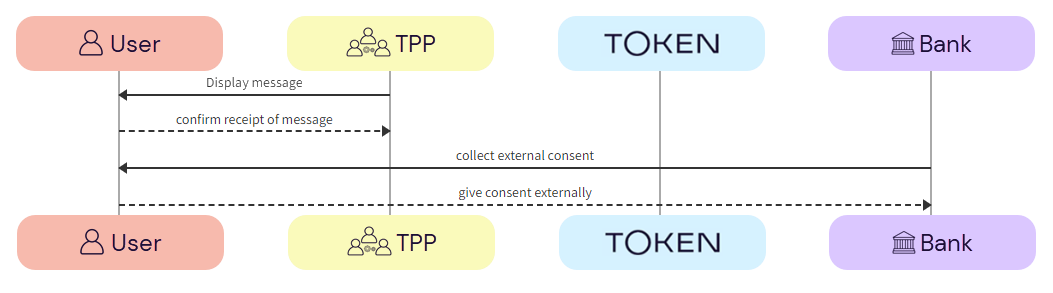
  1. TPP messages user and bank captures additional information

The TPP is expected to show the message to the user and to wait for confirmation of receipt before proceeding to the next step.

The bank will then challenge the user to authenticate themselves outside the API AIS request flow. This could be in the form of an SMS to the user’s registered phone number with the bank, or biometrics through a POS device.

  1. TPP -> User - The TPP displays the message to the user.

  2. User -> TPP - The user confirms receipt of the message.

  3. Bank -> User - The bank requests additional authentication from the user, through an external source, e.g., SMS. POS.

  4. User -> Bank - The user provides additional authentication credentials to the bank via an external source.

  1. TPP submits additional user credentials to bank

Using the POST /token-requests/{tokenRequestId}/authorization call, the TPP submits the additional credentials to the bank via Token.io.

  1. TPP -> Token.io - The TPP sends additional credentials using the POST /token-requests/{tokenRequestId}/authorization call.

  2. Token.io -> TPP - Token.io acknowledges receipts of the additional credentials and requests more, if required.

  3. Token.io -> Bank - Token.io sends this additional information to the bank.

  4. Bank -> Token.io - The bank confirms receipt of the information from Token.io.

  1. User completes authorization with bank

The user completes authorization with the bank.

  1. Bank -> User - The bank displays the authorization page to the user.

  2. User -> Bank - The user authorizes the AIS request with the bank.

  1. TPP obtains access token

The TPP calls GET /token-requests/{tokenRequestId}/result to obtain the access token.

  1. TPP -> Token.io - The TPP calls Token.io using GET /token-requests/{tokenRequestId}/result to obtain the access token.

  2. Token.io -> TPP - Token.io responds with details of the access token.

  1. TPP obtains account IDs

The TPP calls GET /tokens/{tokenId} using the access token ID obtained in the previous step. The response contains the account IDs used for calls to the endpoints in the next step.

  1. TPP -> Token.io - The TPP calls Token.io using GET /tokens/{tokenId} to obtain the account IDs to use to retrieve the AIS data.

  2. Token.io -> TPP - Token.io responds with details of the account IDs.

  1. TPP receives AIS data

Depending on your use case, you can use one or more of the Accounts endpoints to retrieve relevant account information.

See HTTP errors for information on HTTP error status codes.

Callback for API-only integration

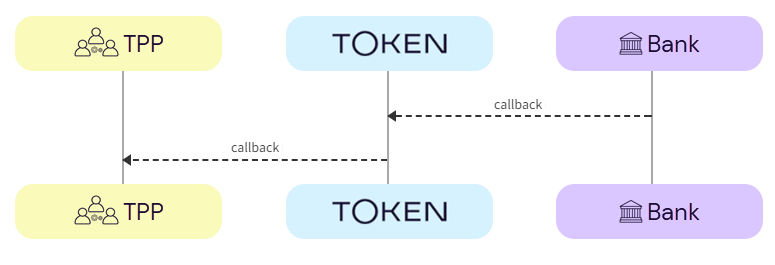
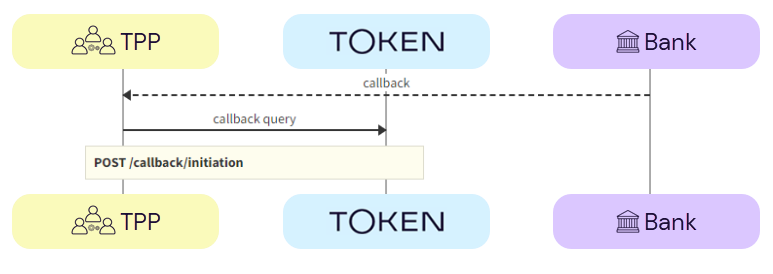
For the API-only integration callback, the bank calls back to Token.io and Token.io calls back to the TPP - as shown here:

For API integrations there are two types of callback, depending on the your setup:

Token.io callback

AIS initiation starts from the POST /token-requests/{tokenRequestId}/authorization endpoint with bank authorization, using a given token request ID. If you've redirected the user to the redirect URL provided in the response for the POST /token-requests/{tokenRequestId}/authorization call, the bank will call back to Token.io. Token.io will process the callback and call back to you. The callback parameters normally include the token request ID, but if this is followed by an embedded or decoupled step, additional credential-fields will be returned.

In the callback response you may receive:

Callback for redirect authentication flow

The callback for redirect authentication flow contains the request-id and the request_id. You won't receive any additional credentials.

Example callback for Payments v1 API-only redirect authentication flow

https://tpp.callback.url?request-id=rq:3SVzgJtzu2DvaZSgRGznpdkn
T3dq:5zKtXEAq&request_id=rq:3SVzgJtzu2DvaZSgRGznpdknT3dq:5zKtXEAq


or in JSON format:

{

    "request-id": "rq:3SVzgJtzu2DvaZSgRGznpdknT3dq:5zKtXEAq",

    "request_id": "rq:3SVzgJtzu2DvaZSgRGznpdknT3dq:5zKtXEAq"

}

After this, you should call GET /token-requests/{tokenRequestId}/result to get the authorization result.

If the callback is unsuccessful, a gRPC code is displayed:

Example callback for Payments v1 API-only redirect authentication flow with error

https://tpp.callabck.url?request-id=rq:3SVzgJtzu2DvaZSgRGznpdknT
3dq:5zKtXEAq&request_id=rq:3SVzgJtzu2DvaZSgRGznpdknT3dq:5zKtXEAq
&trace-id=idm45Ag1X8D8Kvdw&error=14&message=Bank+is+unavailable


or in JSON format:

{

    "request-id": "rq:3SVzgJtzu2DvaZSgRGznpdknT3dq:5zKtXEAq",

    "request_id": "rq:3SVzgJtzu2DvaZSgRGznpdknT3dq:5zKtXEAq"

    "trace-id": "idm45Ag1X8D8Kvdw",

    "error": 14,

    "message": "Bank is unavailable"

}

Callback for embedded authentication flow

If more credentials are required, for example if you're using an embedded authentication flow, additional credentials will be returned in the callback URL in the credential-fields query parameter:

Example callback for Payments v1 API-only embedded authentication flow

https://tpp.callabck.url/?request-id=rq:43hA2P34BC9a1jwYmyjmDYBr
TETA:5zKtXEAq&request_id=rq:43hA2P34BC9a1jwYmyjmDYBrTETA:5zKtXEA
q&credential-fields=eyJmaWVsZHMiOlt7ImRlc2NyaXB0aW9uIjoiT25lLXRp
bWUgcGFzc2NvZGUiLCJpZCI6Im90cCJ9XX0


or in JSON format:

{

    "request-id": "rq:43hA2P34BC9a1jwYmyjmDYBrTETA:5zKtXEAq",

    "request_id": "rq:43hA2P34BC9a1jwYmyjmDYBrTETA:5zKtXEAq",

    "credential-fields": "eyJmaWVsZHMiOlt7ImRlc2NyaXB0aW9uIjoiT
25lLXRpbWUgcGFzc2NvZGUiLCJpZCI6Im90cCJ9XX0"

}

In this example, once you base64-decode the value of credential-fields, you'll see:

Example base64-decoded credential-fields for Payments v1 embedded authentication flow

{

    "fields": [

        {

        "description": "One-time passcode",

        "id": "otp"

        }

    ]

}

The decoded credentials have the same structure as credentials returned in the initiation response.

Callback for decoupled authentication flow

If a decoupled authentication step is required after the callback, additional credentials will be returned in the callback URL in the credential-fields query parameter:

Example callback for Payments v1 API-only decoupled authentication flow

https://tpp.callabck.url/?request-id=rq:3smDYdTPr4gejc9g6MrHFnAA
ssg8:5zKtXEAq&request_id=rq:3smDYdTPr4gejc9g6MrHFnAAssg8:5zKtXEA
q&credential-fields=eyJmaWVsZHMiOlt7ImRlc2NyaXB0aW9uIjoiUGxlYXNl
LCBhdXRob3JpemUgcGF5bWVudCB1c2luZyBtb2JpbGUgZGV2aWNlLiIsInR5cGUi
OiJERUNPVVBMRUQifV19


or in JSON format:

{

    "request-id": "rq:3smDYdTPr4gejc9g6MrHFnAAssg8:5zKtXEAq",

    "request_id": "rq:3smDYdTPr4gejc9g6MrHFnAAssg8:5zKtXEAq",

    "credential-fields": eyJmaWVsZHMiOlt7ImRlc2NyaXB0aW9uIjoiUGxl
YXNlLCBhdXRob3JpemUgcGF5bWVudCB1c2luZyBtb2JpbGUgZGV2aWNlLiIsInR5c
GUiOiJERUNPVVBMRUQifV19"

}

In this example, once you base64-decode the value of credential-fields, you'll see:

Example base64-decoded credential-fields for Payments v1 decoupled authentication flow

{

    "fields": [

        {

        "description": "Please, authorize AIS request using mobile device.",

        "type": "DECOUPLED"

        }

    ]

}

TPP callback

If your configuration can handle the callback, you'll make a POST /callback/initiation call to Token.io to process the callback query. If more credentials are required after the callback, they'll be returned to you in the callback URL in the credential-fields query parameter.

In the TPP callback response you may receive:

ON THIS PAGE

Data (Account Information Services)

Data, powered by Account Information Services (AIS), allows users to grant consent for their bank to share balance, transactions and/or account details associated with their bank account with a third party in order to enable a specified service. Examples of AIS use cases are as follows:

  • Creditworthiness assessment - a user may wish to share their bank transactions with a credit card provider during an application process, in order for the provider to analyse their income and expenditure and offer them a preferable credit limit.

  • Account ownership verification - a user may wish to share their bank account details with a service provider, such as a gaming website or a credit card provider, in order to simplify the onboarding process. These merchants must verify that users’ associated accounts are indeed owned by the user that is setting up the account, and AIS enables a frictionless way of instructing a bank to immutably share this information with a merchant, thus satisfying Know Your Customer requirements.

  • Autofill - instead of manually typing in their bank details, a user may complete an AIS journey to fill in their bank account details in a way that is guaranteed to be error-free.

  • Personal financial management - a user may wish to share their bank transactions with a fintech app that is able to analyze the income and expenditure to offer them budgeting advice, categorisation and recommendations on how to manage their finances.

  • Balance display - a user may wish to see their bank balance within a payment wallet, so that they have a real-time indication of whether they have sufficient funds to make a particular transaction.

Under Open Banking (OB) protocols, banks allow TPPs access to a customer's account data only if the customer (user) explicitly gives consent to the bank to allow such access. Token.io's AIS ensures that all OB protocols are met.

Integration to Token.io's AIS varies depending on whether you use Token.io's Hosted Pages (HP) or the API-only integration.

These integration options are detailed below:

See Hosted Pages v1 for more information on how to implement the Hosted Pages for AIS.

  • API-only integration – the TPP owns the full user experience, including bank selection logic, collecting mandatory fields, and embedded and decoupled authorization flows.

Hosted Pages (HP) integration

Token.io offers the Redirect integration HP option for Data (AIS).

The Redirect integration directs the user from your website to open Token.io's HP in a new tab, using a redirect URL. Redirect integration for Data (AIS) is available for HP v1.

Redirect integration (HP v1)

This section describes the integration where the TPP uses Token.io's HP for some of the steps in the user journey. Authentication methods will be handled entirely by the HP.

Click the image on the right to view a simplified swim lane diagram of the integration flow.

Details of the steps within the integration flow are shown below.

  1. TPP initiates AIS request

The TPP initiates the AIS request with Token.io using the POST /token-requests call. Token.io responds by acknowledging the details of the request.

  1. TPP -> Token.io - The TPP creates the AIS request using the POST /token-requests call.

  1. Token.io -> TPP - Token.io generates a response to the AIS request.

  1. TPP redirects user to Token.io

The TPP redirects the user to the Token.io HP.

  1. TPP -> Token.io - The TPP redirects the user to the Token.io HP at https://{{base-url}}/app/request-token/{tokenRequestId}.

    See Hosted Pages for details on how to construct the redirect URL.

  1. User selects bank

The user selects the bank from the Token.io HP.

  1. Token.io -> User - Token.io displays the bank selection screen.

You can limit the countries available for selection in the HP by sending the countries parameter in the POST /token-requests request. If you limit it to just one, it effectively becomes pre-populated.

You can also pre-populate the country in the HP by including the country code in the HP URL.

See Token.io Hosted Pages v1 for more information.

  1. User -> Token.io - The user selects the bank.

  1. Token.io collects consent from user

Token.io collects consent from the user.

  1. User -> Token.io - The user provides consent to Token.io.

If the selected bank uses the redirect flow, clicking on Accept will initiate the redirect to the user’s bank at this point.

  1. User completes authorization with bank

The user completes authorization with the bank using the appropriate method; redirect, embedded or decoupled.

  1. Bank -> User - The bank displays the authorization page to the user.

  2. User -> Bank - The user authorizes the AIS request with the bank.

    See Hosted pages callback response for more information about the TPP callback response.

  1. TPP obtains access token

The TPP calls GET /token-requests/{tokenRequestId}/result to obtain the access token.

  1. TPP -> Token.io - The TPP calls Token.io using GET /token-requests/{tokenRequestId}/result to obtain the access token.

  2. Token.io -> TPP - Token.io responds with details of the access token.

  1. TPP obtains account IDs

The TPP calls GET /tokens/{tokenId} using the access token ID obtained in the previous step. The response contains the account IDs used for calls to the endpoints in the next step.

  1. TPP -> Token.io - The TPP calls Token.io using GET /tokens/{tokenId} to obtain the account IDs to use to retrieve the AIS data.

  2. Token.io -> TPP - Token.io responds with details of the account IDs.

  1. TPP receives AIS data

Depending on your use case, you can use one or more of the Accounts endpoints to retrieve relevant account information.

See HTTP errors for information on HTTP error status codes.

Hosted Pages callback response

The following is an example callback response for AIS with Hosted Pages v1:

Example callback for AIS

{

    "request-id": "rq:bshuWJZ4JRuYPrrn5pvu5ALpRuA:5zKtXEAq",

    "token-id": "tt:7C5z19gjMir3pYHZnS39bXC3pJHP9vaEsiPHLNGZXWiG:3VMczyq7r7b6HwC"

    "signature": {

        "memberId": "m:2MsNiHgYNphSz2j9GbE83Yqr7iod:5zKtXEAq",

        "keyId": "1x7df4vuFUHYQCa7",

        "signature": "s4INmvY_d5GpYD21Vvma76mz5MpM___B2svn6RSS7fC5p1-WhNJjYQziD6wlw8Ab0bS-gvvGwaP8vYB2JGywBg"

    }

    "status": "PROCESSED",

    "state": "%7B%22innerState%22%3A%7B%22a%22%3A1%7D%7D"

}

The request-id is always returned in the callback for AIS.

token-id is not always returned, for example, if there is an error and the token isn't created, there will be no token-id, as shown below,

Example callback for AIS with error

{

    "error": "EXCEPTION_INITIATE_BANK_AUTH",

    "message": "INTERNAL: InitiateBankAuth failed for TokenRequest: rq:7oJUVi8s129JcYdzK1uGo2PTw81:5zKtXEAq due to INVALID_ARGUMENT: Expected username or OTP credential.",

    "request-id": "rq:7oJUVi8s129JcYdzK1uGo2PTw81:5zKtXEAq",

}

For Hosted Pages v1, the state is not returned, except in specific cases where this is flagged as a feature.

API-only integration

The following SCA methods can be handled using Token.io's API:

See Bank selection for information on selecting banks, mandatory fields and authentication models.

Redirect authentication flow

This section describes the API AIS integration where the TPP owns the full user experience.

See the Token.io API reference for details of the following endpoints:

Then use our Launchpad to test them.

Click the image on the right to view a simplified swim lane diagram of the integration flow.

Details of the steps within the integration flow are shown below.

  1. TPP retrieves list of banks

TPPs retrieve the list of available banks using the GET /banks call.

We recommend that this step is performed once daily, outside any AIS request, e.g., at 11pm UTC, and that the result is cached.

In the GET /banks request, there are numerous filtering criteria you can add as parameters to narrow your query. As a minimum, you should filter by your member ID.

See Mandatory fields for information on which fields must be provided for a given bank to accept an AIS request.

  1. TPP -> Token.io - The TPP requests the list of banks from Token.io.

  1. Token.io -> TPP - Token.io supplies the list of banks to the TPP.

  1. User selects bank

The user selects the bank.

  1. TPP -> User - The TPP displays the bank selection screen.

  1. User -> TPP - The user selects the bank.

  1. TPP collects consent from user

The TPP collects consent from the user. For more information, see User consent collection.

  1. TPP -> User - The TPP initiates consent acceptance from the user.

  2. User -> TPP - The user gives consent to the TPP.

  1. TPP initiates AIS request

The TPP initiates the token request with Token.io using the POST /token-requests call. Token.io responds by acknowledging the details of the request.

  1. TPP -> Token.io - The TPP creates the token request using the POST /token-requests call.

  1. Token.io -> TPP - Token.io generates a response to the token request.

  1. TPP requests authorization URL

The TPP requests authorization using the POST /token-requests/{tokenRequestId}/authorization call. Token.io responds with the authorization URL.

  1. TPP -> Token.io - The TPP requests the bank authorization URL using the POST /token-requests/{tokenRequestId}/authorization call.

  2. Token.io -> TPP - Token.io returns the redirectUrl provided by the bank.

  1. User completes authorization with bank

The user completes authorization with the bank.

  1. Bank -> User - The bank displays the authorization page to the user.

  2. User -> Bank - The user authorizes the AIS request with the bank.

  1. User redirect and callback

The user is redirected and the TPP consumes the Token.io callback response.

  1. Bank -> Token.io - The bank redirects the user to Token.io.

  2. Token.io -> TPP - Token.io immediately redirects the user to the redirect URL provided by the TPP in the redirect URL parameter of the token-request call. The TPP then consumes the callback from Token.io.

    In the API-only integration with redirect authentication and TPP callback, only the request-id is returned in the callback response.

    If Token.io callback is in use, refer to Token.io callback response (API-only) for more details.

  1. TPP obtains access token

The TPP calls GET /token-requests/{tokenRequestId}/result to obtain the access token.

  1. TPP -> Token.io - The TPP calls Token.io using GET /token-requests/{tokenRequestId}/result to obtain the access token.

  2. Token.io -> TPP - Token.io responds with details of the access token.

  1. TPP obtains account IDs

The TPP calls GET /tokens/{tokenId} using the access token ID obtained in the previous step. The response contains the account IDs used for calls to the endpoints in the next step.

  1. TPP -> Token.io - The TPP calls Token.io using GET /tokens/{tokenId} to obtain the account IDs to use to retrieve the AIS data.

  2. Token.io -> TPP - Token.io responds with details of the account IDs.

  1. TPP receives AIS data

Depending on your use case, you can use one or more of the Accounts endpoints to retrieve relevant account information.

See HTTP errors for information on HTTP error status codes.

Other user authentication methods

Some banks require additional credential information for successful authentication and authorization with the bank:

Embedded authentication flow

In most cases, banks will redirect users to their website or mobile app. However, there are some scenarios where the bank requires the TPP to capture the fields needed for user authentication. This experience is referred to as embedded authentication.

See the Token.io API reference for details of the following endpoints:

Then use our Launchpad to test them.

Click the image on the right to view a simplified swim lane diagram of the integration flow.

Details of the steps within the integration flow are shown below.

  1. TPP retrieves list of banks

TPPs retrieve the list of available banks using the GET /banks call.

We recommend that this step is performed once daily, outside any AIS request, e.g., at 11pm UTC, and that the result is cached.

In the GET /banks request, there are numerous filtering criteria you can add as parameters to narrow your query. As a minimum, you should filter by your member ID.

See Mandatory fields for information on which fields must be provided for a given bank to accept an AIS request.

  1. TPP -> Token.io - The TPP requests the list of banks from Token.io.

  1. Token.io -> TPP - Token.io supplies the list of banks to the TPP.

  1. User selects bank

The user selects the bank.

  1. TPP -> User - The TPP displays the bank selection screen.

  1. User -> TPP - The user selects the bank.

  1. TPP collects consent from user

The TPP collects consent from the user. For more information see User consent collection.

  1. TPP -> User - The TPP initiates consent acceptance from the user.

  2. User -> TPP - The user gives consent to the TPP.

  1. TPP initiates AIS request

The TPP initiates the token request with Token.io using the POST /token-requests call. Token.io responds by acknowledging the details of the request.

  1. TPP -> Token.io - The TPP creates the token request using the POST /token-requests call.

  1. Token.io -> TPP - Token.io generates a response to the token request.

  1. TPP requests authorization with bank

The TPP requests authorization using the POST /token-requests/{tokenRequestId}/authorization call. Token.io responds with the fields object, containing the initial fields required for the embedded flow.

  1. TPP -> Token.io - The TPP requests the authorization URL using the POST /token-requests/{tokenRequestId}/authorization call. Initial credentialFields from the response to GET /banks may be sent in the credentials field. The useCredentialFlow flag must be set to true. When this flag is set to true, the credential flow is triggered. The credentials map must be populated if required by the bank (see the credentialFields in the response to GET /banks), otherwise empty credentials are used.

The useCredentialFlow field should not be confused with the useWebAppCredentialsFlow.

When useWebAppCredentialsFlow is set to true and the bank's flow includes embedded steps, these steps are handled by Token.io's HP, rather than by the customer's own pages.

See the POST /token-requests/{tokenRequestId}/authorization request for more details.

  1. Token.io -> TPP - Token.io returns the fields to be used in the embedded flow. The response can contain information relating to additional fields to be captured in the fields object.

  1. TPP captures additional user credentials

The TPP captures additional credentials from the user.

  1. TPP -> User - The TPP requests additional credentials from the user.

  1. User -> TPP - The user provides additional credentials to the TPP.

  1. TPP submits additional user credentials to bank

Using the POST /token-requests/{tokenRequestId}/authorization call, the TPP submits the additional credentials to the bank via Token.io.

  1. TPP -> Token.io - The TPP sends additional credentials using the POST /token-requests/{tokenRequestId}/authorization call.

  2. Token.io -> TPP - Token.io acknowledges receipt of the additional credentials and requests more, if required.

  3. Token.io -> Bank - Token.io sends this additional information to the bank.

  4. Bank -> Token.io - The bank confirms receipt of the information from Token.io.

  1. User completes authorization with bank

The user completes authorization with the bank.

This is an optional step. For some banks, the user may not be redirected to the bank page for completing authorization.

  1. Bank -> User - The bank displays the authorization page to the user.

  2. User -> Bank - The user authorizes the AIS request with the bank.

  1. TPP obtains access token

The TPP calls GET /token-requests/{tokenRequestId}/result to obtain the access token.

  1. TPP -> Token.io - The TPP calls Token.io using GET /token-requests/{tokenRequestId}/result to obtain the access token.

  2. Token.io -> TPP - Token.io responds with details of the access token.

  1. TPP obtains account IDs

The TPP calls GET /tokens/{tokenId} using the access token ID obtained in the previous step. The response contains the account IDs used for calls to the endpoints in the next step.

  1. TPP -> Token.io - The TPP calls Token.io using GET /tokens/{tokenId} to obtain the account IDs to use to retrieve the AIS data.

  2. Token.io -> TPP - Token.io responds with details of the account IDs.

  1. TPP receives AIS data

Depending on your use case, you can use one or more of the Accounts endpoints to retrieve relevant account information.

See HTTP errors for information on HTTP error status codes.

Decoupled authentication flow

With decoupled authentication the bank carries out an additional form of authentication external to the API AIS integration. This model allows for a number of solutions, for example using a mobile phone to authenticate, or using biometrics for authentication through a separate terminal, such as a point of sale (POS) device.

See the Token.io API reference for details of the following endpoints:

    Click the image on the right to view a simplified swim lane diagram of the integration flow.

    Details of the steps within the integration flow are shown below.

  1. TPP retrieves list of banks

The TPP retrieves the list of available banks using the GET /banks call.

We recommend that this step is performed once daily, outside any AIS request, e.g., at 11pm UTC, and that the result is cached.

In the GET /banks request, there are numerous filtering criteria you can add as parameters to narrow your query. As a minimum, you should filter by your member ID.

See Mandatory fields for information on which fields must be provided for a given bank to accept an AIS request.

  1. TPP -> Token.io - The TPP requests the list of banks from Token.io.

  1. Token.io -> TPP - Token.io supplies the list of banks to the TPP.

  1. User selects bank

The user selects the bank.

  1. TPP -> User - The TPP displays the bank selection screen.

  1. User -> TPP - The user selects the bank.

  1. TPP collects consent from user

The TPP collects consent from the user. For more information see User consent collection.

  1. TPP -> User - The TPP initiates consent acceptance from the user.

  2. User -> TPP - The user gives consent to the TPP.

  1. TPP initiates AIS request

The TPP initiates the token request with Token.io using the POST /token-requests call. Token.io responds by acknowledging the details of the request.

  1. TPP -> Token.io - The TPP creates the token request using the POST /token-requests call.

  1. Token.io -> TPP - Token.io generates a response to the token request.

  1. TPP requests authorization with bank

The TPP requests authorization using the POST /token-requests/{tokenRequestId}/authorization call. Token.io responds with the fields object, containing the initial fields. In the fields object the type is returned as DECOUPLED.

  1. TPP -> Token.io - The TPP requests the authorization URL using the POST /token-requests/{tokenRequestId}/authorization call. Initial credentialFields from the response to GET /banks may be sent in the credentials field. The useCredentialFlow flag must be set to true. When this flag is set to true, the credential flow is triggered. The credentials map must be populated if required by the bank (see the credentialFields in the response to GET /banks), otherwise empty credentials are used.

The useCredentialFlow field should not be confused with the useWebAppCredentialsFlow.

When useWebAppCredentialsFlow is set to true and the bank's flow includes embedded steps, these steps are handled by Token.io's HP, rather than by the customer's own pages.

See the POST /token-requests/{tokenRequestId}/authorization request for more details.

  1. Token.io -> TPP - Token.io returns the fields object with type set to DECOUPLED and the message to be displayed to the user.

    See Decoupled callback response for more information on the TPP callback response.

  1. TPP messages user and bank captures additional information

The TPP is expected to show the message to the user and to wait for confirmation of receipt before proceeding to the next step.

The bank will then challenge the user to authenticate themselves outside the API AIS request flow. This could be in the form of an SMS to the user’s registered phone number with the bank, or biometrics through a POS device.

  1. TPP -> User - The TPP displays the message to the user.

  2. User -> TPP - The user confirms receipt of the message.

  3. Bank -> User - The bank requests additional authentication from the user, through an external source, e.g., SMS. POS.

  4. User -> Bank - The user provides additional authentication credentials to the bank via an external source.

  1. TPP submits additional user credentials to bank

Using the POST /token-requests/{tokenRequestId}/authorization call, the TPP submits the additional credentials to the bank via Token.io.

  1. TPP -> Token.io - The TPP sends additional credentials using the POST /token-requests/{tokenRequestId}/authorization call.

  2. Token.io -> TPP - Token.io acknowledges receipts of the additional credentials and requests more, if required.

  3. Token.io -> Bank - Token.io sends this additional information to the bank.

  4. Bank -> Token.io - The bank confirms receipt of the information from Token.io.

  1. User completes authorization with bank

The user completes authorization with the bank.

  1. Bank -> User - The bank displays the authorization page to the user.

  2. User -> Bank - The user authorizes the AIS request with the bank.

  1. TPP obtains access token

The TPP calls GET /token-requests/{tokenRequestId}/result to obtain the access token.

  1. TPP -> Token.io - The TPP calls Token.io using GET /token-requests/{tokenRequestId}/result to obtain the access token.

  2. Token.io -> TPP - Token.io responds with details of the access token.

  1. TPP obtains account IDs

The TPP calls GET /tokens/{tokenId} using the access token ID obtained in the previous step. The response contains the account IDs used for calls to the endpoints in the next step.

  1. TPP -> Token.io - The TPP calls Token.io using GET /tokens/{tokenId} to obtain the account IDs to use to retrieve the AIS data.

  2. Token.io -> TPP - Token.io responds with details of the account IDs.

  1. TPP receives AIS data

Depending on your use case, you can use one or more of the Accounts endpoints to retrieve relevant account information.

See HTTP errors for information on HTTP error status codes.

Callback for API-only integration

For the API-only integration callback, the bank calls back to Token.io and Token.io calls back to the TPP - as shown here:

For API integrations there are two types of callback, depending on the your setup:

Token.io callback

AIS initiation starts from the POST /token-requests/{tokenRequestId}/authorization endpoint with bank authorization, using a given token request ID. If you've redirected the user to the redirect URL provided in the response for the POST /token-requests/{tokenRequestId}/authorization call, the bank will call back to Token.io. Token.io will process the callback and call back to you. The callback parameters normally include the token request ID, but if this is followed by an embedded or decoupled step, additional credential-fields will be returned.

In the callback response you may receive:

Callback for redirect authentication flow

The callback for redirect authentication flow contains the request-id and the request_id. You won't receive any additional credentials.

Example callback for Payments v1 API-only redirect authentication flow

https://tpp.callback.url?request-id=rq:3SVzgJtzu2DvaZSgRGznpdkn
T3dq:5zKtXEAq&request_id=rq:3SVzgJtzu2DvaZSgRGznpdknT3dq:5zKtXEAq


or in JSON format:

{

    "request-id": "rq:3SVzgJtzu2DvaZSgRGznpdknT3dq:5zKtXEAq",

    "request_id": "rq:3SVzgJtzu2DvaZSgRGznpdknT3dq:5zKtXEAq"

}

After this, you should call GET /token-requests/{tokenRequestId}/result to get the authorization result.

If the callback is unsuccessful, a gRPC code is displayed:

Example callback for Payments v1 API-only redirect authentication flow with error

https://tpp.callabck.url?request-id=rq:3SVzgJtzu2DvaZSgRGznpdknT
3dq:5zKtXEAq&request_id=rq:3SVzgJtzu2DvaZSgRGznpdknT3dq:5zKtXEAq
&trace-id=idm45Ag1X8D8Kvdw&error=14&message=Bank+is+unavailable


or in JSON format:

{

    "request-id": "rq:3SVzgJtzu2DvaZSgRGznpdknT3dq:5zKtXEAq",

    "request_id": "rq:3SVzgJtzu2DvaZSgRGznpdknT3dq:5zKtXEAq"

    "trace-id": "idm45Ag1X8D8Kvdw",

    "error": 14,

    "message": "Bank is unavailable"

}

Callback for embedded authentication flow

If more credentials are required, for example if you're using an embedded authentication flow, additional credentials will be returned in the callback URL in the credential-fields query parameter:

Example callback for Payments v1 API-only embedded authentication flow

https://tpp.callabck.url/?request-id=rq:43hA2P34BC9a1jwYmyjmDYBr
TETA:5zKtXEAq&request_id=rq:43hA2P34BC9a1jwYmyjmDYBrTETA:5zKtXEA
q&credential-fields=eyJmaWVsZHMiOlt7ImRlc2NyaXB0aW9uIjoiT25lLXRp
bWUgcGFzc2NvZGUiLCJpZCI6Im90cCJ9XX0


or in JSON format:

{

    "request-id": "rq:43hA2P34BC9a1jwYmyjmDYBrTETA:5zKtXEAq",

    "request_id": "rq:43hA2P34BC9a1jwYmyjmDYBrTETA:5zKtXEAq",

    "credential-fields": "eyJmaWVsZHMiOlt7ImRlc2NyaXB0aW9uIjoiT
25lLXRpbWUgcGFzc2NvZGUiLCJpZCI6Im90cCJ9XX0"

}

In this example, once you base64-decode the value of credential-fields, you'll see:

Example base64-decoded credential-fields for Payments v1 embedded authentication flow

{

    "fields": [

        {

        "description": "One-time passcode",

        "id": "otp"

        }

    ]

}

The decoded credentials have the same structure as credentials returned in the initiation response.

Callback for decoupled authentication flow

If a decoupled authentication step is required after the callback, additional credentials will be returned in the callback URL in the credential-fields query parameter:

Example callback for Payments v1 API-only decoupled authentication flow

https://tpp.callabck.url/?request-id=rq:3smDYdTPr4gejc9g6MrHFnAA
ssg8:5zKtXEAq&request_id=rq:3smDYdTPr4gejc9g6MrHFnAAssg8:5zKtXEA
q&credential-fields=eyJmaWVsZHMiOlt7ImRlc2NyaXB0aW9uIjoiUGxlYXNl
LCBhdXRob3JpemUgcGF5bWVudCB1c2luZyBtb2JpbGUgZGV2aWNlLiIsInR5cGUi
OiJERUNPVVBMRUQifV19


or in JSON format:

{

    "request-id": "rq:3smDYdTPr4gejc9g6MrHFnAAssg8:5zKtXEAq",

    "request_id": "rq:3smDYdTPr4gejc9g6MrHFnAAssg8:5zKtXEAq",

    "credential-fields": eyJmaWVsZHMiOlt7ImRlc2NyaXB0aW9uIjoiUGxl
YXNlLCBhdXRob3JpemUgcGF5bWVudCB1c2luZyBtb2JpbGUgZGV2aWNlLiIsInR5c
GUiOiJERUNPVVBMRUQifV19"

}

In this example, once you base64-decode the value of credential-fields, you'll see:

Example base64-decoded credential-fields for Payments v1 decoupled authentication flow

{

    "fields": [

        {

        "description": "Please, authorize AIS request using mobile device.",

        "type": "DECOUPLED"

        }

    ]

}

TPP callback

If your configuration can handle the callback, you'll make a POST /callback/initiation call to Token.io to process the callback query. If more credentials are required after the callback, they'll be returned to you in the callback URL in the credential-fields query parameter.

In the TPP callback response you may receive:

ON THIS PAGE

Data (Account Information Services)

Data, powered by Account Information Services (AIS), allows users to grant consent for their bank to share balance, transactions and/or account details associated with their bank account with a third party in order to enable a specified service. Examples of AIS use cases are as follows:

  • Creditworthiness assessment - a user may wish to share their bank transactions with a credit card provider during an application process, in order for the provider to analyse their income and expenditure and offer them a preferable credit limit.

  • Account ownership verification - a user may wish to share their bank account details with a service provider, such as a gaming website or a credit card provider, in order to simplify the onboarding process. These merchants must verify that users’ associated accounts are indeed owned by the user that is setting up the account, and AIS enables a frictionless way of instructing a bank to immutably share this information with a merchant, thus satisfying Know Your Customer requirements.

  • Autofill - instead of manually typing in their bank details, a user may complete an AIS journey to fill in their bank account details in a way that is guaranteed to be error-free.

  • Personal financial management - a user may wish to share their bank transactions with a fintech app that is able to analyze the income and expenditure to offer them budgeting advice, categorisation and recommendations on how to manage their finances.

  • Balance display - a user may wish to see their bank balance within a payment wallet, so that they have a real-time indication of whether they have sufficient funds to make a particular transaction.

Under Open Banking (OB) protocols, banks allow TPPs access to a customer's account data only if the customer (user) explicitly gives consent to the bank to allow such access. Token.io's AIS ensures that all OB protocols are met.

Integration to Token.io's AIS varies depending on whether you use Token.io's Hosted Pages (HP) or the API-only integration.

These integration options are detailed below:

See Hosted Pages v1 for more information on how to implement the Hosted Pages for AIS.

  • API-only integration – the TPP owns the full user experience, including bank selection logic, collecting mandatory fields, and embedded and decoupled authorization flows.

Hosted Pages (HP) integration

Token.io offers the Redirect integration HP option for Data (AIS).

The Redirect integration directs the user from your website to open Token.io's HP in a new tab, using a redirect URL. Redirect integration for Data (AIS) is available for HP v1.

Redirect integration (HP v1)

This section describes the integration where the TPP uses Token.io's HP for some of the steps in the user journey. Authentication methods will be handled entirely by the HP.

Click the image on the right to view a simplified swim lane diagram of the integration flow.

Details of the steps within the integration flow are shown below.

  1. TPP initiates AIS request

The TPP initiates the AIS request with Token.io using the POST /token-requests call. Token.io responds by acknowledging the details of the request.

  1. TPP -> Token.io - The TPP creates the AIS request using the POST /token-requests call.

  1. Token.io -> TPP - Token.io generates a response to the AIS request.

  1. TPP redirects user to Token.io

The TPP redirects the user to the Token.io HP.

  1. TPP -> Token.io - The TPP redirects the user to the Token.io HP at https://{{base-url}}/app/request-token/{tokenRequestId}.

    See Hosted Pages for details on how to construct the redirect URL.

  1. User selects bank

The user selects the bank from the Token.io HP.

  1. Token.io -> User - Token.io displays the bank selection screen.

You can limit the countries available for selection in the HP by sending the countries parameter in the POST /token-requests request. If you limit it to just one, it effectively becomes pre-populated.

You can also pre-populate the country in the HP by including the country code in the HP URL.

See Token.io Hosted Pages v1 for more information.

  1. User -> Token.io - The user selects the bank.

  1. Token.io collects consent from user

Token.io collects consent from the user.

  1. User -> Token.io - The user provides consent to Token.io.

If the selected bank uses the redirect flow, clicking on Accept will initiate the redirect to the user’s bank at this point.

  1. User completes authorization with bank

The user completes authorization with the bank using the appropriate method; redirect, embedded or decoupled.

  1. Bank -> User - The bank displays the authorization page to the user.

  2. User -> Bank - The user authorizes the AIS request with the bank.

    See Hosted pages callback response for more information about the TPP callback response.

  1. TPP obtains access token

The TPP calls GET /token-requests/{tokenRequestId}/result to obtain the access token.

  1. TPP -> Token.io - The TPP calls Token.io using GET /token-requests/{tokenRequestId}/result to obtain the access token.

  2. Token.io -> TPP - Token.io responds with details of the access token.

  1. TPP obtains account IDs

The TPP calls GET /tokens/{tokenId} using the access token ID obtained in the previous step. The response contains the account IDs used for calls to the endpoints in the next step.

  1. TPP -> Token.io - The TPP calls Token.io using GET /tokens/{tokenId} to obtain the account IDs to use to retrieve the AIS data.

  2. Token.io -> TPP - Token.io responds with details of the account IDs.

  1. TPP receives AIS data

Depending on your use case, you can use one or more of the Accounts endpoints to retrieve relevant account information.

See HTTP errors for information on HTTP error status codes.

Hosted Pages callback response

The following is an example callback response for AIS with Hosted Pages v1:

Example callback for AIS

{

    "request-id": "rq:bshuWJZ4JRuYPrrn5pvu5ALpRuA:5zKtXEAq",

    "token-id": "tt:7C5z19gjMir3pYHZnS39bXC3pJHP9vaEsiPHLNGZXWiG:3VMczyq7r7b6HwC"

    "signature": {

        "memberId": "m:2MsNiHgYNphSz2j9GbE83Yqr7iod:5zKtXEAq",

        "keyId": "1x7df4vuFUHYQCa7",

        "signature": "s4INmvY_d5GpYD21Vvma76mz5MpM___B2svn6RSS7fC5p1-WhNJjYQziD6wlw8Ab0bS-gvvGwaP8vYB2JGywBg"

    }

    "status": "PROCESSED",

    "state": "%7B%22innerState%22%3A%7B%22a%22%3A1%7D%7D"

}

The request-id is always returned in the callback for AIS.

token-id is not always returned, for example, if there is an error and the token isn't created, there will be no token-id, as shown below,

Example callback for AIS with error

{

    "error": "EXCEPTION_INITIATE_BANK_AUTH",

    "message": "INTERNAL: InitiateBankAuth failed for TokenRequest: rq:7oJUVi8s129JcYdzK1uGo2PTw81:5zKtXEAq due to INVALID_ARGUMENT: Expected username or OTP credential.",

    "request-id": "rq:7oJUVi8s129JcYdzK1uGo2PTw81:5zKtXEAq",

}

For Hosted Pages v1, the state is not returned, except in specific cases where this is flagged as a feature.

API-only integration

The following SCA methods can be handled using Token.io's API:

See Bank selection for information on selecting banks, mandatory fields and authentication models.

Redirect authentication flow

This section describes the API AIS integration where the TPP owns the full user experience.

See the Token.io API reference for details of the following endpoints:

Then use our Launchpad to test them.

Click the image on the right to view a simplified swim lane diagram of the integration flow.

Details of the steps within the integration flow are shown below.

  1. TPP retrieves list of banks

TPPs retrieve the list of available banks using the GET /banks call.

We recommend that this step is performed once daily, outside any AIS request, e.g., at 11pm UTC, and that the result is cached.

In the GET /banks request, there are numerous filtering criteria you can add as parameters to narrow your query. As a minimum, you should filter by your member ID.

See Mandatory fields for information on which fields must be provided for a given bank to accept an AIS request.

  1. TPP -> Token.io - The TPP requests the list of banks from Token.io.

  1. Token.io -> TPP - Token.io supplies the list of banks to the TPP.

  1. User selects bank

The user selects the bank.

  1. TPP -> User - The TPP displays the bank selection screen.

  1. User -> TPP - The user selects the bank.

  1. TPP collects consent from user

The TPP collects consent from the user. For more information, see User consent collection.

  1. TPP -> User - The TPP initiates consent acceptance from the user.

  2. User -> TPP - The user gives consent to the TPP.

  1. TPP initiates AIS request

The TPP initiates the token request with Token.io using the POST /token-requests call. Token.io responds by acknowledging the details of the request.

  1. TPP -> Token.io - The TPP creates the token request using the POST /token-requests call.

  1. Token.io -> TPP - Token.io generates a response to the token request.

  1. TPP requests authorization URL

The TPP requests authorization using the POST /token-requests/{tokenRequestId}/authorization call. Token.io responds with the authorization URL.

  1. TPP -> Token.io - The TPP requests the bank authorization URL using the POST /token-requests/{tokenRequestId}/authorization call.

  2. Token.io -> TPP - Token.io returns the redirectUrl provided by the bank.

  1. User completes authorization with bank

The user completes authorization with the bank.

  1. Bank -> User - The bank displays the authorization page to the user.

  2. User -> Bank - The user authorizes the AIS request with the bank.

  1. User redirect and callback

The user is redirected and the TPP consumes the Token.io callback response.

  1. Bank -> Token.io - The bank redirects the user to Token.io.

  2. Token.io -> TPP - Token.io immediately redirects the user to the redirect URL provided by the TPP in the redirect URL parameter of the token-request call. The TPP then consumes the callback from Token.io.

    In the API-only integration with redirect authentication and TPP callback, only the request-id is returned in the callback response.

    If Token.io callback is in use, refer to Token.io callback response (API-only) for more details.

  1. TPP obtains access token

The TPP calls GET /token-requests/{tokenRequestId}/result to obtain the access token.

  1. TPP -> Token.io - The TPP calls Token.io using GET /token-requests/{tokenRequestId}/result to obtain the access token.

  2. Token.io -> TPP - Token.io responds with details of the access token.

  1. TPP obtains account IDs

The TPP calls GET /tokens/{tokenId} using the access token ID obtained in the previous step. The response contains the account IDs used for calls to the endpoints in the next step.

  1. TPP -> Token.io - The TPP calls Token.io using GET /tokens/{tokenId} to obtain the account IDs to use to retrieve the AIS data.

  2. Token.io -> TPP - Token.io responds with details of the account IDs.

  1. TPP receives AIS data

Depending on your use case, you can use one or more of the Accounts endpoints to retrieve relevant account information.

See HTTP errors for information on HTTP error status codes.

Other user authentication methods

Some banks require additional credential information for successful authentication and authorization with the bank:

Embedded authentication flow

In most cases, banks will redirect users to their website or mobile app. However, there are some scenarios where the bank requires the TPP to capture the fields needed for user authentication. This experience is referred to as embedded authentication.

See the Token.io API reference for details of the following endpoints:

Then use our Launchpad to test them.

Click the image on the right to view a simplified swim lane diagram of the integration flow.

Details of the steps within the integration flow are shown below.

  1. TPP retrieves list of banks

TPPs retrieve the list of available banks using the GET /banks call.

We recommend that this step is performed once daily, outside any AIS request, e.g., at 11pm UTC, and that the result is cached.

In the GET /banks request, there are numerous filtering criteria you can add as parameters to narrow your query. As a minimum, you should filter by your member ID.

See Mandatory fields for information on which fields must be provided for a given bank to accept an AIS request.

  1. TPP -> Token.io - The TPP requests the list of banks from Token.io.

  1. Token.io -> TPP - Token.io supplies the list of banks to the TPP.

  1. User selects bank

The user selects the bank.

  1. TPP -> User - The TPP displays the bank selection screen.

  1. User -> TPP - The user selects the bank.

  1. TPP collects consent from user

The TPP collects consent from the user. For more information see User consent collection.

  1. TPP -> User - The TPP initiates consent acceptance from the user.

  2. User -> TPP - The user gives consent to the TPP.

  1. TPP initiates AIS request

The TPP initiates the token request with Token.io using the POST /token-requests call. Token.io responds by acknowledging the details of the request.

  1. TPP -> Token.io - The TPP creates the token request using the POST /token-requests call.

  1. Token.io -> TPP - Token.io generates a response to the token request.

  1. TPP requests authorization with bank

The TPP requests authorization using the POST /token-requests/{tokenRequestId}/authorization call. Token.io responds with the fields object, containing the initial fields required for the embedded flow.

  1. TPP -> Token.io - The TPP requests the authorization URL using the POST /token-requests/{tokenRequestId}/authorization call. Initial credentialFields from the response to GET /banks may be sent in the credentials field. The useCredentialFlow flag must be set to true. When this flag is set to true, the credential flow is triggered. The credentials map must be populated if required by the bank (see the credentialFields in the response to GET /banks), otherwise empty credentials are used.

The useCredentialFlow field should not be confused with the useWebAppCredentialsFlow.

When useWebAppCredentialsFlow is set to true and the bank's flow includes embedded steps, these steps are handled by Token.io's HP, rather than by the customer's own pages.

See the POST /token-requests/{tokenRequestId}/authorization request for more details.

  1. Token.io -> TPP - Token.io returns the fields to be used in the embedded flow. The response can contain information relating to additional fields to be captured in the fields object.

  1. TPP captures additional user credentials

The TPP captures additional credentials from the user.

  1. TPP -> User - The TPP requests additional credentials from the user.

  1. User -> TPP - The user provides additional credentials to the TPP.

  1. TPP submits additional user credentials to bank

Using the POST /token-requests/{tokenRequestId}/authorization call, the TPP submits the additional credentials to the bank via Token.io.

  1. TPP -> Token.io - The TPP sends additional credentials using the POST /token-requests/{tokenRequestId}/authorization call.

  2. Token.io -> TPP - Token.io acknowledges receipt of the additional credentials and requests more, if required.

  3. Token.io -> Bank - Token.io sends this additional information to the bank.

  4. Bank -> Token.io - The bank confirms receipt of the information from Token.io.

  1. User completes authorization with bank

The user completes authorization with the bank.

This is an optional step. For some banks, the user may not be redirected to the bank page for completing authorization.

  1. Bank -> User - The bank displays the authorization page to the user.

  2. User -> Bank - The user authorizes the AIS request with the bank.

  1. TPP obtains access token

The TPP calls GET /token-requests/{tokenRequestId}/result to obtain the access token.

  1. TPP -> Token.io - The TPP calls Token.io using GET /token-requests/{tokenRequestId}/result to obtain the access token.

  2. Token.io -> TPP - Token.io responds with details of the access token.

  1. TPP obtains account IDs

The TPP calls GET /tokens/{tokenId} using the access token ID obtained in the previous step. The response contains the account IDs used for calls to the endpoints in the next step.

  1. TPP -> Token.io - The TPP calls Token.io using GET /tokens/{tokenId} to obtain the account IDs to use to retrieve the AIS data.

  2. Token.io -> TPP - Token.io responds with details of the account IDs.

  1. TPP receives AIS data

Depending on your use case, you can use one or more of the Accounts endpoints to retrieve relevant account information.

See HTTP errors for information on HTTP error status codes.

Decoupled authentication flow

With decoupled authentication the bank carries out an additional form of authentication external to the API AIS integration. This model allows for a number of solutions, for example using a mobile phone to authenticate, or using biometrics for authentication through a separate terminal, such as a point of sale (POS) device.

See the Token.io API reference for details of the following endpoints:

    Click the image on the right to view a simplified swim lane diagram of the integration flow.

    Details of the steps within the integration flow are shown below.

  1. TPP retrieves list of banks

The TPP retrieves the list of available banks using the GET /banks call.

We recommend that this step is performed once daily, outside any AIS request, e.g., at 11pm UTC, and that the result is cached.

In the GET /banks request, there are numerous filtering criteria you can add as parameters to narrow your query. As a minimum, you should filter by your member ID.

See Mandatory fields for information on which fields must be provided for a given bank to accept an AIS request.

  1. TPP -> Token.io - The TPP requests the list of banks from Token.io.

  1. Token.io -> TPP - Token.io supplies the list of banks to the TPP.

  1. User selects bank

The user selects the bank.

  1. TPP -> User - The TPP displays the bank selection screen.

  1. User -> TPP - The user selects the bank.

  1. TPP collects consent from user

The TPP collects consent from the user. For more information see User consent collection.

  1. TPP -> User - The TPP initiates consent acceptance from the user.

  2. User -> TPP - The user gives consent to the TPP.

  1. TPP initiates AIS request

The TPP initiates the token request with Token.io using the POST /token-requests call. Token.io responds by acknowledging the details of the request.

  1. TPP -> Token.io - The TPP creates the token request using the POST /token-requests call.

  1. Token.io -> TPP - Token.io generates a response to the token request.

  1. TPP requests authorization with bank

The TPP requests authorization using the POST /token-requests/{tokenRequestId}/authorization call. Token.io responds with the fields object, containing the initial fields. In the fields object the type is returned as DECOUPLED.

  1. TPP -> Token.io - The TPP requests the authorization URL using the POST /token-requests/{tokenRequestId}/authorization call. Initial credentialFields from the response to GET /banks may be sent in the credentials field. The useCredentialFlow flag must be set to true. When this flag is set to true, the credential flow is triggered. The credentials map must be populated if required by the bank (see the credentialFields in the response to GET /banks), otherwise empty credentials are used.

The useCredentialFlow field should not be confused with the useWebAppCredentialsFlow.

When useWebAppCredentialsFlow is set to true and the bank's flow includes embedded steps, these steps are handled by Token.io's HP, rather than by the customer's own pages.

See the POST /token-requests/{tokenRequestId}/authorization request for more details.

  1. Token.io -> TPP - Token.io returns the fields object with type set to DECOUPLED and the message to be displayed to the user.

    See Decoupled callback response for more information on the TPP callback response.

  1. TPP messages user and bank captures additional information

The TPP is expected to show the message to the user and to wait for confirmation of receipt before proceeding to the next step.

The bank will then challenge the user to authenticate themselves outside the API AIS request flow. This could be in the form of an SMS to the user’s registered phone number with the bank, or biometrics through a POS device.

  1. TPP -> User - The TPP displays the message to the user.

  2. User -> TPP - The user confirms receipt of the message.

  3. Bank -> User - The bank requests additional authentication from the user, through an external source, e.g., SMS. POS.

  4. User -> Bank - The user provides additional authentication credentials to the bank via an external source.

  1. TPP submits additional user credentials to bank

Using the POST /token-requests/{tokenRequestId}/authorization call, the TPP submits the additional credentials to the bank via Token.io.

  1. TPP -> Token.io - The TPP sends additional credentials using the POST /token-requests/{tokenRequestId}/authorization call.

  2. Token.io -> TPP - Token.io acknowledges receipts of the additional credentials and requests more, if required.

  3. Token.io -> Bank - Token.io sends this additional information to the bank.

  4. Bank -> Token.io - The bank confirms receipt of the information from Token.io.

  1. User completes authorization with bank

The user completes authorization with the bank.

  1. Bank -> User - The bank displays the authorization page to the user.

  2. User -> Bank - The user authorizes the AIS request with the bank.

  1. TPP obtains access token

The TPP calls GET /token-requests/{tokenRequestId}/result to obtain the access token.

  1. TPP -> Token.io - The TPP calls Token.io using GET /token-requests/{tokenRequestId}/result to obtain the access token.

  2. Token.io -> TPP - Token.io responds with details of the access token.

  1. TPP obtains account IDs

The TPP calls GET /tokens/{tokenId} using the access token ID obtained in the previous step. The response contains the account IDs used for calls to the endpoints in the next step.

  1. TPP -> Token.io - The TPP calls Token.io using GET /tokens/{tokenId} to obtain the account IDs to use to retrieve the AIS data.

  2. Token.io -> TPP - Token.io responds with details of the account IDs.

  1. TPP receives AIS data

Depending on your use case, you can use one or more of the Accounts endpoints to retrieve relevant account information.

See HTTP errors for information on HTTP error status codes.

Callback for API-only integration

For the API-only integration callback, the bank calls back to Token.io and Token.io calls back to the TPP - as shown here:

For API integrations there are two types of callback, depending on the your setup:

Token.io callback

AIS initiation starts from the POST /token-requests/{tokenRequestId}/authorization endpoint with bank authorization, using a given token request ID. If you've redirected the user to the redirect URL provided in the response for the POST /token-requests/{tokenRequestId}/authorization call, the bank will call back to Token.io. Token.io will process the callback and call back to you. The callback parameters normally include the token request ID, but if this is followed by an embedded or decoupled step, additional credential-fields will be returned.

In the callback response you may receive:

Callback for redirect authentication flow

The callback for redirect authentication flow contains the request-id and the request_id. You won't receive any additional credentials.

Example callback for Payments v1 API-only redirect authentication flow

https://tpp.callback.url?request-id=rq:3SVzgJtzu2DvaZSgRGznpdkn
T3dq:5zKtXEAq&request_id=rq:3SVzgJtzu2DvaZSgRGznpdknT3dq:5zKtXEAq


or in JSON format:

{

    "request-id": "rq:3SVzgJtzu2DvaZSgRGznpdknT3dq:5zKtXEAq",

    "request_id": "rq:3SVzgJtzu2DvaZSgRGznpdknT3dq:5zKtXEAq"

}

After this, you should call GET /token-requests/{tokenRequestId}/result to get the authorization result.

If the callback is unsuccessful, a gRPC code is displayed:

Example callback for Payments v1 API-only redirect authentication flow with error

https://tpp.callabck.url?request-id=rq:3SVzgJtzu2DvaZSgRGznpdknT
3dq:5zKtXEAq&request_id=rq:3SVzgJtzu2DvaZSgRGznpdknT3dq:5zKtXEAq
&trace-id=idm45Ag1X8D8Kvdw&error=14&message=Bank+is+unavailable


or in JSON format:

{

    "request-id": "rq:3SVzgJtzu2DvaZSgRGznpdknT3dq:5zKtXEAq",

    "request_id": "rq:3SVzgJtzu2DvaZSgRGznpdknT3dq:5zKtXEAq"

    "trace-id": "idm45Ag1X8D8Kvdw",

    "error": 14,

    "message": "Bank is unavailable"

}

Callback for embedded authentication flow

If more credentials are required, for example if you're using an embedded authentication flow, additional credentials will be returned in the callback URL in the credential-fields query parameter:

Example callback for Payments v1 API-only embedded authentication flow

https://tpp.callabck.url/?request-id=rq:43hA2P34BC9a1jwYmyjmDYBr
TETA:5zKtXEAq&request_id=rq:43hA2P34BC9a1jwYmyjmDYBrTETA:5zKtXEA
q&credential-fields=eyJmaWVsZHMiOlt7ImRlc2NyaXB0aW9uIjoiT25lLXRp
bWUgcGFzc2NvZGUiLCJpZCI6Im90cCJ9XX0


or in JSON format:

{

    "request-id": "rq:43hA2P34BC9a1jwYmyjmDYBrTETA:5zKtXEAq",

    "request_id": "rq:43hA2P34BC9a1jwYmyjmDYBrTETA:5zKtXEAq",

    "credential-fields": "eyJmaWVsZHMiOlt7ImRlc2NyaXB0aW9uIjoiT
25lLXRpbWUgcGFzc2NvZGUiLCJpZCI6Im90cCJ9XX0"

}

In this example, once you base64-decode the value of credential-fields, you'll see:

Example base64-decoded credential-fields for Payments v1 embedded authentication flow

{

    "fields": [

        {

        "description": "One-time passcode",

        "id": "otp"

        }

    ]

}

The decoded credentials have the same structure as credentials returned in the initiation response.

Callback for decoupled authentication flow

If a decoupled authentication step is required after the callback, additional credentials will be returned in the callback URL in the credential-fields query parameter:

Example callback for Payments v1 API-only decoupled authentication flow

https://tpp.callabck.url/?request-id=rq:3smDYdTPr4gejc9g6MrHFnAA
ssg8:5zKtXEAq&request_id=rq:3smDYdTPr4gejc9g6MrHFnAAssg8:5zKtXEA
q&credential-fields=eyJmaWVsZHMiOlt7ImRlc2NyaXB0aW9uIjoiUGxlYXNl
LCBhdXRob3JpemUgcGF5bWVudCB1c2luZyBtb2JpbGUgZGV2aWNlLiIsInR5cGUi
OiJERUNPVVBMRUQifV19


or in JSON format:

{

    "request-id": "rq:3smDYdTPr4gejc9g6MrHFnAAssg8:5zKtXEAq",

    "request_id": "rq:3smDYdTPr4gejc9g6MrHFnAAssg8:5zKtXEAq",

    "credential-fields": eyJmaWVsZHMiOlt7ImRlc2NyaXB0aW9uIjoiUGxl
YXNlLCBhdXRob3JpemUgcGF5bWVudCB1c2luZyBtb2JpbGUgZGV2aWNlLiIsInR5c
GUiOiJERUNPVVBMRUQifV19"

}

In this example, once you base64-decode the value of credential-fields, you'll see:

Example base64-decoded credential-fields for Payments v1 decoupled authentication flow

{

    "fields": [

        {

        "description": "Please, authorize AIS request using mobile device.",

        "type": "DECOUPLED"

        }

    ]

}

TPP callback

If your configuration can handle the callback, you'll make a POST /callback/initiation call to Token.io to process the callback query. If more credentials are required after the callback, they'll be returned to you in the callback URL in the credential-fields query parameter.

In the TPP callback response you may receive:

ON THIS PAGE


If you have any feedback about the developer documentation, please contact devdocs@token.io

© 2025 TOKEN, INC.     ALL RIGHTS RESERVED.